1
CODING TRANSMITTERS
STEP 17 - STORING TRANSMITTER CODES
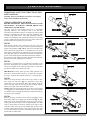
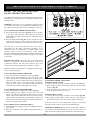
FIG. 22
PRESS AND
HOLD DOOR
CODE
BUTTON
Make sure to connect the battery to the transmitters. The
memory in the openers receiver can store up to 27 different
remote control transmitters.
17.1 STORING TRANSMITTER CODE
1. Press and hold the Door Code button (Fig. 22).
2. Press the button (one of four) on the transmitter you would
like to use to control the door for two seconds.
3. Pause for two seconds. Press the same button again on the
transmitter for two seconds.
4. Release the Door Code button.
5. Press the transmitter button to test if it operates the door.
17.2. STORING TRANSMITTER(S) FROM A
REMOTE LOCATION
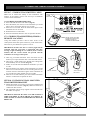
SELECT ONE OF THE
FOUR BUTTONS YOU
WISH TO USE TO
CONTROL THE DOOR.
Using this method you don’t need to have access to the
control panel on the door opener. However, you do need a transmitter that is pre-coded to the opener’s receiver.
IMPORTANT NOTE: The door or courtesy light will be
activated when the step below is performed. The door
moving or light switching on is to confirm, from a remote
location, that the correct button was pressed and the
transmitter is in range of the opener.
FIG. 23
1. Take any pre-coded transmitter. Press the button for the
function you require until the door is activated and release.
2. Then using a small needle press through the Coding Hole
and hold firmly for two seconds (Fig. 23).
3. Within 10 seconds take the additional transmitter you wish
to code.
4. Press the button (one of four) on that transmitter you would
like to use to control the door for two seconds, pause for two
seconds. Press the same button again on the transmitter for
two seconds, the button should now be recorded.
5. Wait for 10 seconds and then press the recorded transmitter
button to confirm that it operates the door.
CODING HOLE
SMALL NEEDLE
WALL MOUNT
BRACKET
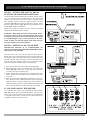
FIG. 24
STEP 18 - INSTALLING WALL MOUNTED
TRANSMITTER BRACKET
1. Mount the bracket in a location out of reach of children and
convenient to the customer. (Fig. 24). Make sure the door is
visible from this location.
2. The transmitter can be easily clipped in and removed from
the holder as required.
IMPORTANT NOTICE: DO NOT CUT THE ANTENNA
WIRE AND KEEP IT AWAY FROM ANY METAL. IF
THIS NOTICE IS NOT FOLLOWED RANGE WILL BE
REDUCED.
14