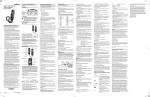
1
1 POWER
Switches the power on / off for the currently selected device
Switches STB to power on / standby mode
2 DEVICE CONTROL
TV: Select to control TV (if programmed)
STB: This button is pre-programmed to control the Janus Media Hub
AUX: Select to control another device (if programmed)
3 TRANSPORT KEYS
Controls video program for LIVE TV / DVR / VOD
REPLAY: Go back a few seconds
REW: Rewinds video quickly
FF: Fast forwards video quickly
SKIP: Skips ahead in 30 second increments
REC: Starts recording program
PAUSE: Pauses video
PLAY: Plays video or resumes a paused program
STOP: Stops playback of video
5
4 SHORTCUT
Color-code buttons correspond to features that are enabled by
your service provider (contact service provider for more details)
6
5 MENU
Shows on-screen menu or home screen
6 INFO
Shows on-screen information about the current TV / VOD /
DVR program
7 NAVIGATION
ARROW KEYS: Navigates up, down, left and right within the
on-screen guide or menus
OK: Executes the currently selected menu option
8 EXIT
Exits the current menu item or out to LIVE TV
9 GUIDE
Shows the on-screen program guide
S E TUP GU IDE
1
2
3
4
18
7
17
8
9
16
10
10 CH/PG
Changes channel up or down or goes page up or down within
on-screen program guide
15
11
11 LAST
Changes channel to the most recently viewed channel
12 NUMBER KEYS
Allows direct access to specific channels and menu items
13 CC
Toggles closed captioning on or off
14 INPUT
Changes the current A/V input of the selected device programmed
12
J AN US MED IA HUB
8
Description
(i.e. TV or AUX)
May be used when entering a period in certain channels
On select applications use to bring up on-screen keyboard in
web browser
14
13
S E T U P GUID E
Button(s)
15 MUTE
Turns the volume of the currently selected device off and on
16 VOL + /-
Increases or decreases volume of the currently selected device
17 BACK
Goes back one level within menus *
18 OPTIONS
Provides additional options for given on-screen menu or
highlighted item*
* Availability of certain features is dependent on your provider
JA NUS MED IA H U B
REMOTE CONTROL
9