1
Français
Español
English
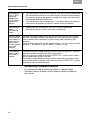
EXPANDING YOUR AUDIO LINK
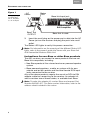
Figure 1
Connection to
a LIFESTYLE®
SA-3, amplifier,
as an example
AC
Power
Status
LED
Bose link Input jack
LIFESTYLE®
SA-3 amplifier
Receiver
Bose® link
OUTPUT
3.
Bose link A cable
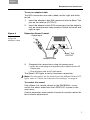
Insert the small plug on the power pack cable into the AC
Power jack on the receiver and plug the pack into a wall outlet.
The Status LED lights to verify this power connection.
Note: For information on the meaning of the different Status LED
lights, refer to the owner’s guide that came with your Bose link
AL8 Homewide Wireless Audio Link.
Instructions for non-Bose or older Bose products
The AR1 receiver can connect to some products that are not
Bose link compatible, including:
• Non-Bose products like a tuner/receiver or powered speaker
system
• Bose powered speakers, a radio, or system with its own volume and on/off controls and line-level female RCA input
jacks connected to the receiver
Any of the above products require the use of an RCA to DIN
adapter cable for connecting to the receiver. An adapter kit,
which contains two of these cables, is available from Bose.
Note: To order the adapter kit, contact Bose and request Part
Number 285320-207. For Bose contact information, refer to the
address sheet included in the carton.
6