1
Français
CONFIRMING
Español
English
OPERATION
Check the indicators and settings
Before you use this addition to the audio link, you may want to
check some of the indicators and settings that make your
expansion products work together smoothly.
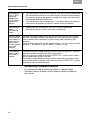
The Status LED
On the connection panel of both the transmitter and the
receiver, the Status LED indicates how the two units are communicating, as shown in the table below.
Status
LED
Blinking
Green
Solid
Green
Blinking
Orange
Solid
Orange
On the
transmitter
Searching for receiver
Receiver
located
Not applicable
Powered on, no communication
On the
receiver
Searching for
transmitter
Solid signal
received
Weak signal
received
Weak or no signal received
On the receiver, a blinking or solid orange light indicates a
communications problem. Repositioning the transmitter or
receiver, or both, may resolve the problem and cause both
LEDs to change to solid green. For further information, refer to
“Troubleshooting” on page 9.
Your Bose® link expansion room remote control
• Room code
If you have more than one LIFESTYLE® system expansion
room set up, make sure the remote used in each one has a
unique room code.
• House code
The house code setting on the remote must match the setting on your LIFESTYLE® system. This is an issue only if you
have changed the system house code due to interference
with another Bose LIFESTYLE® system.
For information on these house code and room code settings
and how to change them, refer to the owner’s guide that came
with your remote.
Note: Setup codes for the AL8 transmitter and AR1 receiver,
which must be identical to each other, do NOT need to match
house codes on the remote or LIFESTYLE® system.
8