1
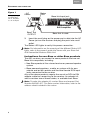
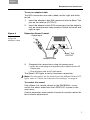
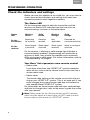
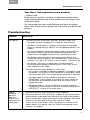
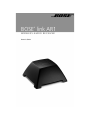
English Español Français CONFIRMING OPERATION Your Bose® link expansion room product • Room code Make sure the system, amplifier, or powered speaker room code setting matches that of the remote you are using in the expansion room. For information on room code settings and how to change them, refer to the owner’s guide that came with your Bose® link product. Troubleshooting Problem What to do No sound • For both the AL8 transmitter and AR1 receiver, make sure: – the audio source is plugged in, turned on, and working. – the Bose® link A cable is securely connected at both ends. Refer to “Connecting to a Bose link compatible product” on page 5. – the small connector end of the power cord is inserted firmly into the AC Power jack on the connection panel and the power pack is plugged securely into a working AC outlet. – the Setup code switches on the connection panel of the transmitter and the receiver are set identically. There are four options: 1 & 2 up; 1 & 2 down; 1 up & 2 down; 1 down & 2 up. – the Status LEDs are lit a solid green to indicate solid communication between the two parts. If not, refer to the next problem in this table. • For the expansion room products, make sure: – the system, amplifier, or powered speaker is plugged in and turned on. On an SA-2 or SA-3 amplifier in that room, make sure the status LED is lit to indicate the amplifier is working. – the room code is set on the Bose link remote control or PERSONAL® music center II to match the room codes on the amplifier or powered speaker and are unique to this expansion room. – the house code is set on the Bose link remote control or PERSONAL music center II to match the house code of the LIFESTYLE® system in the main room. Above problem persists and the Status LED lights are not solid green • • • Move the receiver and transmitter closer together. Move the receiver, the transmitter, or both so the transmission path between them does not intersect with large metal objects (like a refrigerator), impervious construction materials (like thick masonry) or other obstructions (like a pool of water). Check to see if the Status LEDs turn green as a result of the above efforts. For details, refer to “Check the indicators and settings” on page 8. 9