1
Network Installation
Windows®
Install Printer Software for TCP/IP
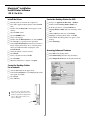
□ Click Remote Print, then click Add Printer.
!
Installing a printer on a network is best handled by
someone familiar with networks such as a network
Administrator.
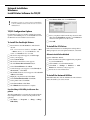
TCP/IP Configuration Options
For information on how to modify configuration settings
specific to the TCP/IP protocol, see the TCP/IP section in
the Print Server User's Guide located on CD 2.
□ Select your printer model from the drop-down list, then
either enter the IP Address manually, or click Discover
and wait for the printer to be discovered.
□ Click OK.
To Install the PostScript Drivers
□ Insert CD1 into the CD-ROM drive. The CD will
□
□
□
□
□
□
□
□
□
□
□
□
□
To Install the PCL Driver
autorun.
If the system autorun is disabled, click Start → Run
→ Browse. Browse to your CD-ROM drive and
double-click Install.exe then click OK.
The License Agreement appears, click I Accept.
Select your language.
Select Custom Install.
The Software Installation screen appears.
Click the Printer Driver Installer button.
Select Network Printer. Click Next.
Connection Type screen appears. Select Directly to
the network.... Click Next.
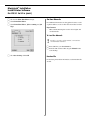
The TCP/IP Connection screen appears. Select Search
Address. Click Next.
Highlight your printer model. Click Next.
Select Printer Emulation PS. Click Next.
Select printer name. Click Next.
Select Do not share. Click Next.
Click Finish when installation is complete.
Follow the instructions for installing the PostScript driver.
When prompted to select the printer emulation, select PCL.
Alternate Installation Method
Use the Add Printer Wizard:
□ Insert the Driver CD (CD1) supplied with your printer
in your CD-ROM drive.
□ Click Cancel to close the Menu Installer.
□ Click Start → Settings → Printers → Add
Printer. The Add Printer Wizard appears.
□ Follow the on-screen instructions.
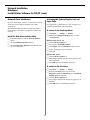
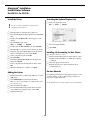
To Install the Network Utilities
In the Menu Installer, click the Administration Tools button.
Select the Utilities you want to install.
Use the Sharp LPR Utility to discover the
printer
The Sharp LPR Utility is automatically installed with the
network printer drivers. To discover the printer, do the
following:
□ Click Start → Programs → Sharp → Sharp
LPR Utility.
5