1
SED2 Operation & Maintenance Manual
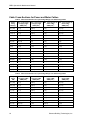
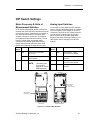
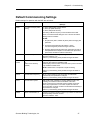
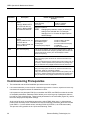
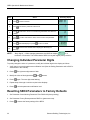
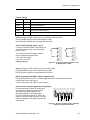
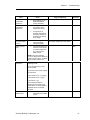
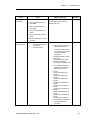
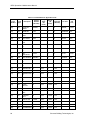
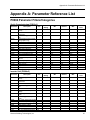
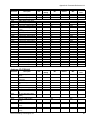
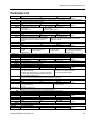
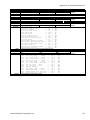
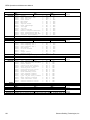
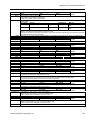
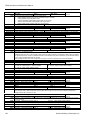
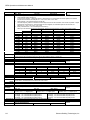
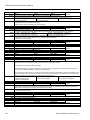
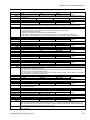
Parameter
P0700[0]
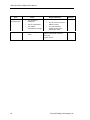
P1000
Description
Selection of command
source
Index [0]: IN000=AUTO,
1st command data set
Index [1]: IN001=HAND,
2nd command data set
Selection of frequency
setpoint
Index [0]: IN000=AUTO, 1st
command data set
Index [1]: IN001=HAND, 2nd
command data set
Default Value for North America
(Europe)
0=Factory default setting
1=BOP (keypad)
2=Terminal
4=USS on BOP link, AOP
5=USS on COM link
6=CB on COM link
Default for P0700 is 2.
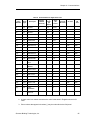
NOTE:
Changing this parameter resets (to default) all
setting on the selected item. For example,
changing from 1 to 2 resets all digital inputs to
default settings.
Selects the frequency setpoint source as follows:
1=Motor potentiometer
setpoint/BOP keypad
2=Analog input
3=Fixed frequency setpoint
4=USS on BOP Link/AOP
5=USS on COM link
6=Communication board (CB)
on COM link/
P1-N2 communications
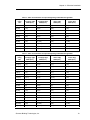
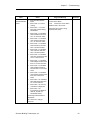
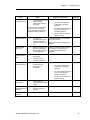
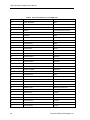
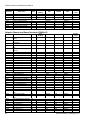
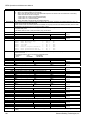
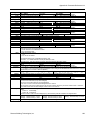
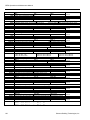
P1082
Max. motor frequency
60 Hz or 50 Hz (default). This value is limited internally to 200 Hz
or five times the rated motor frequency (P0305) when P1300>=20
(control mode=vector control). The value displays in r0209
(maximum frequency).
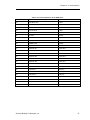
P1120
Ramp-up time
Default for P1120 is 10.00.
Setting the ramp-up time too short can cause the inverter to trip
(overcurrent).
If using an external frequency setpoint with set ramp rates (such as
from a PLC), achieve optimum drive performance by setting ramp
times (P1120 and P1121) slightly shorter than those of the PLC.
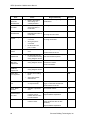
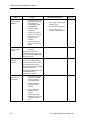
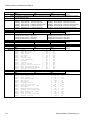
P1121
Ramp-down time
Default for P1121 is 10.00.
Setting the ramp-up time too short can cause the inverter to trip
(overcurrent, F0001 or overvoltage, F0002).
If using an external frequency setpoint with set ramp rates (such as
from a PLC), achieve optimum drive performance by setting ramp
times (P1120 and P1121) slightly shorter than those of the PLC.
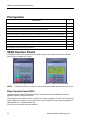
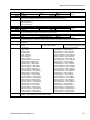
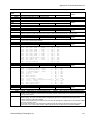
Commissioning Prerequisites
1. The mechanical and electrical installation procedures must be complete.
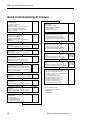
2. It is recommended that you use the quick commissioning procedure. However, experienced users may
commission the equipment without the P0004 filter functions.
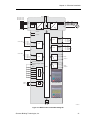
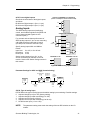
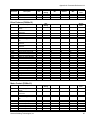
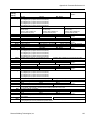
It is important to use parameter P0010 to commission the SED2, and P0003 to select the number
of accessible parameters. Parameter P0010 allows you to select a group of parameters that can
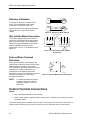
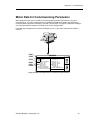
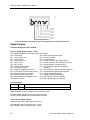
be used for quick commissioning. These include parameters for the motor data (Figure 22), and for
the motor ramp-up and ramp-down settings.
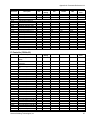
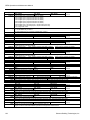
At the end of the quick commissioning procedure, select P3900. When set to 1, this parameter
performs the necessary motor calculations and sets all remaining parameters (those not included
under P0010 = 1) to the default values, including P0010=0 (if P0010=1, the VFD cannot start).
This process is only possible in the “quick commissioning” mode.
28
Siemens Building Technologies, Inc.