1
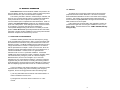
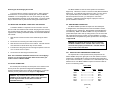
3.2 FRONT CARD CONFIGURATION
3.3.1 REAR CARD STRAP SETTINGS
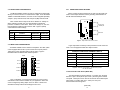
The Model 1000RC contains two sets of configuration straps which
allow you to set the function of “Carrier Detect” output. Since the Model
1000RC contains two modems, each unit can be configured separately:
Jumper 1 (JB1) controls Unit A, while Jumper 2 (JB2) controls Unit B.
Figure 5 shows the strap locations for the 1Q11 and the 1Q45 rear
cards. These straps determine various grounding characteristics for
the RS-232 and twisted pair lines.
(Unit A)
(Unit B)
JB4
1
2
3
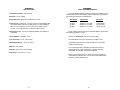
INTERFACE CARD JUMPER SUMMARY TABLE #1
Jumper
Function
Position 1&2
Carrier Detect - Unit A
Always ON*
Normal
JP1-B
Carrier Detect - Unit B
Always ON*
Normal
(Unit A)
1
2
3
Position 2&3
JP1-A
1
2
3
JB2
Each “Carrier Detect” strap can be set to “Normal” or “Always on”.
When operating normally, the “CD” LED will blink to indicate the
presence or absence of the carrier. When set to “Always on”, the “CD”
LED will always indicate that the carrier is “ON”. Figure 3 (below)
summarizes the switch settings.
JB6
(Unit B)
JB7
JB5
}
}
Converter
twisted pair
Terminal
1
2
3
1 2 3
Figure 3. Summary of jumper settings, *indicates factory default
Figure 5. Strap locations for both rear cards
3.3 REAR CARD CONFIGURATION
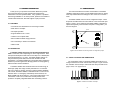
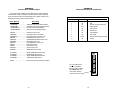
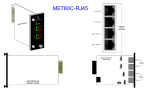
The Model 1000RC has two interface card options: the 1Q11 (which
comes equipped with two RJ-11 ports and two RJ-45 ports) and the
1Q45 (which comes equipped with four RJ-45 ports). Figure 4
illustrates these two different rear interface options.
1Q11
1Q45
RJ-11/6
RJ-45/10
RJ-11/6
RJ-45/10
RJ-45/10
RJ-45/10
RJ-45/10
RJ-45/10
Figure 6 provides a summary of strap functions for both of the rear
cards. The next page describes each strap's function.
INTERFACE CARD STRAP SUMMARY TABLE #1
Strap
Position 1&2
Position 2&3
JB2
Line A Shield
No Shield†
JB4
Line B Shield
No Shield†
JB5
SGND & FRGND*
Open (Not Connected)†
JB6
Unit A DSR†
N/A
JB7
Unit B DSR
N/A
†
Figure 6. Summary of strap settings, indicates factory default
*via 100 ohm resistor
†
Line A Shield & Line B Shield (JB2 & JB4)
Figure 4. Model 1000RC rear interface card options
Prior to installation, you should examine the rear card you have
selected and ensure that it is suitable for your application. Each rear
card is configured by setting straps on the PC board. Section 3.3.1
describes the strap locations and settings for each card.
5
This strap pertains to the line interface. In position 1&2, the strap
links RJ-11 pins 1 and 6 (RJ-45 pins 2 and 7) to frame ground and the
rear panel. These pins can be used as connections for the twisted pair
cable shield. In position 2&3, pins 1 and 6 (or 2 and 7) are
disconnected from frame ground.
(continued)
6