1
Caller ID Operation
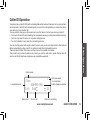
Dial a Displayed Number
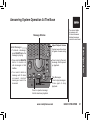
1. Locate the record in call history that you want to dial.
2.If you wish to change how the number is dialed, press #. The
screen displays alternate dialing sequences available for this call.
3. Press SELECT. Press or until DIAL flashes.
4. Press SELECT again. The number is automatically dialed.
-OR When the number is correctly displayed for dialing, press TALK.
595-9511
5/01 5:40PMOLD28
•Press OFF at
any time to exit
call history.
DIAL PROGRAM
800-595-9511
5/01 5:40PM
OLD28
Basic Operation
Store a Call History Record in the Directory
1. Locate the record in the call history you want to store in the directory.
2.If you wish to change how the number is stored, press #. The screen
DIAL PROGRAM
displays alternate dialing sequences available for this call.
800-595-9511
3. Press SELECT, then press or until PROGRAM flashes.
5/01 5:40PM
OLD28
4. Press SELECT three times. The screen displays:
5. Press or to select Y or N for distinctive ringer.
6.Press SELECT. You’ll hear a confirmation beep. If you choose Y
DISTINCT RING? N
800-595-9511
in step 5 a D will be displayed with the directory entry.
Screen Displays:
When:
PRIVATE
The other party is blocking name and/or number
information.
UNKNOWN
Your phone company is unable to receive
information about this caller’s name and/or number.
* (after name)
This caller has called you more than once.
www.vtechphones.com
BASIC OPERATION
21