1
Installation
•Use only the
provided VTech
battery, or
equivalent.
Choose Location
Install Handset Battery
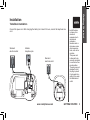
For maximum performance of your
cordless telephone system:
1.Choose a central location for your
Base Unit.
2. I n s t a l l yo u r b a s e u n i t a n d
extension handsets away from
electronic equipment, such as
personal computers, television
sets and microwave ovens.
3. I n locations where there are
multiple cordless telephones,
separate base units as much as
possible.
4. Install your telephone equipment
away from heat sources and
sunlight.
5.Avoid excessive moisture, dust
or extreme cold.
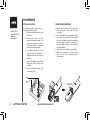
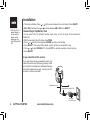
a) Align the two holes in the plug with
the socket pins, then snap the plug
into place.
b) P
lace the battery in the compartment with
the wires in the lower right corner. Angle
the top of the battery under the top claws
first, then snap the bottom of the pack in.
Place the wires under the guide, located
below the battery.
c)Replace cover by sliding it up into place.
d)P lace the handset in its base when
not in use to ensure maximum daily
performance.
“CLICK”
GETTING STARTED
www.vtechphones.com