1
10
AutoView 1000R/AutoView 2000R Installer/User Guide
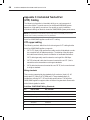
Setting up your network
The AutoView 1000R/2000R appliance uses IP addresses to uniquely identify
the appliances and the computers running AVWorks software. The AutoView
appliance supports both BootP (a subset of DHCP) and static IP addressing.
Avocent recommends that IP addresses be reserved for each appliance and
that they remain static while the appliances are connected to the network.
Rack Mounting Your AutoView 1000R/2000R
Your AutoView 1000R/2000R appliance ships with rack mounting brackets for
easy integration into your rack. Before installing the appliance and other
components in the rack cabinet (if not already installed), stabilize the rack in a
permanent location. Install your equipment starting at the bottom of the rack
cabinet, then work to the top. Avoid uneven loading or overloading of
rack cabinets.
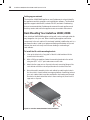
To install the 1U switch mounting bracket:
1.
Line up the holes in the “long side” of the kit’s side brackets with the
screw holes in the switch.
2.
With a Phillips screwdriver, fasten the mounting brackets to the switch
using two 8/32 ” x 1//2 ” pan head screws on each side.
3.
Attach the four cage nuts or clip nuts to the rack mounting flange of the
rack cabinet so that the nuts are positioned on the inside of the rack.
4.
Mount the switch assembly to the rack cabinet by matching the holes in
the “short side” of each bracket to an appropriate set of matching holes on
your rack cabinet. Next, insert the combination hex head screws through
the slots in the bracket and the holes in the mounting rail, then into the
cage nuts or clip nuts.
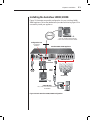
Figure 2.1: AutoView 1000R/2000R Horizontal Installation