1
Crestron TPMC-9
9” Tilt Touch Screen
Uploading and Upgrading
Crestron recommends using the latest programming software and that each device
contains the latest firmware to take advantage of the most recently released features.
However, before attempting to upload or upgrade it is necessary to establish
communication. Once communication has been established, files (for example,
programs, projects or firmware) can be transferred to the control system (or device).
Finally, program checks can be performed (such as changing the device ID or
creating an IP table) to ensure proper functioning.
NOTE: Crestron software and any files on the website are for authorized Crestron
dealers and Crestron Service Providers (CSPs) only. New users must register to
obtain access to certain areas of the site (including the FTP site).
Establishing Communication
NOTE: For PCs running Windows 2000 or XP, ActiveSync 4.5 or later is required
for Toolbox to communicate with the TPMC-9 via USB to upload firmware and
display lists. Download and install ActiveSync from the Microsoft website
(www.microsoft.com/windowsmobile/en-us/help/synchronize/device-synch.mspx).
PCs running Windows Vista or 7 require Windows Mobile Device Center for
communication with Toolbox. Download and install Windows Mobile Device Center
(WMDC) from the Microsoft website
(www.microsoft.com/windowsmobile/devicecenter.mspx).
Use Crestron Toolbox for communicating with the TPMC-9; refer to the Crestron
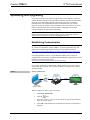
Toolbox help file for details. There are three methods of communication: indirect,
TCP/IP and USB.
Indirect
Indirect Communication
Serial,
Control
System
TPMC-9
Cresnet
N
LA
or USB
AC
CO
R ET H
TE
RN
M PU PW
RSW
W-
-R
AC
QU
IR
ITY
TIV
E
PC Running
Crestron Toolbox
TPMC-9 connects to control system via Cresnet:
Operations Guide – DOC. 6965G
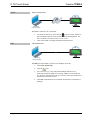
1.
Click Tools | System Info.
2.
Click the
3.
For Connection Type, select Cresnet ID. In the Through drop-down menu,
select the control system.
4.
Click OK. Communications are confirmed when the device information is
displayed.
icon.
9” Tilt Touch Screen: TPMC-9 • 25