1
Chapter 3: Operation
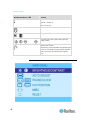
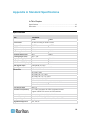
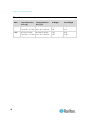
Membrane button or LED
Function
Light off = Power off
Blue = Power on
Power on/off LCD
Display the OSD menu
Scroll through menu options and adjust the
display control
Exit the OSD screen.
Shortcut key to auto-adjustment by pressing the
button for 5 seconds or toggle analog, digital &
video connection (DVI-D and video options
only).
Onscreen Menu
16