1
SERVSWITCH™
Contents
Chapter
Page
1.
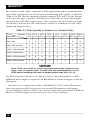
Specifications ........................................................................................... 10
2.
Introduction .............................................................................................
2.1 The Complete Package .....................................................................
2.2 Operating Features ...........................................................................
2.3 The Front Panel ................................................................................
2.4 The Rear Panel ..................................................................................
2.5 Cable Requirements .........................................................................
2.6 Equipment Requirements ................................................................
13
13
13
15
17
19
19
3.
Installation ................................................................................................
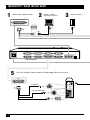
3.1 Quick Setup Guide ...........................................................................
3.2 Installation Procedure ......................................................................
3.2.1 Rackmounting (Optional) ....................................................
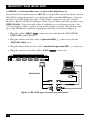
3.2.2 Connecting the Keyboard, Monitor, and Mouse ................
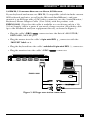
3.2.3 Connecting CPUs ..................................................................
3.2.4 Connecting Submasters (Optional) .....................................
3.2.5 Powering Up the System .......................................................
3.2.6 Changing the Keyboard Setting of Windows NT 4.0 CPUs ...
3.2.7 Switching from the Keyboard ...............................................
3.3 Cascading in ServSwitch Systems .....................................................
3.3.1 Cable Requirements for Expansion .....................................
3.3.2 Installing a Cascade ...............................................................
20
20
21
21
21
22
23
24
25
25
26
27
27
4.
Operation: Hardware and Keyboard Commands ..................................
4.1 Guidelines for Using the ServSwitch with Your Equipment ...........
4.1.1 CPUs .......................................................................................
4.1.2 Mouse and Keyboard ............................................................
4.1.3 Monitor ..................................................................................
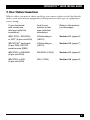
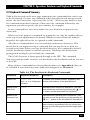
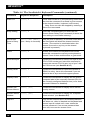
4.2 Keyboard-Command Summary ........................................................
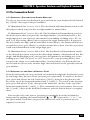
4.3 The Commands in Detail .................................................................
4.3.1 Selecting a Port from the Shared Keyboard .........................
4.3.2 Switching to the Next or Previous Port ................................
4.3.3 Scan Mode .............................................................................
4.3.4 Keep Settings .........................................................................
4.3.5 Set Screen-Saver Interval ......................................................
4.3.6 Reset .......................................................................................
4.3.7 Send Null Byte (PS/2 Type Mice Only) ..............................
4.3.8 Identify ROM .........................................................................
4.3.9 Display Label ..........................................................................
4.3.10 Activate On-Screen Menus ...................................................
4.3.11 Activate Select Window .........................................................
4.3.12 Log Out ..................................................................................
32
32
32
32
34
37
39
39
39
40
40
40
41
42
42
43
43
43
43
6