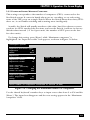
1
CHAPTER 1: Specifications
2. Introduction
Thank you for choosing a ServSwitch™. Designed with your needs in mind, your
new Switch will simplify your job by helping you organize your multiple-computer
application. With your Switch, you can use one keyboard, monitor, and mouse to
access a number of IBM® PC compatible computers (including IBM RS/6000®
computers and current SGI® computers), so you can significantly reduce your
equipment overhead and end keyboard and monitor clutter.
This chapter describes everything that comes with the Switch, the external and
operating features of the Switch, and the cabling you’ll need for the Switch.
2.1 The Complete Package
Your ServSwitch package includes the Switch unit, its power supply, a modular
cable and adpater for connecting the unit’s RS-232 port to a remote PC, and this
manual. If you didn’t receive everything, or if anything arrived damaged, contact
Black Box.
2.2 Operating Features
Some of the useful features of the ServSwitch:
• Microprocessor-controlled keyboard and mouse switching.
• On-screen menu system for configuration and operation.
• You can access up to 256 CPUs with one keyboard, monitor, and mouse. (This
would require the maximum cascaded system of seventeen 16-port Serv units.)
• You can select the desired CPU using the on-screen display, keyboard, front
panel, or RS-232 port.
• Front-panel LEDs show the selected CPU and its power-on state.
• Support for IBM PC and RS/6000 compatible computers, as well as current
SGI compatible computers.
• Mouse can be PS/2®, Microsoft® serial, PC Mouse® (Mouse Systems®) serial, or
serial 8-bit type.
• Support for all modes of PS/2 and PC/AT® compatible keyboards.
• Support for SVGA, RS/6000, SGI, and color or monochrome XGA or VGA
video at resolutions up to 1280 x 1024 noninterlaced (although all video types
except VGA require coaxial or special cables).
13