1
Installation Guide
Revision 1.0
ePolicy
version 3.0
Orchestrator™
COPYRIGHT
© 2003 Networks Associates Technology, Inc. All Rights Reserved. No part of this publication may be
reproduced, transmitted, transcribed, stored in a retrieval system, or translated into any language in any form
or by any means without the written permission of Networks Associates Technology, Inc., or its suppliers or
affiliate companies. To obtain this permission, write to the attention of the Network Associates legal department
at: 5000 Headquarters Drive, Plano, Texas 75024, or call +1-972-308-9960.
TRADEMARK ATTRIBUTIONS
Active Firewall, Active Security, Active Security (in Katakana), ActiveHelp, ActiveShield, AntiVirus Anyware and
design, AVERT, Bomb Shelter, Certified Network Expert, Clean-Up, CleanUp Wizard, CNX, CNX Certification Certified
Network Expert and design, Covert, Design (stylized N), Disk Minder, Distributed Sniffer System, Distributed Sniffer
System (in Katakana), Dr Solomon’s, Dr Solomon’s label, Enterprise SecureCast, Enterprise SecureCast (in Katakana),
ePolicy Orchestrator, Event Orchestrator (in Katakana), EZ SetUp, First Aid, ForceField, GMT, GroupShield,
GroupShield (in Katakana), Guard Dog, HelpDesk, HomeGuard, Hunter, LANGuru, LANGuru (in Katakana), M and
design, Magic Solutions, Magic Solutions (in Katakana), Magic University, MagicSpy, MagicTree, McAfee, McAfee (in
Katakana), McAfee and design, McAfee.com, MultiMedia Cloaking, Net Tools, Net Tools (in Katakana), NetCrypto,
NetOctopus, NetScan, NetShield, NetStalker, Network Associates, Network Policy Orchestrator, NetXray, NotesGuard,
nPO, Nuts & Bolts, Oil Change, PC Medic, PCNotary, PortalShield, Powered by SpamAssassin, PrimeSupport,
Recoverkey, Recoverkey – International, Registry Wizard, Remote Desktop, ReportMagic, RingFence, Router PM, Safe &
Sound, SalesMagic, SecureCast, Service Level Manager, ServiceMagic, SmartDesk, Sniffer, Sniffer (in Hangul),
SpamKiller, SpamAssassin, Stalker, SupportMagic, ThreatScan, TIS, TMEG, Total Network Security, Total Network
Visibility, Total Network Visibility (in Katakana), Total Service Desk, Total Virus Defense, Trusted Mail, UnInstaller,
Virex, Virus Forum, ViruScan, VirusScan, WebScan, WebShield, WebShield (in Katakana), WebSniffer, WebStalker,
WebWall, Who’s Watching Your Network, WinGauge, Your E-Business Defender, ZAC 2000, Zip Manager are
registered trademarks or trademarks of Network Associates, Inc. and/or its affiliates in the US and/or other
countries. Sniffer® brand products are made only by Network Associates, Inc. All other registered and
unregistered trademarks in this document are the sole property of their respective owners.
This product includes or may include software developed by the OpenSSL Project for use in the OpenSSL
Toolkit (http://www.openssl.org/).
This product includes or may include cryptographic software written by Eric Young ([email protected]).
This product includes or may include some software programs that are licensed (or sublicensed) to the user
under the GNU General Public License (GPL) or other similar Free Software licenses which, among other rights,
permit the user to copy, modify and redistribute certain programs, or portions thereof, and have access to the
source code. The GPL requires that for any software covered under the GPL which is distributed to someone in
an executable binary format, that the source code also be made available to those users. For any such software
covered under the GPL, the source code is made available on this CD. If any Free Software licenses require that
Network Associates provide rights to use, copy or modify a software program that are broader than the rights
granted in this agreement, then such rights shall take precedence over the rights and restrictions herein.
LICENSE AGREEMENT
NOTICE TO ALL USERS: CAREFULLY READ THE APPROPRIATE LEGAL AGREEMENT CORRESPONDING TO THE LICENSE
YOU PURCHASED, WHICH SETS FORTH THE GENERAL TERMS AND CONDITIONS FOR THE USE OF THE LICENSED
SOFTWARE. IF YOU DO NOT KNOW WHICH TYPE OF LICENSE YOU HAVE ACQUIRED, PLEASE CONSULT THE SALES AND
OTHER RELATED LICENSE GRANT OR PURCHASE ORDER DOCUMENTS THAT ACCOMPANIES YOUR SOFTWARE
PACKAGING OR THAT YOU HAVE RECEIVED SEPARATELY AS PART OF THE PURCHASE (AS A BOOKLET, A FILE ON THE
PRODUCT CD, OR A FILE AVAILABLE ON THE WEB SITE FROM WHICH YOU DOWNLOADED THE SOFTWARE PACKAGE). IF
YOU DO NOT AGREE TO ALL OF THE TERMS SET FORTH IN THE AGREEMENT, DO NOT INSTALL THE SOFTWARE. IF
APPLICABLE, YOU MAY RETURN THE PRODUCT TO NETWORK ASSOCIATES OR THE PLACE OF PURCHASE FOR A FULL
REFUND.
Issued May 2003 / ePolicy Orchestrator™ software version 3.0
DOCUMENT BUILD 3.0.0.6
Contents
Preface . . . . . . . . . . . . . . . . . . . . . . . . . . . . . . . . . . . . . . . . . . . . . . . 7
Audience . . . . . . . . . . . . . . . . . . . . . . . . . . . . . . . . . . . . . . . . . . . . . . . . . . . . . . . . . . . . . . . 7
Conventions . . . . . . . . . . . . . . . . . . . . . . . . . . . . . . . . . . . . . . . . . . . . . . . . . . . . . . . . . . . . 8
Getting more information . . . . . . . . . . . . . . . . . . . . . . . . . . . . . . . . . . . . . . . . . . . . . . . . . . . 9
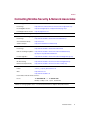
Contacting McAfee Security & Network Associates . . . . . . . . . . . . . . . . . . . . . . . . . . . . . . 11
1 Requirements and Recommendations . . . . . . . . . . . . . . . . . . . . . 13
System requirements . . . . . . . . . . . . . . . . . . . . . . . . . . . . . . . . . . . . . . . . . . . . . . . . . . . . . 13
Server and console requirements . . . . . . . . . . . . . . . . . . . . . . . . . . . . . . . . . . . . . . . 14
Remote console requirements . . . . . . . . . . . . . . . . . . . . . . . . . . . . . . . . . . . . . . . . . . 15
Database requirements . . . . . . . . . . . . . . . . . . . . . . . . . . . . . . . . . . . . . . . . . . . . . . . 16
Distributed repositories . . . . . . . . . . . . . . . . . . . . . . . . . . . . . . . . . . . . . . . . . . . . . . . 17
Reporting requirements . . . . . . . . . . . . . . . . . . . . . . . . . . . . . . . . . . . . . . . . . . . . . . . 18
Agent for Windows requirements . . . . . . . . . . . . . . . . . . . . . . . . . . . . . . . . . . . . . . . 18
SuperAgent requirements . . . . . . . . . . . . . . . . . . . . . . . . . . . . . . . . . . . . . . . . . . . . . 21
Agent for NetWare requirements . . . . . . . . . . . . . . . . . . . . . . . . . . . . . . . . . . . . . . . . 21
Agent for WebShield appliances requirements . . . . . . . . . . . . . . . . . . . . . . . . . . . . . 22
Operating systems language support . . . . . . . . . . . . . . . . . . . . . . . . . . . . . . . . . . . . 22
Recommendations . . . . . . . . . . . . . . . . . . . . . . . . . . . . . . . . . . . . . . . . . . . . . . . . . . . . . . . 23
2 Pre-Installation Procedures . . . . . . . . . . . . . . . . . . . . . . . . . . . . . 25
Pre-installation best practices guidelines . . . . . . . . . . . . . . . . . . . . . . . . . . . . . . . . . . . . . . 26
Installing or upgrading the database software . . . . . . . . . . . . . . . . . . . . . . . . . . . . . . . . . . 27
Installing MSDE 2000 manually . . . . . . . . . . . . . . . . . . . . . . . . . . . . . . . . . . . . . . . . . 28
Upgrading to MSDE 2000 . . . . . . . . . . . . . . . . . . . . . . . . . . . . . . . . . . . . . . . . . . . . . 29
Upgrading to MDAC 2.7 . . . . . . . . . . . . . . . . . . . . . . . . . . . . . . . . . . . . . . . . . . . . . . . . . . . 30
Determining the version number of MDAC . . . . . . . . . . . . . . . . . . . . . . . . . . . . . . . . 30
Installing MDAC . . . . . . . . . . . . . . . . . . . . . . . . . . . . . . . . . . . . . . . . . . . . . . . . . . . . 31
Downloading the software . . . . . . . . . . . . . . . . . . . . . . . . . . . . . . . . . . . . . . . . . . . . . . . . . 32
Which files are checked in during the installation . . . . . . . . . . . . . . . . . . . . . . . . . . . . . . . 33
Which files are removed during the installation . . . . . . . . . . . . . . . . . . . . . . . . . . . . . . . . . 34
How McAfee AutoUpdate Architect 1.0 information is converted . . . . . . . . . . . . . . . . . . . . 35
Installation Guide
iii
Contents
Preparing McAfee AutoUpdate Architect 1.0 repositories . . . . . . . . . . . . . . . . . . . . . . . . . 36
How AutoUpdate 7.0 information is converted . . . . . . . . . . . . . . . . . . . . . . . . . . . . . . . . . . 37
3 Installing the Software for the First-Time . . . . . . . . . . . . . . . . . . 39
Before you begin . . . . . . . . . . . . . . . . . . . . . . . . . . . . . . . . . . . . . . . . . . . . . . . . . . . . . . . . 40
Installing the server and console . . . . . . . . . . . . . . . . . . . . . . . . . . . . . . . . . . . . . . . . . . . . 41
Changing the default password on the administrator user account . . . . . . . . . . . . . . 51
Installing remote consoles . . . . . . . . . . . . . . . . . . . . . . . . . . . . . . . . . . . . . . . . . . . . . . . . . 52
4 Upgrading from Version 2.0, 2.5, or 2.5.1 . . . . . . . . . . . . . . . . . . 57
Before you begin . . . . . . . . . . . . . . . . . . . . . . . . . . . . . . . . . . . . . . . . . . . . . . . . . . . . . . . . 58
Backing up ePolicy Orchestrator databases . . . . . . . . . . . . . . . . . . . . . . . . . . . . . . . . . . . 59
Upgrading the server and console . . . . . . . . . . . . . . . . . . . . . . . . . . . . . . . . . . . . . . . . . . . 60
Upgrading remote consoles . . . . . . . . . . . . . . . . . . . . . . . . . . . . . . . . . . . . . . . . . . . . . . . . 69
5 Migrating to a Licensed Version of the Software . . . . . . . . . . . . 75
Beta and evaluation software . . . . . . . . . . . . . . . . . . . . . . . . . . . . . . . . . . . . . . . . . . . . . . 75
6 Post-Installation Procedures . . . . . . . . . . . . . . . . . . . . . . . . . . . . 77
Post-installation best practices guidelines . . . . . . . . . . . . . . . . . . . . . . . . . . . . . . . . . . . . . 78
Which files you need to check in manually . . . . . . . . . . . . . . . . . . . . . . . . . . . . . . . . . . . . 79
Deploying product plug-in files . . . . . . . . . . . . . . . . . . . . . . . . . . . . . . . . . . . . . . . . . . . . . . 79
Determining which products can be managed . . . . . . . . . . . . . . . . . . . . . . . . . . . . . . . . . . 80
Determining which products and product updates can be deployed . . . . . . . . . . . . . . . . . 80
Agent AutoUpgrade . . . . . . . . . . . . . . . . . . . . . . . . . . . . . . . . . . . . . . . . . . . . . . . . . . . . . . 81
Where the installation stores custom report templates . . . . . . . . . . . . . . . . . . . . . . . . . . . 81
Importing McAfee AutoUpdate Architect 1.0 repositories . . . . . . . . . . . . . . . . . . . . . . . . . . 82
Verifying configuration settings for repositories . . . . . . . . . . . . . . . . . . . . . . . . . . . . . . . . . 84
Defining proxy server settings . . . . . . . . . . . . . . . . . . . . . . . . . . . . . . . . . . . . . . . . . . . . . . 85
Removing AutoUpdate 7.0 policies and tasks after agent deployment . . . . . . . . . . . . . . . 86
7 Getting Started . . . . . . . . . . . . . . . . . . . . . . . . . . . . . . . . . . . . . . . . 87
Determining the language version of the software . . . . . . . . . . . . . . . . . . . . . . . . . . . . . . . 87
Starting the software . . . . . . . . . . . . . . . . . . . . . . . . . . . . . . . . . . . . . . . . . . . . . . . . . . . . . 87
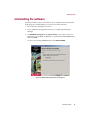
Uninstalling the software . . . . . . . . . . . . . . . . . . . . . . . . . . . . . . . . . . . . . . . . . . . . . . . . . . 89
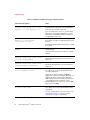
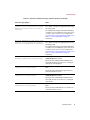
8 Troubleshooting . . . . . . . . . . . . . . . . . . . . . . . . . . . . . . . . . . . . . . . 91
iv
ePolicy Orchestrator™ software version 3.0
Contents
A Migrating Existing Databases to SQL Server 2000 . . . . . . . . . . . 99
Migrating from MSDE to SQL Server 2000 . . . . . . . . . . . . . . . . . . . . . . . . . . . . . . . . . . . . 99
Migrating from SQL Server 7 to SQL Server 2000 . . . . . . . . . . . . . . . . . . . . . . . . . . . . . . . 99
Stopping the ePolicy Orchestrator server service . . . . . . . . . . . . . . . . . . . . . . . . . . 100
Installing Client Tools only (SQL Server 2000) . . . . . . . . . . . . . . . . . . . . . . . . . . . . 100
Backing up ePolicy Orchestrator 3.0 databases (MSDE users) . . . . . . . . . . . . . . . . 101
Backing up ePolicy Orchestrator 3.0 databases (SQL Server 7 users) . . . . . . . . . . 102
Installing SQL Server 2000 . . . . . . . . . . . . . . . . . . . . . . . . . . . . . . . . . . . . . . . . . . . 103
Configuring the ePolicy Orchestrator server . . . . . . . . . . . . . . . . . . . . . . . . . . . . . . 103
Starting the ePolicy Orchestrator server service . . . . . . . . . . . . . . . . . . . . . . . . . . . 103
Index . . . . . . . . . . . . . . . . . . . . . . . . . . . . . . . . . . . . . . . . . . . . . . . 105
Installation Guide
v
Contents
vi
ePolicy Orchestrator™ software version 3.0
Preface
This Installation Guide introduces McAfee® ePolicy Orchestrator™ software
version 3.0, and provides the following information:
n
Minimum hardware and database software recommendations.
n
Minimum hardware and software requirements.
n
Detailed instructions for installing or upgrading the database software.
n
Detailed instructions for installing the software for the first time.
n
Detailed instructions for upgrading the software from a previous version.
n
Detailed instructions for migrating data.
n
Detailed instructions for migrating to a licensed version of the software.
n
Detailed instructions for starting the software.
n
Troubleshooting information.
Audience
This information is designed for system and network administrators who are
responsible for their company’s anti-virus and security program.
Installation Guide
7
Preface
Conventions
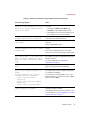
This guide uses the following conventions:
Bold
All words from the user interface, including options, menus,
buttons, and dialog box names.
Example
Type the User name and Password of the desired account.
Courier
Text that represents something the user types exactly; for example,
a command at the system prompt.
Example
To enable the agent, run this command line on the client
computer:
FRMINST.EXE /INSTALL=AGENT
/SITEINFO=C:\TEMP\SITELIST.XML
Italic
Names of product manuals and topics (headings) within the
manuals; emphasis; introducing a new term.
Example
Refer to the VirusScan Enterprise Product Guide for more
information.
<TERM>
Angle brackets enclose a generic term.
Example
In the console tree under ePolicy Orchestrator, right-click
<SERVER>.
8
NOTE
Supplemental information; for example, an alternate method of
executing the same command.
WARNING
Important advice to protect a user, computer system, enterprise,
software installation, or data.
ePolicy Orchestrator™ software version 3.0
Preface
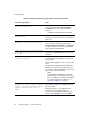
Getting more information
Product Guide
Product introduction and features, detailed instructions for
configuring the software, information on deployment,
recurring tasks, and operating procedures.
Available in an Adobe Acrobat .PDF file from either the
product CD or the McAfee Security download site.
Product
Deployment
Comparison
Compares the method used to deploy products in version 3.0
with the same process in version 2.0, 2.5, and 2.5.1.
Installation
Guide
System requirements and instructions for installing and
starting the software.
Available in an Adobe Acrobat .PDF file from either the
product CD or the McAfee Security download site.
Available as a printed booklet that accompanies the product
CD. Also available in an Adobe Acrobat .PDF file from either
the product CD or the McAfee Security download site.
Help
Product information in the Help system that is accessed from
within the application.
n
Configuration
Guide
The Help system provides high-level and detailed
information. Access from either a Help menu option or
Help button in the application.
For use with ePolicy Orchestrator. Procedures for installing,
configuring, deploying, and managing your McAfee and
third-party products through ePolicy Orchestrator
management software.
Available in an Adobe Acrobat .PDF file from either the
product CD or the McAfee Security download site.
Installation Guide
9
Preface
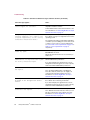
Getting Started
Guide
Detailed instructions for installing the Small Business Edition
of the software, detailed instructions for configuring and
deploying the agent and anti-virus products using an
automated wizard, and a list of weekly anti-virus
management tasks.
Available as a printed booklet that accompanies the product
CD. Also available in an Adobe Acrobat .PDF file from either
the product CD or the McAfee Security download site.
Release Notes
README file. Product information, resolved issues, any
known issues, and last-minute additions or changes to the
product or its documentation.
Available as a .TXT file from either the product CD or the
McAfee Security download site.
Contact
10
A list of phone numbers, street addresses, web addresses,
and fax numbers for Network Associates offices in the United
States and around the world. Also provides contact
information for services and resources, including:
n
Technical support.
n
Customer service.
n
Download support.
n
AVERT Anti-Virus Emergency Response Team.
n
McAfee Security beta site.
n
On-Site training.
n
Reporting a problem.
n
Linguistic feedback.
n
Network Associates offices worldwide.
ePolicy Orchestrator™ software version 3.0
Preface
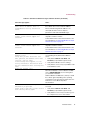
Contacting McAfee Security & Network Associates
Technical Support
Home Page
http://www.nai.com/naicommon/services/technical-support/intro.asp
KnowledgeBase Search
https://knowledgemap.nai.com/phpclient/Homepage.aspx
PrimeSupport Service Portal *
http://mysupport.nai.com
McAfee Security Beta Program
http://www.mcafeeb2b.com/beta/
AVERT Anti-Virus Emergency Response Team
Home Page
http://www.mcafeeb2b.com/naicommon/avert/default.asp
Virus Information Library
http://vil.nai.com
Submit a Sample
https://www.webimmune.net/default.asp
Download Site
Home Page
http://www.mcafeeb2b.com/naicommon/download/
DAT File and Engine Updates
http://www.mcafeeb2b.com/naicommon/download/dats/find.asp
ftp://ftp.nai.com/pub/antivirus/datfiles/4.x
Product Upgrades *
http://www.mcafeeb2b.com/naicommon/download/upgrade/login.asp
Training
On-Site Training
http://www.mcafeeb2b.com/services/mcafee-training/default.asp
McAfee Security University
http://www.mcafeeb2b.com/services/mcafeesecurityu.asp
Network Associates Customer Service
E-mail
[email protected]
Web
http://www.nai.com
http://www.mcafeeb2b.com
US, Canada, and Latin America toll-free:
Phone
+1-888-VIRUS NO
or
+1-888-847-8766
Monday – Friday, 8 a.m. – 8 p.m., Central Time
For additional information on contacting Network Associates and McAfee Security— including toll-free
numbers for other geographic areas — see the Contact file that accompanies this product release.
* Login credentials required.
Installation Guide
11
Preface
12
ePolicy Orchestrator™ software version 3.0
1
Requirements and
Recommendations
The minimum system requirements and minimum hardware configuration and
database software are provided in these topics:
n
System requirements.
n
Recommendations.
System requirements
Before you begin the installation, verify that the minimum system requirements
are met for all computers being used as ePolicy Orchestrator servers, consoles, and
remote consoles; for the ePolicy Orchestrator database; for ePolicy Orchestrator
reporting; and for ePolicy Orchestrator agent. The requirements for each of these
components are listed in these topics:
n
Server and console requirements.
n
Remote console requirements.
n
Database requirements.
n
Distributed repositories.
n
Reporting requirements.
n
Agent for Windows requirements.
n
SuperAgent requirements.
n
Agent for NetWare requirements.
n
Agent for WebShield appliances requirements.
n
Operating systems language support.
Installation Guide
13
Requirements and Recommendations
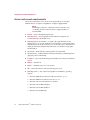
Server and console requirements
The ePolicy Orchestrator server and console install and run on any Intel
Pentium II-class (or higher) compatible PC or higher equipped with:
NOTE
Installing the software to a Primary Domain Controller (PDC)
or a Backup Domain Controller (BDC) is supported, but not
recommended.
n
Browser — Microsoft Internet Explorer 6.0.
n
Dedicated server — If managing more than 250 client computers, we
recommend using a dedicated server.
n
Deploying agent across domains — To deploy the agent from the ePolicy
Orchestrator sever across domains, the server must have a trust relationship
with the Primary Domain Controller (PDC) on the network. For instructions on
setting up trust relationships between domains, see the Microsoft product
documentation.
n
File system — NTFS (NT file system) partition recommended.
n
Free disk space — 250MB minimum (first-time installation); 650MB minimum
(upgrade); 1GB recommended.
n
IP address — We recommend using static IP addresses for ePolicy Orchestrator
servers.
n
Memory — 256MB RAM.
n
Monitor — 1024x768, 256-color, VGA monitor.
n
NIC — Network interface card (NIC) that supports TCP/IP.
n
Operating system — Any of the following Microsoft Windows operating
systems:
w Windows 2000 Advanced Server with Service Pack 1, 2, or 3.
w Windows 2000 Server with Service Pack 1, 2, or 3.
w Windows NT Server 4.0 with Service Pack 6a.
w Windows Server 2003 Enterprise.
w Windows Server 2003 Standard.
w Windows Server 2003 Web.
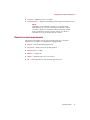
14
ePolicy Orchestrator™ software version 3.0
Requirements and Recommendations
n
Processor — 400MHz processor or higher.
n
Terminal Services — Supported operating systems support Terminal Services.
NOTE
Although you can install the software on a computer with
Terminal Services, you cannot use Terminal Services to install
or use the software. To manage the software remotely, install
ePolicy Orchestrator remote consoles and log on to ePolicy
Orchestrator servers from these remote consoles.
Remote console requirements
The ePolicy Orchestrator remote console installs and runs on any Intel
Pentium-class (or higher) or compatible PC equipped with:
n
Browser — Microsoft Internet Explorer 6.0.
n
File system — NTFS or FAT file system partition.
n
Free disk space — 120MB.
n
Memory — 128MB RAM.
n
Monitor — 1024x768, 256-color, VGA monitor.
n
NIC — Network interface card (NIC) that supports TCP/IP.
Installation Guide
15
Requirements and Recommendations
n
Operating system — Any of the following Microsoft Windows operating
systems:
w Windows 2000 Advanced Server with Service Pack 1 or later.
w Windows 2000 Professional with Service Pack 1 or later.
w Windows 2000 Server with Service Pack 1 or later.
w Windows NT Server 4.0 with Service Pack 6a.
w Windows NT Workstation 4.0 with Service Pack 6a.
w Windows Server 2003 Enterprise.
w Windows Server 2003 Standard.
w Windows Server 2003 Web.
w Windows XP Professional.
n
Terminal Services — Supported operating systems support Terminal Services.
NOTE
Although you can install the software on a computer with
Terminal Services, you cannot use Terminal Services to install
or use the software. To manage the software remotely, install
ePolicy Orchestrator remote consoles and log on to ePolicy
Orchestrator servers from these remote consoles.
Database requirements
The ePolicy Orchestrator database requirements are:
n
Database software — Any of the following:
w Microsoft Data Engine 7 (MSDE) with Service Pack 3.
w Microsoft SQL Server 2000 Desktop Engine (MSDE 2000) with Service
Pack 3.
NOTE
Neither MSDE 7 nor MSDE 2000 with Service Pack 3 can be
installed on a BDC.
w Microsoft SQL Server 2000 Standard or Enterprise Edition with Service
Pack 3.
w Microsoft SQL Server 7 Standard or Enterprise Edition with Service Pack 3
or 4.
NOTE
If using SQL Server, you must use a case-insensitive instance.
16
ePolicy Orchestrator™ software version 3.0
Requirements and Recommendations
n
Dedicated network connection — If using SQL Server and managing more than
5,000 client computers, install SQL Server on a separate server from the ePolicy
Orchestrator server, and use a dedicated network connection.
n
Local database server — If using SQL Server on the same server as the ePolicy
Orchestrator server, we recommend specifying a fixed memory size
approximately two-thirds of the total memory for SQL Server in Enterprise
Manager. For example, if using 256MB of RAM, set 150MB as the fixed memory
size for SQL Server. For instructions, see the Microsoft product
documentation.
n
Named instance — If using a named instance of SQL Server as the ePolicy
Orchestrator database, you must install the database on a different computer
than the ePolicy Orchestrator server.
n
Maintenance settings — We recommend making specific maintenance settings
to ePolicy Orchestrator databases. For instructions, see Maintaining ePolicy
Orchestrator databases in the ePolicy Orchestrator 3.0 Product Guide.
n
Remote database server — Microsoft Data Access Components (MDAC) 2.7.
n
SQL Server licenses — If using SQL Server, you need a SQL Server license for
each processor on the computer where SQL Server is installed, regardless of
whether the processor is running SQL Server. The Per Processor licensing
model allows unlimited access to SQL Server. For the most current information
on SQL Server licensing, see the Microsoft product documentation. At press
time, information for United States and Canadian customers was available on
the Microsoft web site:
www.microsoft.com/sql/howtobuy/production.asp
WARNING
If the minimum number of SQL Server licenses is not available
after you install the software, you cannot start the software.
Distributed repositories
Distributed repositories can be created on any of the following:
n
HTTP-compliant (version 1.1) servers on Microsoft Windows, Linux, or Novell
NetWare operating systems with a UNC share.
n
Windows, Linux, or NetWare FTP servers.
n
Windows, Linux, NetWare, or UNIX Samba UNC shares.
n
Computer with a SuperAgent installed on it. For more information, see
SuperAgent requirements on page 21.
Installation Guide
17
Requirements and Recommendations
Reporting requirements
To create custom report templates, you must use Crystal Decisions Crystal Reports
8.0.
The Chinese (Simplified), Chinese (Traditional), Japanese, and Korean language
versions of reports install and run on computers equipped with the corresponding
language version of the supported operating system and database software. For
example, to install the Chinese (Simplified) language version of reports, first install
the Chinese (Simplified) language version of the operating system and database
software.
Agent for Windows requirements
The ePolicy Orchestrator agent for Windows installs and runs on any PC with —
at a minimum — an Intel Pentium-class, Celeron, or compatible processor
equipped with:
n
Citrix — These Citrix products are supported on supported operating systems:
w Citrix Metaframe 1. 8 for Windows.
w Citrix Metaframe XP for Windows.
n
Cluster — If using cluster services, Microsoft Cluster Server (MSCS) is
supported.
18
n
Free disk space (agent) — 5MB.
n
Free disk space (products) — Sufficient disk space on client computers for each
McAfee anti-virus and security product that you plan on deploying. For more
information, see the corresponding product documentation.
n
Memory — 8MB RAM.
n
Network environment — Microsoft or Novell NetWare networks. NetWare
networks require TCP/IP.
n
NIC — Network interface card (NIC) that supports TCP/IP.
ePolicy Orchestrator™ software version 3.0
Requirements and Recommendations
n
Operating system — Any of the following Microsoft Windows operating
systems:
w Windows 2000 Advanced Server with Service Pack 1, 2, or 3.
w Windows 2000 Datacenter Server with Service Pack 1, 2, or 3.
w Windows 2000 Professional with Service Pack 1, 2, or 3.
w Windows 2000 Server with Service Pack 1, 2, or 3.
w Windows 95.
w Windows 98 Second Edition (SE).
w Windows 98.
w Windows Millennium Edition (Me).
w Windows NT 4.0 Enterprise Server, with Service Pack 4, 5, 6, or 6a.
w Windows NT Server 4.0 with Service Pack 4, 5, 6, or 6a.
w Windows NT Workstation 4.0 with Service Pack 4, 5, 6, or 6a.
w Windows Server 2003 Enterprise.
w Windows Server 2003 Standard.
w Windows Server 2003 Web.
w Windows XP Home with Service Pack 1.
w Windows XP Professional with Service Pack 1.
n
Processor — 166MHz processor or higher.
n
Terminal Services — Supported operating systems support Terminal Services.
Installation Guide
19
Requirements and Recommendations
n
Windows 95 — Client computers using Windows 95A, Windows 95B, and
Windows 95C must meet these additional requirements:
w
VCREDIST.EXE, available at no charge from Microsoft. At press time, this
program and instructions for installation were available on the Microsoft
web site:
support.microsoft.com/directory/article.asp?ID=KB;EN-US;Q259403&
NOTE
After you install VCREDIST.EXE, you must restart the computer.
w
DCOM95 1.3, available at no charge from Microsoft. At press time, this
program and instructions for installation were available on the Microsoft
web site:
www.microsoft.com/com/dcom/dcom95/dcom1_3.asp
NOTE
After you install DCOM95 1.3, you must restart the computer.
n
Windows 98 — Client computers using Windows 98 must meet these additional
requirements. Client computers using Windows 98 SE do not need this
program installed on them.
w
VCREDIST.EXE, available at no charge from Microsoft. At press time, this
program and instructions for installation were available on the Microsoft
web site:
support.microsoft.com/directory/article.asp?ID=KB;EN-US;Q259403&
NOTE
After you install VCREDIST.EXE, you must restart the computer.
20
ePolicy Orchestrator™ software version 3.0
Requirements and Recommendations
SuperAgent requirements
You can enable the ePolicy Orchestrator agent for Windows as a SuperAgent,
which is used to communicate with other agents or store a distributed repository.
n
Operating system — Any of the following Microsoft Windows operating
systems:
w Windows 2000 Datacenter Server with Service Pack 1, 2, or 3.
w Windows 2000 Professional with Service Pack 1, 2, or 3.
w Windows 2000 Server with Service Pack 1, 2, or 3.
w Windows NT 4.0 Enterprise Server, with Service Pack 4, 5, 6, or 6a.
w Windows NT Server 4.0 with Service Pack 4, 5, 6, or 6a.
w Windows NT Workstation 4.0 with Service Pack 4, 5, 6, or 6a.
w Windows XP Home with Service Pack 1.
w Windows XP Professional with Service Pack 1.
Distributed repository
n
Free disk space — 100MB (on the drive where the repository is stored).
n
Memory — 256MB minimum.
Agent for NetWare requirements
The ePolicy Orchestrator agent for NetWare installs and runs on any PC equipped
with:
n
NetWare 4.11 and 4.2 — Client computers using NetWare 4.11 or 4.2 must meet
this additional requirement:
w
NW4WSOCK.EXE, available at no charge from Novell. At press time, this
program and instructions for installation were available on the Novell web
site:
http://support.novell.com/servlet/tidfinder/2958994
n
Network environment — TCP/IP.
Installation Guide
21
Requirements and Recommendations
n
Operating system — Any of the following Novell operating systems:
w NetWare 4.11 with Support Pack 9.
w NetWare 4.2 with Support Pack 9.
w NetWare 5.0 with Support Pack 6a.
w NetWare 5.1 with Support Pack 5.
w NetWare 6.0.
n
Product — McAfee NetShield 4.6 for NetWare.
Agent for WebShield appliances requirements
The ePolicy Orchestrator agent for WebShield appliances installs and runs on ny
of the following WebShield appliances:
n
WebShield e250 appliance.
n
WebShield e500 appliance.
n
WebShield e1000 appliance.
Operating systems language support
This version of the ePolicy Orchestrator software works with the following
language versions of supported operating systems:
22
n
Brazilian Portuguese
n
Italian
n
Chinese (Simplified)
n
Japanese
n
Chinese (Traditional)
n
Korean
n
Dutch
n
Polish
n
English
n
Spanish
n
French
n
Swedish
n
German
ePolicy Orchestrator™ software version 3.0
Requirements and Recommendations
Recommendations
For optimum performance, we recommend the following minimum hardware
configuration and database software based on the number of client computers
being managed by a single ePolicy Orchestrator server:
Client computers
Processor and processor
speed
Memory
Free disk
space for
database
Database
Less than 100
Pentium II 400MHz
256MB
500MB
MSDE
100 – 500
Pentium III 500MHz
256MB (dedicated server)
500MB – 1GB
MSDE
512MB (non-dedicated
server)
500 – 2,000
Pentium III 800MHz
512MB (dedicated server
only)
1GB
MSDE
2,000 – 5,000
Pentium III 1GHz
512MB
2GB
Remote
SQL Server
5,000 – 20,000
Dual Pentium III 500MHz or
Pentium IIII 2GHz
1GB
4GB
Remote
SQL Server
20,000 – 50,000
Quad Pentium III 500MHz
or Dual Pentium IIII 1.5GHz
1 – 2GB
8GB
Remote
SQL Server
More than 50,000
Quad Pentium IIII 1.5GHz
2GB
15GB
Remote
SQL Server
Installation Guide
23
Requirements and Recommendations
24
ePolicy Orchestrator™ software version 3.0
2
Pre-Installation Procedures
The procedures you need to complete before you install the new version of the
software depend on whether you are installing the software for the first time or
upgrading from version 2.0, 2.5, or 2.5.1. For a list of which procedures apply to
you, see the appropriate Before you begin section in Installing the Software for the
First-Time on page 39 or Upgrading from Version 2.0, 2.5, or 2.5.1 on page 57,
respectively.
n
Pre-installation best practices guidelines.
n
Installing or upgrading the database software.
n
Upgrading to MDAC 2.7.
n
Downloading the software.
n
Which files are checked in during the installation.
n
Which files are removed during the installation.
n
How McAfee AutoUpdate Architect 1.0 information is converted.
n
Preparing McAfee AutoUpdate Architect 1.0 repositories.
n
How AutoUpdate 7.0 information is converted.
Installation Guide
25
Pre-Installation Procedures
Pre-installation best practices guidelines
We recommend that you complete the following tasks before you install the
software.
n
Update the ePolicy Orchestrator server with the latest Microsoft security
updates.
n
Update the ePolicy Orchestrator database server with the latest Microsoft
security updates for the database software you use.
NOTE
Specifically, be sure to install Service Pack 3 on all MSDE 2000
and SQL Server 2000 databases.
n
Install anti-virus software (for example, VirusScan Enterprise 7.0 or NetShield
4.5 with HotFix Rollup for Windows NT) on the ePolicy Orchestrator server.
n
Update your anti-virus software with the most current virus definition files.
n
Scan the ePolicy Orchestrator server for viruses.
n
Install firewall software (for example, Desktop Firewall 8.0) on the ePolicy
Orchestrator server.
n
Update your firewall software with the most current intrusion detection
signature files. If you select a different port for agent-to-server communication
than the default (80), be sure to update the firewall rules accordingly.
n
Avoid using port 80 for any HTTP communication via ePolicy Orchestrator,
because it might be disabled during virus outbreaks. Select a different port (for
example, 82) instead and verify that it is not already in use.
If you need to change the port number used for HTTP communication via
ePolicy Orchestrator after you install the software, back up all ePolicy
Orchestrator databases, uninstall the software, then assign new port numbers
when you re-install the software.
26
n
Ensure that the ports you choose are not already in use on the ePolicy
Orchestrator server computer. HTTP servers, including the World Wide Web
Publishing service, are commonly assigned to port 80.
n
Notify the network staff of the ports you intend to use for HTTP
communication via ePolicy Orchestrator, to ensure that traffic will not be
blocked unintentionally.
n
If you are upgrading the ePolicy Orchestrator software, you must assign a
password to the System Administrator (sa) user account. Otherwise, you
cannot upgrade the software. For instructions, see Securing ePolicy Orchestrator
databases in the ePolicy Orchestrator 3.0 Product Guide.
ePolicy Orchestrator™ software version 3.0
Pre-Installation Procedures
Installing or upgrading the database software
Depending on which database you are using and whether you are upgrading it to
the most recent version, you need to complete different tasks. In most cases, we
recommend that you install or upgrade the database before you install the ePolicy
Orchestrator software.
n
Installing MSDE 2000 for the first time.
n
Upgrading MSDE to MSDE 2000.
n
Remote database servers using MSDE or MSDE 2000.
n
Installing SQL Server 2000 for the first time.
n
Upgrading to SQL Server 2000.
n
Remote database servers using SQL Server.
Installing MSDE 2000 for the first time
If you plan to use Microsoft SQL Server 2000 Desktop Engine (MSDE 2000) as the
ePolicy Orchestrator database, it is automatically installed with Service Pack 3
when you install the ePolicy Orchestrator software. You can also install
MSDE 2000 manually. If so, we recommend that you install it before you install the
ePolicy Orchestrator software. For instructions, see Installing MSDE 2000 manually
on page 28.
Upgrading MSDE to MSDE 2000
If you are currently using Microsoft Data Engine (MSDE) as the ePolicy
Orchestrator database and want to upgrade the database to MSDE 2000, you must
manually upgrade the database. You must upgrade it before you upgrade the
ePolicy Orchestrator software. For instructions, see Upgrading to MSDE 2000 on
page 29. Be sure to back up the existing database before you upgrade the database
software. For instructions, see Backing up ePolicy Orchestrator MSDE databases in the
ePolicy Orchestrator 3.0 Product Guide.
Remote database servers using MSDE or MSDE 2000
Typically, you would install MSDE and MSDE 2000 on the same computer as the
ePolicy Orchestrator server. However, if you are using a remote database server,
you must manually install or upgrade the database before you install the ePolicy
Orchestrator software. Note that you don’t need to upgrade remote database
servers using MSDE 2000 to version 2.7 of Microsoft Data Access Components
(MDAC), because the MSDE 2000 installation does this for you.
Installation Guide
27
Pre-Installation Procedures
Installing SQL Server 2000 for the first time
If you are installing SQL Server 2000 for the first time, you must manually install
it before you install the ePolicy Orchestrator software. Be sure to also install
Service Pack 3 for SQL Server 2000. For instructions, see the SQL Server product
documentation. If you installed SQL Server remotely, verify that it is visible on the
network before you install the ePolicy Orchestrator software.
Upgrading to SQL Server 2000
If you want to upgrade existing ePolicy Orchestrator databases to SQL Server 2000
with Service Pack 3, you must upgrade them before you upgrade the ePolicy
Orchestrator software. Be sure to back up existing databases before you upgrade
the database software. For instructions, see the SQL Server product
documentation. If you installed SQL Server remotely, verify that it is visible on the
network before you install the ePolicy Orchestrator software.
Remote database servers using SQL Server
If you are currently using SQL Server as the ePolicy Orchestrator database and it
is installed on a separate computer from the ePolicy Orchestrator server, you need
to upgrade these remote database servers to Microsoft Data Access Components
(MDAC) 2.7. For instructions, see Installing MDAC on page 31.
Installing MSDE 2000 manually
Use this procedure to install Microsoft SQL Server 2000 Desktop Engine (MSDE
2000) with Service Pack 3 for the first time. For more information, see Installing
MSDE 2000 for the first time on page 27 and Remote database servers using MSDE or
MSDE 2000 on page 27.
NOTE
We distribute the MSDE 2000 Setup program on the product
CD only. MSDE 2000 is also available at no charge from
Microsoft. At press time, this program (SQL2KDESKSP3.EXE)
and instructions for installation were available on the
Microsoft web site:
http://www.microsoft.com/sql/downloads/2000/sp3.asp
28
1
Insert the product CD into the CD-ROM drive of the computer.
2
On the taskbar, click the Start button, then point to Run. The Run dialog box
appears.
ePolicy Orchestrator™ software version 3.0
Pre-Installation Procedures
3
In Open, type the following command:
MSIEXEC.EXE /I “E:\SETUP\MSDE\SQLRUN01.MSI” /Q
TARGETDIR=”C:\PROGRAM FILES\NETWORK ASSOCIATES\EPO\”
COLLATION=SQL_LATIN1_GENERAL_CP1_CI_AS SAPWD=<PASSWORD> REBOOT=R
Where TARGETDIR equals the installation path of the ePolicy Orchestrator
software. The default location is provided here.
And where <PASSWORD> is the password for the System Administrator (sa)
user account.
4
Click OK to start the installation.
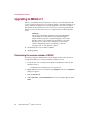
Upgrading to MSDE 2000
Use this procedure to upgrade Microsoft Data Engine (MSDE) to Microsoft SQL
Server 2000 Desktop Engine (MSDE 2000) with Service Pack 3. For more
information, see Upgrading MSDE to MSDE 2000 on page 27 and Remote database
servers using MSDE or MSDE 2000 on page 27.
NOTE
We distribute the MSDE 2000 Setup program on the product
CD only. MSDE 2000 is also available at no charge from
Microsoft. At press time, this program (SQL2KDESKSP3.EXE)
and instructions for installation were available on the
Microsoft web site:
http://www.microsoft.com/sql/downloads/2000/sp3.asp
1
Insert the product CD into the CD-ROM drive of the computer.
2
On the taskbar, click the Start button, then point to Run. The Run dialog box
appears.
3
In Open, type the following command:
SETUP /UPGRADESP SQLRUN INSTANCENAME=MSSQLSERVER
UPGRADEUSER=<USER> UPGRADEPWD=<PASSWORD>
Where <USER> and <PASSWORD> are the user name and password of a valid
user account on the database.
4
Click OK to start the installation.
Installation Guide
29
Pre-Installation Procedures
Upgrading to MDAC 2.7
Before you install the ePolicy Orchestrator software, you need to determine the
version of Microsoft Data Access Components (MDAC) currently installed on all
ePolicy Orchestrator database servers, then upgrade to version 2.7 as needed.
Because the ePolicy Orchestrator server uses version 2.7, it’s important that all
database servers use the same version to avoid performance and functionality
issues.
WARNING
The ePolicy Orchestrator 3.0 Setup program upgrades MDAC
automatically for local database servers using an English,
French, German, Japanese, or Spanish language version of the
database software. You must do this manually for all remote
database servers and for all local database servers using a
Chinese (Simplified), Chinese (Traditional), or Korean
language version of the database software.
n
Determining the version number of MDAC.
n
Installing MDAC.
Determining the version number of MDAC
Use this procedure to determine the version number of Microsoft Data Access
Components (MDAC) on ePolicy Orchestrator database servers.
1
Locate the MSDADC.DLL file that corresponds to the database software. The
default location is:
C:\PROGRAM FILES\COMMON FILES\SYSTEM\OLE DB
30
2
Right-click the MSDADC.DLL file, then select Properties. The <FILE> Properties
dialog box appears.
3
Click the Version tab.
4
Under Item name, select ProductVersion. The version number appears under
Value.
ePolicy Orchestrator™ software version 3.0
Pre-Installation Procedures
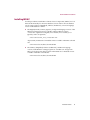
Installing MDAC
Use this procedure to install Microsoft Data Access Components (MDAC) 2.7. You
must do this manually for all remote database servers and for all local database
servers using a Chinese (Simplified), Chinese (Traditional), or Korean language
version of the database software.
n
The English, French, German, Japanese, and Spanish language versions of the
MDAC 2.7 Setup program are available on the product CD (where
<LANGUAGE> equals EN for English, FR for French, DE for German, JP for
Japanese, and ES for Spanish):
SETUP\MDAC\MADC_TYPE_<LANGUAGE>.EXE
At press time, instructions for installation were available on the Microsoft web
site:
www.microsoft.com/data/download.htm
n
The Chinese (Simplified), Chinese (Traditional), and Korean language
versions of the MDAC 2.7 Setup program are available at no charge from
Microsoft. At press time, this program and instructions for installation were
available on the Microsoft web site:
www.microsoft.com/data/download.htm
Installation Guide
31
Pre-Installation Procedures
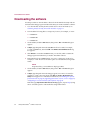
Downloading the software
Use this procedure to download the software from the McAfee Security web site
and extract the Setup program and other files that you need to install the software.
1
Go to the McAfee Security download web site. For more information, see
Contacting McAfee Security & Network Associates on page 11.
2
Download the following files to a temporary location; for example, C:\TEMP:
w
EPO300B.EXE
w
EPO300B.C00
w
EPO300B.C01
3
On the taskbar, click the Start button, then point to Run. The Run dialog box
appears.
4
In Open, type the path where the EPO300B.EXE file is located (for example,
C:\TEMP\EPO300B.EXE), then click OK. The WinAce v2.0 Self-Extractor dialog
box appears.
5
Click Extract to create the EPO300SHIPPING_FULL.ZIP file, which contains the
Setup program and other files you need to install the software.
6
Extract the files from EPO300SHIPPING_FULL.ZIP to a temporary location; for
example, C:\TEMP. Be sure to select the option to extract the files using folder
names.
NOTE
Keep these files; you need them to deploy products.
7
On the taskbar, click the Start button, then point to Run. The Run dialog box
appears.
8
In Open, type the path where the Setup program (SETUP.EXE) is located (for
example, C:\TEMP\SETUP.EXE), then click OK. The ePolicy Orchestrator 3.0
Setup wizard appears. For installation instructions, see Installing the Software
for the First-Time on page 39, Upgrading from Version 2.0, 2.5, or 2.5.1 on page 57,
or Migrating to a Licensed Version of the Software on page 75.
If the message, Required installer files are missing appears, repeat Step 6, being
sure to select the option to extract the files using folder names.
32
ePolicy Orchestrator™ software version 3.0
Pre-Installation Procedures
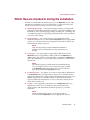
Which files are checked in during the installation
Files that are checked into the master repository or the Repository as part of the
installation are listed below. For more information, see Supported Products and
Features in the ePolicy Orchestrator 3.0 Product Guide or Help.
n
Agent language packages — The agent language packages for all supported
languages are checked into the master repository as part of the installation. For
information on how agent language packages are deployed — including a list
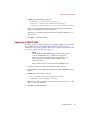
of available languages, see Agent language deployment in the ePolicy Orchestrator
3.0 Product Guide or Help.
n
Custom packages — Any custom packages you created with McAfee
Installation Designer 1.0 or 1.1 that are in the Repository when you upgrade the
software are converted to the new package file format (PKGCATALOG.Z) and
checked into the master repository.
NOTE
Only custom packages created with McAfee Installation
Designer 7.0 can be checked into ePolicy Orchestrator 3.0
directly.
n
Policy pages — Any policy page for supported products that are in the
Repository when you upgrade the software remain in the Repository. In
addition, the policy pages for selected products are added to the Repository as
part of the installation. For a list, see the ePolicy Orchestrator 3.0 Release Notes
(README.TXT).
NOTE
The LWI policy page used with VirusScan ThinClient 6.0 and
6.1 is an exception. A new version of this policy page is added
to the Repository and replaces all previous versions. This new
policy page includes the Log Activity tab only.
n
Product plug-in files — Any plug-in (.DLL) files for supported products that are
in the Repository when you upgrade the software are converted to the new
package file format (PKGCATALOG.Z) and checked into the master repository. In
addition, plug-in files for selected products are checked into the master
repository during the installation. For a list, see the ePolicy Orchestrator 3.0
Release Notes (README.TXT).
n
Products — Any supported products that are in the Repository when you
upgrade the software are converted to the new package file format
(PKGCATALOG.Z) and checked into the master repository as part of the
installation.
NOTE
VirusScan ThinClient 6.0 and 6.1 are exceptions and are
removed from the Repository when you upgrade the software.
Installation Guide
33
Pre-Installation Procedures
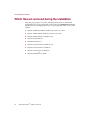
Which files are removed during the installation
All policy pages, plug-in (.DLL) files, and Setup (binary) files associated with
products that are no longer supported are removed from the Repository during the
installation. The following products are no longer supported in this version of the
software:
34
n
McAfee AVERT Klez/Elkern stand-alone scanner 1.0 or later.
n
McAfee AVERT Nimda stand-alone scanner 1.0 or later.
n
McAfee NetShield 4.0.3 for Windows NT.
n
McAfee ThreatScan® 2.0.
n
McAfee ThreatScan 2.1.
n
McAfee VirusScan 4.0.3 for Windows NT.
n
McAfee VirusScan 4.0.3 for Windows.
n
McAfee VirusScan 4.5 for Windows.
n
McAfee WebShield® 4.5 SMTP.
ePolicy Orchestrator™ software version 3.0
Pre-Installation Procedures
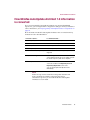
How McAfee AutoUpdate Architect 1.0 information
is converted
If you are using McAfee AutoUpdate Architect 1.0 to manage distributed
repositories, you can migrate their configuration settings to ePolicy Orchestrator
3.0. For instructions, see Preparing McAfee AutoUpdate Architect 1.0 repositories on
page 36.
How information in McAfee AutoUpdate Architect 1.0 is converted in ePolicy
Orchestrator 3.0 is described below:
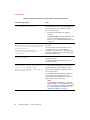
In version 1.0, this...
Is converted to this...
Master repository.
Global distributed repository.
Distributed repositories.
Global distributed repositories.
Source repositories.
Source repositories.
Fallback repository.
Source repository.
Contents of the master repository.
The contents of the master repository are not
migrated.
Proxy server settings.
These settings are not converted.
You must define the proxy server settings for both
the master repository and client computers.
Pull and replication tasks.
These tasks are not converted.
You must schedule new Repository Pull and
Repository Replication server tasks.
You can still run pull and replication tasks
immediately.
NOTE
If there are repositories in McAfee AutoUpdate Architect and
ePolicy Orchestrator with the same name, the ePolicy
Orchestrator repository is used and the McAfee AutoUpdate
Architect is not converted.
Installation Guide
35
Pre-Installation Procedures
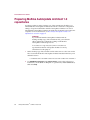
Preparing McAfee AutoUpdate Architect 1.0
repositories
Use this procedure to make a backup copy of the SITEMGR.XML file before you
uninstall McAfee AutoUpdate Architect 1.0. This file contains the configuration
settings of repositories defined in McAfee AutoUpdate Architect. You cannot
install McAfee AutoUpdate Architect 1.0 and ePolicy Orchestrator 3.0 on the same
computer. For more information, see How McAfee AutoUpdate Architect 1.0
information is converted on page 35.
WARNING
If you uninstall McAfee AutoUpdate Architect without
making a backup copy of the SITEMGR.XML file, you will not be
able to migrate the configuration settings of the McAfee
AutoUpdate Architect repositories.
You cannot use a repository list (SITELIST.XML) that was
exported from McAfee AutoUpdate Architect or ePolicy
Orchestrator for this purpose.
1
Make a backup copy of the SITEMGR.XML file and store it in a safe location. This
file is located in the McAfee AutoUpdate Architect installation directory. The
default location is:
C:\PROGRAM FILES\NETWORK ASSOCIATES\MCAFEE AUTOUPDATE ARCHITECT
2
36
Use Add/Remove Programs in the Control Panel to remove the software. For
instructions, see the Windows Help File. To open this file, click the Start button,
then select Help.
ePolicy Orchestrator™ software version 3.0
Pre-Installation Procedures
How AutoUpdate 7.0 information is converted
If you are currently using ePolicy Orchestrator 2.5 or 2.5.1 to manage McAfee
Security products that use AutoUpdate 7.0 (for example, McAfee VirusScan
Enterprise 7.0), you can — as part of the installation — keep the McAfee AutoUpdate
7.0 policies and tasks for use with the agent 2.5 or 2.5.1 and convert them to ePolicy
Orchestrator Agent policies and tasks for use with the agent 3.1.
WARNING
If you don’t migrate the McAfee AutoUpdate 7.0 policies and
tasks, they are no longer enforced on client computers.
Regardless of whether you choose to migrate these policies
and tasks during the installation, the McAfee AutoUpdate 7.0
policy page is removed and cannot be added back to the
Repository in version 3.0.
Although you cannot view or change the McAfee AutoUpdate 7.0 policies and tasks
after the installation, they continue to be enforced on the agent 2.5 and 2.5.1. Their
settings remain in the ePolicy Orchestrator database and continue to be exchanged
during agent-to-server communication. You can remove these settings from the
database after you upgrade all agents to version 3.1, or when you no longer want
to enforce these policies and tasks on the agent 2.5 or 2.5.1.
How AutoUpdate 7.0 information in ePolicy Orchestrator 2.5 or 2.5.1 is converted
in version 3.0 is described below:
In version 2.5 or 2.5.1, this...
Is converted to this...
Repositories.
Hidden repositories. Although these repositories
no longer appear, client computers using the
agent 2.5 or 2.5.1 continue to retrieve updates
from these repositories.
These repositories are also converted to local
distributed repositories. Client computers using
the agent 3.1 retrieve updates from these
repositories.
NAIFtp and NAIHttp default
repositories.
Although these are converted to local distributed
repositories, we recommend that you remove
them after the installation as they are now used as
the default fallback and source repositories,
respectively.
Proxy server settings.
Proxy server settings are converted and applied to
client computers.
You must define the proxy server settings for the
master repository separately.
Installation Guide
37
Pre-Installation Procedures
In version 2.5 or 2.5.1, this...
Is converted to this...
McAfee AutoUpdate 7.0 —
Update and Mirror client tasks.
Hidden McAfee AutoUpdate 7.0 — Update and
Mirror client tasks. Although these tasks no
longer appear, they continue to be enforced on
the agent 2.5 and 2.5.1.
These tasks are also converted to ePolicy
Orchestrator agent — Update and Mirror tasks,
which are enforced on the agent 3.1 only.
Policy and task inheritance.
38
ePolicy Orchestrator™ software version 3.0
Policy and task inheritance is preserved.
3
Installing the Software for the
First-Time
The procedures you need to complete to install the new version of the software
depend on whether you are migrating existing information from McAfee
AutoUpdate Architect 1.0, and whether you are installing the ePolicy Orchestrator
server and console or the remote console. Be sure to complete all pre-installation
procedures that apply to you before you install the software.
WARNING
If you uninstall McAfee AutoUpdate Architect without
making a backup copy of the SITEMGR.XML file, you will not be
able to migrate the configuration settings of the McAfee
AutoUpdate Architect repositories.
n
Before you begin.
n
Installing the server and console.
n
Installing remote consoles.
Software features
To review the features of the software, see the ePolicy Orchestrator 3.0 Product Guide.
NOTE
The agent released with ePolicy Orchestrator 3.0 is the
agent 3.1.
Installation Guide
39
Installing the Software for the First-Time
Before you begin
You need to complete the following procedures before you install the software:
n
Requirements and Recommendations on page 13.
n
Pre-installation best practices guidelines on page 26.
n
Installing or upgrading the database software on page 27.
n
Upgrading to MDAC 2.7 on page 30.
n
Downloading the software on page 32.
n
Which files are checked in during the installation on page 33.
Migrating information from McAfee AutoUpdate Architect 1.0
If you are using McAfee AutoUpdate Architect 1.0 to manage distributed
repositories, you can migrate their configuration settings to ePolicy Orchestrator
3.0. For more information and instructions, see How McAfee AutoUpdate Architect
1.0 information is converted on page 35 and Preparing McAfee AutoUpdate Architect
1.0 repositories on page 36, respectively.
WARNING
If you uninstall McAfee AutoUpdate Architect without
making a backup copy of the SITEMGR.XML file, you will not be
able to migrate the configuration settings of the McAfee
AutoUpdate Architect repositories.
40
ePolicy Orchestrator™ software version 3.0
Installing the Software for the First-Time
Installing the server and console
Use this procedure to install ePolicy Orchestrator 3.0 server and console on
computers. For a list of common installation messages and their causes and
solutions, see Troubleshooting on page 91.
The ePolicy Orchestrator 3.0 Setup program requires you to restart the computer
up to two times. All installations require that you restart the computer once. If
Setup upgrades MDAC to version 2.7, you will need to restart the computer a
second time. Setup upgrades MDAC automatically for local database servers using
an English, French, German, Japanese, or Spanish language version of the database
software.
NOTE
Although you can install the software on a computer with
Terminal Services, you cannot use Terminal Services to install
or use the software. To manage the software remotely, install
ePolicy Orchestrator remote consoles and log on to ePolicy
Orchestrator servers from these remote consoles.
Agent installation
This procedure also installs the ePolicy Orchestrator agent for Windows on the
same computer on which you are installing the software. This server computer
appears in the Directory after the agent communicates with the ePolicy
Orchestrator server for the first time. Initial agent-to-server communication occurs
randomly within a ten-minute interval.
The agent that is installed on the ePolicy Orchestrator server during the installation
is located in the COMMON FRAMEWORK folder in the installation directory. The
default location is:
C:\PROGRAM FILES\NETWORK ASSOCIATES\EPO\COMMON FRAMEWORK
1
Log on to the desired computer using a user account with local administrator
permissions.
2
If you are using Microsoft SQL Server 2000 as the ePolicy Orchestrator
database, verify that the SQL Server 2000 service (MSSQLSERVER) is running.
Depending on the operating system that you are using, this procedure varies.
For instructions, see the Microsoft product documentation.
3
If installing the software from the product CD:
a
Insert the CD into the CD-ROM drive of the computer.
b
In the ePolicy Orchestrator autorun window, select the desired language,
then select Install ePolicy Orchestrator 3.0.
If downloading the software from the McAfee Security web site, see Downloading the
software on page 32 for instructions.
Installation Guide
41
Installing the Software for the First-Time
4
In the ePolicy Orchestrator 3.0 Setup wizard, click Next to begin the installation.
5
For beta and evaluation versions of the software, an additional dialog box
identifies how long you are licensed to use the software. Also, Step 6 and
Step 7 differ slightly. For more information, see Beta and evaluation software on
page 75.
6
In the Network Associates End User License Agreement dialog box, select the
appropriate license type and the country in which you purchased the software.
The license type you select must match the license you purchased. If you are
unsure which license you purchased, contact the person who sold you the
software.
NOTE
This dialog box uses the system fonts to display the license
agreement in the appropriate language, so it might not
display correctly if the required fonts are not available. In this
circumstance, read the appropriate license in the
LICENSEAGREEMENT.PDF file supplied with the software.
7
Read the entire license agreement carefully and perform one of the following
actions:
w Select I accept the terms in the license agreement if you agree to the license
terms. Click OK to continue.
w Click Cancel if you do not agree to the license terms, and want to stop the
installation process.
42
ePolicy Orchestrator™ software version 3.0
Installing the Software for the First-Time
8
In the Installation Options dialog box, select Install Server and Console.
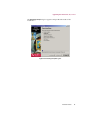
Figure 3-1. Installation Options dialog box
9
Accept the default installation path (C:\PROGRAM FILES\NETWORK
ASSOCIATES\EPO) in Install to Folder, or click Browse to select a different
location, then click Next.
Installation Guide
43
Installing the Software for the First-Time
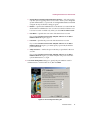
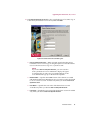
10 In the Server Service Account dialog box, specify the type of account to log on
to the ePolicy Orchestrator server service, then click Next.
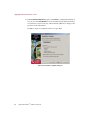
Figure 3-2. Server Service Account dialog box
w
Use Local System Account — When selected, specifies that the ePolicy
Orchestrator server service logs on using the system account rather than a
user account. Most services log on to a system account.
NOTE
If you select Use Local System Account, you cannot use the
ePolicy Orchestrator server credentials to deploy the agent.
You will need to provide a user account that belongs to the
local administrators group on the desired computers.
w
Domain Name — Specifies the NetBIOS name of the domain associated
with the desired domain administrator user account. Leave this box blank
to use a local user account. Available only when you deselect Use Local
System Account.
44
w
User Name — Specifies the user name of the desired user account.
Available only when you deselect Use Local System Account.
w
Password — Specifies the password of the desired user account. Available
only when you deselect Use Local System Account.
ePolicy Orchestrator™ software version 3.0
Installing the Software for the First-Time
Best practices recommendation
When you change the password on the account used to
log on to the ePolicy Orchestrator server service, be
sure to update the password for the McAfee ePolicy
Orchestrator 3.0 Server service. This procedure varies
depending on the operating system. For instructions,
see the operating system product documentation.
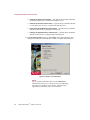
11 In the Select Database Server dialog box, specify the desired database server,
then click Next.
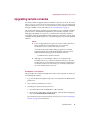
Figure 3-3. Select Database Server dialog box
w
Install a server on this computer and use it — Installs Microsoft SQL Server
2000 Desktop Engine (MSDE 2000) as the ePolicy Orchestrator database,
using the default system administrator (sa) login. You will be required to
change the password in the next step.
w
Use the existing server on this computer — Uses the existing MSDE,
MSDE 2000, or SQL Server database server on this computer.
Installation Guide
45
Installing the Software for the First-Time
w
Use an existing server on the network — Uses the remote database server
that you specify. The drop-down list displays all remote SQL Server
database servers that are in the same domain as this computer. If the
desired database server doesn’t appear, type its name in the list box.
NOTE
If using Windows NT, MDAC 2.7 is required to display the
names of remote database servers in this list. If using other
operating systems, MDAC 2.5 or later is required. For
instructions, see Determining the version number of MDAC on
page 30 and Installing MDAC on page 31.
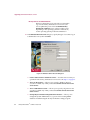
12 In the Database Server Account dialog box, specify the type of account to log on
to the database server, then click Next.
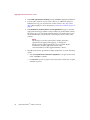
Figure 3-4. Database Server Account dialog box
w
Use the same account as the Server service — Uses the same account you
specified for the ePolicy Orchestrator server service in Step 10 on page 44.
46
w
This is an NT account — Allows you to specify a Windows NT user
account. Available only when you deselect Use the same account as the
Server service.
w
This is a SQL Server account — Allows you to specify a SQL Server user
account. Available only when you deselect Use the same account as the
Server service.
ePolicy Orchestrator™ software version 3.0
Installing the Software for the First-Time
w
Change SA password of existing SQL Server Account — This option applies
only when you are upgrading the server and console. Allows you to change the
System Administrator (sa) password on existing MSDE databases installed
using the ePolicy Orchestrator Setup program.
w
Domain — Specifies the NetBIOS name of the domain associated with the
desired domain administrator user account. Leave this box blank to use a
local user account. Available only when you select This is an NT account.
w
User Name — Specifies the user name of the desired user account.
If you selected Install a server on this computer and use it in the Select
Database Server dialog box, type sa.
w
Password — Specifies the password of the desired user account.
If you selected Install a server on this computer and use it in the Select
Database Server dialog box, you must specify a password; the default
password is blank.
w
Verify Password — Verifies the password that you specified for the user
account.
If you selected Install a server on this computer and use it in the Select
Database Server dialog box, you must verify the new password for the
system administrator (sa) login.
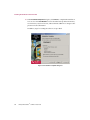
13 In the HTTP Configuration dialog box, specify the port numbers used for
communication to and from the server, then click Next.
Figure 3-5. HTTP Configuration dialog box
Installation Guide
47
Installing the Software for the First-Time
w
HTTP port for Agent communication — Specifies the port number (default is
80) that the agent uses to communicate with the server.
w
HTTP port for Console communication — Specifies the port number (default
is 81) that the console uses to communicate with the server.
w
HTTP port for Agent Wake-Up communication — Specifies the port number
(default is 8081) used to send agent wakeup calls.
w
HTTP port for Agent Broadcast communication — Specifies the port number
(default is 8082) used to send SuperAgent wakeup calls.
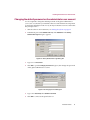
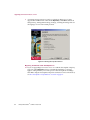
14 In the Ready To Install dialog box, click Install to begin the installation. This
dialog box includes the estimated time needed to complete the installation.
Figure 3-6. Ready To Install dialog box
NOTE
If you cancel the installation after you click Install, then
uninstall the software, you can ignore messages indicating
that Setup was unable to remove items. These messages
appear because the items were never installed.
48
ePolicy Orchestrator™ software version 3.0
Installing the Software for the First-Time
The Executing Setup dialog box appears and provides the status of the
installation.
Figure 3-7. Executing Setup dialog box
Installation Guide
49
Installing the Software for the First-Time
15 In the Installation Complete dialog box, click Finish to complete the installation.
You can also click View Readme to learn about the latest product information,
resolved issues, any known issues, and last-minute additions or changes to the
product or its documentation.
In addition, steps for starting the software are provided.
Figure 3-8. Installation Complete dialog box
50
ePolicy Orchestrator™ software version 3.0
Installing the Software for the First-Time
Changing the default password on the administrator user account
You are required to change the default password on the global administrator
(admin) user account after you install the software for the first time. It is important
to change the default password on every ePolicy Orchestrator server to ensure that
they are kept secure.
1
Start the software. For instructions, see Starting the software on page 87.
2
In the details pane under Global Task List, click Add Server. The ePolicy
Orchestrator Login dialog box appears.
Figure 3-9. ePolicy Orchestrator Login dialog box
3
Type admin in Password.
4
Click OK to open the Change password dialog box, then change the password
on the global administrator account.
Figure 3-10. Change password dialog box
5
Type a new Password, then Confirm Password.
6
Click OK to connect to the specified server.
Installation Guide
51
Installing the Software for the First-Time
Installing remote consoles
Use this procedure to install ePolicy Orchestrator 3.0 remote consoles on
computers. You can use remote consoles to log on to and manage ePolicy
Orchestrator servers across your network. For a list of common installation
messages and their causes and solutions, see Troubleshooting on page 91.
The ePolicy Orchestrator 3.0 Setup program requires you to restart the computer
up to two times. All installations require that you restart the computer once. If
Setup upgrades MDAC to version 2.7, you will need to restart the computer a
second time. Setup upgrades MDAC automatically for local database servers using
an English, French, German, Japanese, or Spanish language version of the database
software.
NOTE
Although you can install the software on a computer with
Terminal Services, you cannot use Terminal Services to install
or use the software. To manage the software remotely, install
ePolicy Orchestrator remote consoles and log on to ePolicy
Orchestrator servers from these remote consoles.
AutoUpdate 7.0 installation
This procedure also installs AutoUpdate 7.0 on the same computer on which you
are installing the software.
1
Log on to the desired computer using a user account with local administrator
permissions.
2
If installing the software from the product CD:
a
Insert the CD into the CD-ROM drive of the computer.
b
In the ePolicy Orchestrator autorun window, select the desired language,
then select Install ePolicy Orchestrator 3.0.
If downloading the software from the McAfee Security web site, see Downloading the
software on page 32 for instructions.
52
3
In the ePolicy Orchestrator 3.0 Setup wizard, click Next to begin the installation.
4
For beta and evaluation versions of the software, an additional dialog box
identifies how long you are licensed to use the software. Also, Step 5 and
Step 6 differ slightly. For more information, see Beta and evaluation software on
page 75.
ePolicy Orchestrator™ software version 3.0
Installing the Software for the First-Time
5
In the Network Associates End User License Agreement dialog box, select the
appropriate license type and the country in which you purchased the software.
The license type you select must match the license you purchased. If you are
unsure which license you purchased, contact the person who sold you the
software.
NOTE
This dialog box uses the system fonts to display the license
agreement in the appropriate language, so it might not
display correctly if the required fonts are not available. In this
circumstance, read the appropriate license in the
LICENSEAGREEMENT.PDF file supplied with the software.
6
Read the entire license agreement carefully and perform one of the following
actions:
w Select I accept the terms in the license agreement if you agree to the license
terms. Click OK to continue.
w Click Cancel if you do not agree to the license terms, and want to stop the
installation process.
7
In the Installation Options dialog box, select Install Console.
Figure 3-11. Installation Options dialog box
8
Accept the default installation location (C:\PROGRAM FILES\NETWORK
ASSOCIATES\EPO) in Install to Folder, or click Browse to select a different
location, then click Next.
Installation Guide
53
Installing the Software for the First-Time
9
In the Ready To Install dialog box, click Install to begin the installation. This
dialog box includes the estimated time needed to complete the installation.
Figure 3-12. Ready To Install dialog box
NOTE
If you cancel the installation after you click Install, then
uninstall the software, you can ignore messages indicating
that Setup was unable to remove items. These messages
appear because the items were never installed.
54
ePolicy Orchestrator™ software version 3.0
Installing the Software for the First-Time
The Executing Setup dialog box appears and provides the status of the
installation.
Figure 3-13. Executing Setup dialog box
Installation Guide
55
Installing the Software for the First-Time
10 In the Installation Complete dialog box, click Finish to complete the installation.
You can also click View Readme to learn about the latest product information,
resolved issues, any known issues, and last-minute additions or changes to the
product or its documentation.
In addition, steps for starting the software are provided.
Figure 3-14. Installation Complete dialog box
56
ePolicy Orchestrator™ software version 3.0
4
Upgrading from Version 2.0,
2.5, or 2.5.1
The procedures you need to complete to upgrade from version 2.0, 2.5, or 2.5.1
depend on whether you are migrating existing information from McAfee
AutoUpdate Architect 1.0 or AutoUpdate 7.0, and whether you are upgrading the
ePolicy Orchestrator server and console or the remote console. You migrate
AutoUpdate 7.0 information as part of the installation. Be sure to complete all
pre-installation procedures that apply to you before you install the software.
WARNING
If you uninstall McAfee AutoUpdate Architect without
making a backup copy of the SITEMGR.XML file, you will not be
able to migrate the configuration settings of the McAfee
AutoUpdate Architect repositories.
n
Before you begin.
n
Backing up ePolicy Orchestrator databases.
n
Upgrading the server and console.
n
Upgrading remote consoles.
If you are using version 1.0 or 1.1, you must upgrade to version 2.0 before you can
upgrade to version 3.0. For instructions, see the ePolicy Orchestrator 1.1 Getting
Started Guide or ePolicy Orchestrator 2.0 Installation Guide, respectively.
What’s new in this release?
To review the new features in this release, see the ePolicy Orchestrator 3.0 Product
Guide.
NOTE
The agent released with ePolicy Orchestrator 3.0 is the
agent 3.1.
Installation Guide
57
Upgrading from Version 2.0, 2.5, or 2.5.1
Before you begin
You need to complete the following procedures before you upgrade the software:
n
Requirements and Recommendations on page 13.
n
Pre-installation best practices guidelines on page 26.
n
Installing or upgrading the database software on page 27.
n
Upgrading to MDAC 2.7 on page 30.
n
Downloading the software on page 32.
n
Which files are checked in during the installation on page 33.
n
Which files are removed during the installation on page 34.
Migrating information from McAfee AutoUpdate Architect 1.0
If you are using McAfee AutoUpdate Architect 1.0 to manage distributed
repositories, you can migrate their configuration settings to ePolicy Orchestrator
3.0. For more information and instructions, see How McAfee AutoUpdate Architect
1.0 information is converted on page 35 and Preparing McAfee AutoUpdate Architect
1.0 repositories on page 36, respectively.
WARNING
If you uninstall McAfee AutoUpdate Architect without
making a backup copy of the SITEMGR.XML file, you will not be
able to migrate the configuration settings of the McAfee
AutoUpdate Architect repositories.
Migrating information from AutoUpdate 7.0
If you are migrating existing information from AutoUpdate 7.0 as part of the
installation, see How AutoUpdate 7.0 information is converted on page 37.
58
ePolicy Orchestrator™ software version 3.0
Upgrading from Version 2.0, 2.5, or 2.5.1
Backing up ePolicy Orchestrator databases
Before you upgrade to version 3.0, we recommend that you back up all ePolicy
Orchestrator databases.
n
If you are using Microsoft SQL Server as the ePolicy Orchestrator database, see
the Microsoft product documentation.
n
If you are using Microsoft Data Engine (MSDE) as the ePolicy Orchestrator
database, you can use the Database Backup Utility (DBBAK.EXE) to back up
ePolicy Orchestrator MSDE databases on the database server. For instructions,
see Backing up ePolicy Orchestrator MSDE databases in the ePolicy Orchestrator 3.0
Product Guide.
Installation Guide
59
Upgrading from Version 2.0, 2.5, or 2.5.1
Upgrading the server and console
Use this procedure to upgrade the ePolicy Orchestrator server and console from
version 2.0, 2.5, or 2.5.1 to version 3.0. For a list of common installation messages
and their causes and solutions, see Troubleshooting on page 91.
The ePolicy Orchestrator 3.0 Setup program requires you to restart the computer
up to two times. All installations require that you restart the computer once. If
Setup upgrades MDAC to version 2.7, you will need to restart the computer a
second time. Setup upgrades MDAC automatically for local database servers using
an English, French, German, Japanese, or Spanish language version of the database
software.
NOTE
n
If you are upgrading from a previous version of the software, be
sure to install ePolicy Orchestrator 3.0 on every ePolicy
Orchestrator server, console, and remote console.
All of the ePolicy Orchestrator utility programs (for example,
Database Merge) must reside in the installation directory to be
updated by the Setup program. The default location is:
C:\PROGRAM FILES\MCAFEE\EPO\2.0
n
Although you can install the software on a computer with
Terminal Services, you cannot use Terminal Services to install or
use the software. To manage the software remotely, install ePolicy
Orchestrator remote consoles and log on to ePolicy Orchestrator
servers from these remote consoles.
Agent installation
This procedure also installs the ePolicy Orchestrator agent for Windows on the
same computer on which you are installing the software. The server computer
appears in the Directory after the agent communicates with the ePolicy
Orchestrator server for the first time. Initial agent-to-server communication occurs
randomly within a ten-minute interval.
The agent that is installed on the ePolicy Orchestrator server during the installation
is located in the COMMON FRAMEWORK folder in the installation directory. The
default location is:
C:\PROGRAM FILES\MCAFEE\EPO\COMMON FRAMEWORK
60
ePolicy Orchestrator™ software version 3.0
Upgrading from Version 2.0, 2.5, or 2.5.1
1
Log on to the desired computer using a user account with local administrator
permissions.
2
If you are using Microsoft SQL Server 2000 as the ePolicy Orchestrator
database, verify that the SQL Server 2000 service (MSSQLSERVER) is running.
Depending on the operating system that you are using, this procedure varies.
For instructions, see the Microsoft product documentation.
3
Close all ePolicy Orchestrator consoles.
4
If installing the software from the product CD:
a
Insert the CD into the CD-ROM drive of the computer.
b
In the ePolicy Orchestrator autorun window, select the desired language,
then select Install ePolicy Orchestrator 3.0.
If downloading the software from the McAfee Security web site, see Downloading the
software on page 32 for instructions.
5
In the ePolicy Orchestrator 3.0 Setup wizard, click Next to begin the installation.
6
For beta and evaluation versions of the software, an additional dialog box
identifies how long you are licensed to use the software. Also, Step 7 and
Step 8 differ slightly. For more information, see Beta and evaluation software on
page 75.
7
In the Network Associates End User License Agreement dialog box, select the
appropriate license type and the country in which you purchased the software.
The license type you select must match the license you purchased. If you are
unsure which license you purchased, contact the person who sold you the
software.
NOTE
This dialog box uses the system fonts to display the license
agreement in the appropriate language, so it might not
display correctly if the required fonts are not available. In this
circumstance, read the appropriate license in the
LICENSEAGREEMENT.PDF file supplied with the software.
8
Read the entire license agreement carefully and perform one of the following
actions:
w Select I accept the terms in the license agreement if you agree to the license
terms. Click OK to continue.
w Click Cancel if you do not agree to the license terms, and want to stop the
installation process.
Installation Guide
61
Upgrading from Version 2.0, 2.5, or 2.5.1
9
A warning message appears to notify you which products are no longer
supported and will be removed from the Repository. Click Next to delete all
Setup (binary), Management Package, Package, and Plug-In Package files for
all language versions of the listed products.
Figure 4-1. Warning about product removal
Migrating information from AutoUpdate 7.0
10 If you are upgrading from version 2.5 or 2.5.1 and the AutoUpdate 7.0 policy
page was in the Repository when you started the installation, a message
appears asking whether you want to preserve the AutoUpdate 7.0 settings.
Click Yes to migrate AutoUpdate 7.0 policies and tasks. For more information,
see How AutoUpdate 7.0 information is converted on page 37.
62
ePolicy Orchestrator™ software version 3.0
Upgrading from Version 2.0, 2.5, or 2.5.1
11 In the Server Service Account dialog box, specify the type of account to log on
to the ePolicy Orchestrator server service, then click Next.
Figure 4-2. Server Service Account dialog box
w
Use Local System Account — When selected, specifies that the ePolicy
Orchestrator server service logs on using the system account rather than a
user account. Most services log on to a system account.
NOTE
If you select Use Local System Account, you cannot use the
ePolicy Orchestrator server credentials to deploy the agent.
You will need to provide a user account that belongs to the
local administrators group on the desired computers.
w
Domain Name — Specifies the NetBIOS name of the domain associated
with the desired domain administrator user account. Leave this box blank
to use a local user account. Available only when you deselect Use Local
System Account.
w
User Name — Specifies the user name of the desired user account.
Available only when you deselect Use Local System Account.
w
Password — Specifies the password of the desired user account. Available
only when you deselect Use Local System Account.
Installation Guide
63
Upgrading from Version 2.0, 2.5, or 2.5.1
Best practices recommendation
When you change the password on the account used to
log on to the ePolicy Orchestrator server service, be
sure to update the password for the McAfee ePolicy
Orchestrator 3.0 Server service. This procedure varies
depending on the operating system. For instructions,
see the operating system product documentation.
12 In the Database Server Account dialog box, specify the type of account to log on
to the database server, then click Next.
Figure 4-3. Database Server Account dialog box
w
Use the same account as the Server service — Uses the same account you
specified for the ePolicy Orchestrator server service in Step 11 on page 63.
w
This is an NT account — Allows you to specify a Windows NT user
account. Available only when you deselect Use the same account as the
server service.
w
This is a SQL Server account — Allows you to specify a SQL Server user
account. Available only when you deselect Use the same account as the
Server service.
w
Change SA password of existing SQL Server Account — Allows you to
change the System Administrator (sa) password on existing MSDE
databases installed using the ePolicy Orchestrator Setup program.
64
ePolicy Orchestrator™ software version 3.0
Upgrading from Version 2.0, 2.5, or 2.5.1
w
Domain — Specifies the NetBIOS name of the domain associated with the
desired domain administrator user account. Leave this box blank to use a
local user account. Available only when you select This is an NT account.
w
User Name — Specifies the user name of the desired user account.
If you selected Install a server on this computer and use it in the Select
Database Server dialog box, type sa.
w
Password — Specifies the password of the desired user account.
If you selected Install a server on this computer and use it in the Select
Database Server dialog box, you must specify a password; the default
password is blank.
w
Verify Password — Verifies the password that you specified for the user
account.
If you selected Install a server on this computer and use it in the Select
Database Server dialog box, you must verify the new password for the
system administrator (sa) login.
Installation Guide
65
Upgrading from Version 2.0, 2.5, or 2.5.1
13 In the Ready To Install dialog box, click Install to begin the installation. This
dialog box includes the estimated time needed to complete the installation.
Figure 4-4. Ready To Install dialog box
NOTE
If you cancel the installation after you click Install, then
uninstall the software, you can ignore messages indicating
that Setup was unable to remove items. These messages
appear because the items were never installed.
66
ePolicy Orchestrator™ software version 3.0
Upgrading from Version 2.0, 2.5, or 2.5.1
The Executing Setup dialog box appears and provides the status of the
installation.
Figure 4-5. Executing Setup dialog box
Installation Guide
67
Upgrading from Version 2.0, 2.5, or 2.5.1
14 In the Installation Complete dialog box, click Finish to complete the installation.
You can also click View Readme to learn about the latest product information,
resolved issues, any known issues, and last-minute additions or changes to the
product or its documentation.
In addition, steps for starting the software are provided.
Figure 4-6. Installation Complete dialog box
68
ePolicy Orchestrator™ software version 3.0
Upgrading from Version 2.0, 2.5, or 2.5.1
Upgrading remote consoles
Use this procedure to upgrade ePolicy Orchestrator remote consoles from version
2.0, 2.5, or 2.5.1 to version 3.0. You can use remote consoles to log on to and manage
ePolicy Orchestrator servers across your network. For a list of common installation
messages and their causes and solutions, see Troubleshooting on page 91.
The ePolicy Orchestrator 3.0 Setup program requires you to restart the computer
up to two times. All installations require that you restart the computer once. If
Setup upgrades MDAC to version 2.7, you will need to restart the computer a
second time. Setup upgrades MDAC automatically for local database servers using
an English, French, German, Japanese, or Spanish language version of the database
software.
NOTE
n
If you are upgrading from a previous version of the software, be
sure to install ePolicy Orchestrator 3.0 on every ePolicy
Orchestrator server, console, and remote console.
All of the ePolicy Orchestrator utility programs (for example,
Database Merge) must reside in the installation directory to be
updated by the Setup program. The default location is:
C:\PROGRAM FILES\MCAFEE\EPO\2.0
n
Although you can install the software on a computer with
Terminal Services, you cannot use Terminal Services to install or
use the software. To manage the software remotely, install ePolicy
Orchestrator remote consoles and log on to ePolicy Orchestrator
servers from these remote consoles.
AutoUpdate 7.0 installation
This procedure also installs AutoUpdate 7.0 on the same computer on which you
are installing the software.
1
Log on to the desired computer using a user account with local administrator
permissions.
2
Close all ePolicy Orchestrator consoles.
3
If installing the software from the product CD:
a
Insert the CD into the CD-ROM drive of the computer.
b
In the ePolicy Orchestrator autorun window, select the desired language,
then select Install ePolicy Orchestrator 3.0.
If downloading the software from the McAfee Security web site, see Downloading the
software on page 32 for instructions.
Installation Guide
69
Upgrading from Version 2.0, 2.5, or 2.5.1
4
In the ePolicy Orchestrator 3.0 Setup wizard, click Next to begin the installation.
5
For beta and evaluation versions of the software, an additional dialog box
identifies how long you are licensed to use the software. Also, Step 6 and
Step 7 differ slightly. For more information, see Beta and evaluation software on
page 75.
6
In the Network Associates End User License Agreement dialog box, select the
appropriate license type and the country in which you purchased the software.
The license type you select must match the license you purchased. If you are
unsure which license you purchased, contact the person who sold you the
software.
NOTE
This dialog box uses the system fonts to display the license
agreement in the appropriate language, so it might not
display correctly if the required fonts are not available. In this
circumstance, read the appropriate license in the
LICENSEAGREEMENT.PDF file supplied with the software.
7
Read the entire license agreement carefully and perform one of the following
actions:
w Select I accept the terms in the license agreement if you agree to the license
terms. Click OK to continue.
w Click Cancel if you do not agree to the license terms, and want to stop the
installation process.
70
ePolicy Orchestrator™ software version 3.0
Upgrading from Version 2.0, 2.5, or 2.5.1
8
In the Ready To Install dialog box, click Install to begin the installation. This
dialog box includes the estimated time needed to complete the installation.
Figure 4-7. Ready To Install dialog box
NOTE
If you cancel the installation after you click Install, then
uninstall the software, you can ignore messages indicating
that Setup was unable to remove items. These messages
appear because the items were never installed.
Installation Guide
71
Upgrading from Version 2.0, 2.5, or 2.5.1
The Executing Setup dialog box appears and provides the status of the
installation.
Figure 4-8. Executing Setup dialog box
72
ePolicy Orchestrator™ software version 3.0
Upgrading from Version 2.0, 2.5, or 2.5.1
9
In the Installation Complete dialog box, click Finish to complete the installation.
You can also click View Readme to learn about the latest product information,
resolved issues, any known issues, and last-minute additions or changes to the
product or its documentation.
In addition, steps for starting the software are provided.
Figure 4-9. Installation Complete dialog box
Installation Guide
73
Upgrading from Version 2.0, 2.5, or 2.5.1
74
ePolicy Orchestrator™ software version 3.0
5
Migrating to a Licensed
Version of the Software
Use this procedure to migrate an evaluation version of the software to a licensed
version. To migrate any pre-release software (beta or release candidate) to a
licensed version, you must first uninstall the existing version of the software. For
instructions, see Uninstalling the software on page 89.
1
Log on to the desired computer using a user account with local administrator
permissions.
2
Close all ePolicy Orchestrator consoles.
3
If installing the software from the product CD:
a
Insert the CD into the CD-ROM drive of the computer.
b
In the ePolicy Orchestrator autorun window, select the desired language,
then select Install ePolicy Orchestrator 3.0.
If downloading the software from the McAfee Security web site, see Downloading the
software on page 32 for instructions.
NOTE
Be sure that the Setup program you are using is for the
licensed version of the software.
4
In the ePolicy Orchestrator 3.0 Setup wizard, click Next to begin the migration.
5
A message appears indicating that the migration was completed successfully.
Beta and evaluation software
For beta and evaluation versions of the software, the installation process differs
slightly from the steps presented in this guide, as follows:
n
A dialog box appears before the license agreement, identifying how long you
are licensed to use the beta or evaluation software. Click OK to continue to the
license agreement.
n
The license agreement always displays in English — regardless of your
computer’s system language — and the license type options are disabled.
When you are using the software, a reminder dialog box appears near the end of
the license period, showing the number of days remaining before the license
expires. Depending on the type of software, you can:
Installation Guide
75
Migrating to a Licensed Version of the Software
n
Beta software — Click Beta Contact to access the beta feedback page on the
Network Associates web site, where you can supply your comments about the
beta software.
n
Evaluation software — Click Buy to access a page on the Network Associates
web site, where you can purchase a full version of the software.
The reminder dialog box appears a number of times before the license expires. If
you are not ready to purchase the full version or provide beta feedback, you can
click OK to close the panel.
If the license expires, you can no longer log on to the ePolicy Orchestrator server,
but can choose to uninstall the agent for Windows. If you leave the agent installed,
it continues to enforce policies locally, run scheduled tasks, and send properties
and events to the server.
76
ePolicy Orchestrator™ software version 3.0
6
Post-Installation Procedures
The procedures you need to complete after you install the new version of the
software depend on whether you are migrating existing information from McAfee
AutoUpdate Architect 1.0 or AutoUpdate 7.0, and whether you are installing the
software for the first time or upgrading from version 2.0, 2.5, or 2.5.1. Regardless,
you need to complete the following procedures after you install the software:
n
Post-installation best practices guidelines on page 78.
n
Which files you need to check in manually on page 79.
n
Deploying product plug-in files on page 79.
n
Determining which products can be managed on page 80.
n
Determining which products and product updates can be deployed on page 80.
If you are upgrading from version 2.0, 2.5, or 2.5.1, you also need to complete these
procedures after you install the software:
n
Agent AutoUpgrade on page 81.
n
Where the installation stores custom report templates on page 81.
Migrating information from McAfee AutoUpdate Architect 1.0
If you are migrating existing information from McAfee AutoUpdate Architect 1.0,
you also need to complete these procedures after you install the software:
n
Importing McAfee AutoUpdate Architect 1.0 repositories on page 82.
n
Verifying configuration settings for repositories on page 84.
n
Defining proxy server settings on page 85.
Migrating information from AutoUpdate 7.0
If you are migrating existing information from AutoUpdate 7.0, you also need to
complete these procedures after you install the software:
n
Verifying configuration settings for repositories on page 84.
n
Removing AutoUpdate 7.0 policies and tasks after agent deployment on page 86.
Installation Guide
77
Post-Installation Procedures
Post-installation best practices guidelines
We recommend that you complete the following tasks after you install the
software.
n
If you installed a new ePolicy Orchestrator database, we recommend that you
assign a password to the System Administrator (sa) user account. For
instructions, see Securing ePolicy Orchestrator databases in the ePolicy
Orchestrator 3.0 Product Guide or Help.
n
Define maintenance settings for ePolicy Orchestrator databases. For
instructions, see Maintaining ePolicy Orchestrator databases in the ePolicy
Orchestrator 3.0 Product Guide or Help.
n
After you define the Directory and policy settings, back up the database. For
instructions, see these topics in the ePolicy Orchestrator 3.0 Product Guide or
Help:
w The Directory.
w Policies, Properties, and Client Tasks.
w Backing up and restoring ePolicy Orchestrator databases.
78
ePolicy Orchestrator™ software version 3.0
Post-Installation Procedures
Which files you need to check in manually
Files that you must check into the master repository or the Repository after you
install the software are listed below. For more information, see Supported Products
and Features in the ePolicy Orchestrator 3.0 Product Guide or Help.
n
Contents of the McAfee AutoUpdate Architect 1.0 master repository — Packages
that were checked into the McAfee AutoUpdate Architect master repository
are not migrated to the ePolicy Orchestrator 3.0 master repository.
n
Custom packages — Only custom packages created with McAfee Installation
Designer 7.0 can be checked into the master repository.
n
Policy pages — To manage products whose policy page is not added to the
Repository during the installation, you must manually add their policy page to
the Repository.
n
Product plug-in files — Any product plug-in (.DLL) files that were not checked
in as part of the installation, must be checked into the master repository
manually.
n
Products — If you are installing the software for the first time, you must check
in all products that you want to deploy via ePolicy Orchestrator. If you are
upgrading the software, any supported products that were not already in the
Repository must be checked into the master repository manually.
NOTE
VirusScan ThinClient 6.0 and 6.1 are exceptions. You need to
check these products into the master repository regardless of
whether they were already in the Repository.
n
Product updates — You must check in all product updates that you want to
deploy via ePolicy Orchestrator. One exception is product plug-in (.DLL) files
that were converted as part of the installation.
Deploying product plug-in files
You must schedule an ePolicy Orchestrator agent | Update client task in order to
deploy new and updated product plug-in (.DLL) files to client computers. These
plug-in files are required for agent-to-server communication. For instructions, see
Scheduling client tasks in the ePolicy Orchestrator 3.0 Product Guide or Help.
Installation Guide
79
Post-Installation Procedures
Determining which products can be managed
Use this procedure to determine which products currently have policy pages in the
Repository. Policy pages allow you to set policies and create scheduled tasks for
products.
1
Log on to the desired ePolicy Orchestrator server. For instructions, see Logging
on to or adding ePolicy Orchestrator servers in the ePolicy Orchestrator 3.0 Product
Guide or Help.
2
In the console tree under ePolicy Orchestrator | <SERVER>, select Directory. The
Policies, Properties, and Tasks tabs appear in the details pane.
The Policies tab lists the products that you can currently manage.
Determining which products and product updates
can be deployed
Use this procedure to determine which packages are currently in the master
repository. These are the products and product updates that you can deploy to
client computers.
1
Log on to the desired ePolicy Orchestrator server. For instructions, see Logging
on to or adding ePolicy Orchestrator servers in the ePolicy Orchestrator 3.0 Product
Guide or Help.
2
In the console tree under ePolicy Orchestrator | <SERVER>, select Repository.
3
In the details pane under AutoUpdate Tasks, click Manage packages.
The Packages page lists the products and product updates that you can
currently deploy.
80
ePolicy Orchestrator™ software version 3.0
Post-Installation Procedures
Agent AutoUpgrade
The items below apply only to the agent for Windows. The agent for WebShield
appliances and the agent for NetWare have not been updated for this release.
n
If you upgrade the software from version 2.0, 2.5, or 2.5.1, agents are not
automatically upgraded to version 3.1 unless you enable agent AutoUpgrade.
The version 2.0, 2.5, and 2.5.1 agents continue to send events and properties to
the ePolicy Orchestrator server. For instructions, see Enabling or disabling agent
AutoUpgrade in the ePolicy Orchestrator 3.0 Product Guide or Help.
n
If you want to migrate unmanaged products that already have a disabled agent
installed on them, you can enable the agent without deploying it. For
instructions, see Enabling the agent on unmanaged products in the ePolicy
Orchestrator 3.0 Product Guide or Help.
n
If you upgrade the agent from version 3.0 to a later version, agents are no
longer automatically upgraded. For instructions, see Agent deployment in the
ePolicy Orchestrator 3.0 Product Guide or Help.
Where the installation stores custom report
templates
If there were custom report templates in the Report Repository when you installed
the software, they are copied — along with the predefined report templates — to
the IMPORTS\AVI folder in the installation directory during the installation. The
default location is:
C:\PROGRAM FILES\MCAFEE\3\IMPORTS\AVI
You must convert these custom report templates into Crystal Reports 8.0 before
you can add them into the Report Repository.
Installation Guide
81
Post-Installation Procedures
Importing McAfee AutoUpdate Architect 1.0
repositories
Use this procedure to import the configuration settings of repositories defined in
the McAfee AutoUpdate Architect 1.0 software into the ePolicy Orchestrator 3.0
software. For more information, see How McAfee AutoUpdate Architect 1.0
information is converted on page 35.
We recommend that you import repositories from McAfee AutoUpdate Architect
before you set up repositories in ePolicy Orchestrator.
WARNING
You cannot use a repository list (SITELIST.XML) that was
exported from McAfee AutoUpdate Architect or ePolicy
Orchestrator for this purpose.
You must be a global administrator to import the repository
list from McAfee AutoUpdate Architect.
For option definitions, click Help in the interface.
82
1
Log on to the desired ePolicy Orchestrator server using a global administrator
user account. For instructions, see Logging on to or adding ePolicy Orchestrator
servers in the ePolicy Orchestrator 3.0 Product Guide or Help.
2
In the console tree under ePolicy Orchestrator | <SERVER>, select Repository.
ePolicy Orchestrator™ software version 3.0
Post-Installation Procedures
3
In the details pane under AutoUpdate Components, click Source Repository.
The Source and Fallback Repositories page appears.
Figure 6-1. Source and Fallback Repositories page
4
Click Import repository list to open the Open dialog box, and select the McAfee
AutoUpdate Architect repository list (SITEMGR.XML).
Installation Guide
83
Post-Installation Procedures
Verifying configuration settings for repositories
If you migrated existing information from McAfee AutoUpdate Architect 1.0 or
AutoUpdate 7.0, use this procedure to verify that no duplicate repositories exist
and that the configuration settings for all repositories are correct.
1
Review source and fallback repositories. For instructions, see these topics in
the ePolicy Orchestrator 3.0 Product Guide or Help:
w Redefining the default source repository.
w Redefining the fallback repository.
w Removing source or fallback repositories.
2
Review global distributed repositories. For instructions, see these topics in the
ePolicy Orchestrator 3.0 Product Guide or Help:
w Changing global distributed repositories.
w Deleting global distributed repositories.
3
Review local distributed repositories. For instructions, see these topics in the
ePolicy Orchestrator 3.0 Product Guide or Help:
w Changing local distributed repositories.
w Removing local distributed repositories.
84
ePolicy Orchestrator™ software version 3.0
Post-Installation Procedures
Defining proxy server settings
You need to provide separate proxy server settings for the master repository and
for client computers. The settings for the master repository enable it to retrieve
packages through a proxy server. The master repository uses these settings to
retrieve packages from source repositories through a proxy server.
The client computer settings enable client computers to retrieve packages through
a proxy server. The agent uses these settings to retrieve packages from repositories
using HTTP or FTP protocols.
NOTE
Agent-to-server communication does not use these settings. However,
agent-to-server communication can be made through a firewall. For
instructions, see Connecting through an ISP and a firewall in the ePolicy
Orchestrator 3.0 Product Guide or Help.
You can use the proxy server settings in Internet Explorer or specify custom proxy
server settings. For instructions, see these topics in the ePolicy Orchestrator 3.0
Product Guide or Help:
n
Using Internet Explorer proxy server settings (master repository).
n
Defining custom proxy server settings (master repository).
n
Using Internet Explorer proxy server settings (client computers).
n
Setting custom proxy server policies (client computers).
Installation Guide
85
Post-Installation Procedures
Removing AutoUpdate 7.0 policies and tasks after
agent deployment
If you migrated existing McAfee AutoUpdate 7.0 policies and tasks during the
installation, you can remove these settings from the database after you upgrade all
agents to version 3.1, or when you no longer want to enforce these policies and
tasks on the agent 2.5 or 2.5.1. Because these policies and tasks continue to be
enforced on the agent 2.5 and 2.5.1, their settings remain in the ePolicy
Orchestrator database and continue to be exchanged during agent-to-server
communication. For instructions, see Removing policy pages from the Repository in
the ePolicy Orchestrator 3.0 Product Guide or Help.
WARNING
Regardless of whether you choose to migrate these policies
and tasks during the installation, the McAfee AutoUpdate 7.0
policy page is removed and cannot be added back to the
Repository in version 3.0.
86
ePolicy Orchestrator™ software version 3.0
7
Getting Started
Once you have installed the software, use these topics to start using it:
n
Determining the language version of the software.
n
Starting the software.
n
Uninstalling the software.
Determining the language version of the software
The ePolicy Orchestrator software is automatically installed in multiple languages.
The locale you select in Regional Settings when you start the software determines
the language version in which the ePolicy Orchestrator console and policy (.NAP)
pages appear.
If you select a locale other than English (United States), French (Standard), German
(Standard), Japanese, or Spanish (Traditional Sort), the software appears in
English.
Starting the software
1
Before you start the software, be sure to specify to bypass the proxy server for
local addresses:
a
In Microsoft Internet Explorer, select Internet Options from the Tools menu.
The Internet Options dialog box appears.
b
Click the Connections tab.
c
Click LAN Settings to open the Local Area Network (LAN) Settings dialog
box.
d
Select Bypass proxy server for local addresses.
e
Click OK twice to save the current entries.
Installation Guide
87
Getting Started
2
Click the Start button, then point to Programs | Network Associates | ePolicy
Orchestrator 3.0 Console. The ePolicy Orchestrator console appears.
Figure 7-1. ePolicy Orchestrator console
3
88
If you have just installed the software to a computer for the first time, you are
required to change the default password on the global administrator user
account. For instructions, see Changing the default password on the administrator
user account on page 51.
ePolicy Orchestrator™ software version 3.0
Getting Started
Uninstalling the software
Use this procedure to remove the software. If you used the ePolicy Orchestrator
Setup program to install MSDE, you can remove it at the same time.
1
Close all ePolicy Orchestrator consoles.
2
Close all database management software; for example, SQL Enterprise
Manager.
3
Use Add/Remove Programs in the Control Panel to remove the software. For
instructions, see the Windows Help File. To open this file, click the Start button,
then select Help.
To remove the existing MSDE database, select Remove MSDE.
Figure 7-2. Remove ePolicy Orchestrator dialog box
Installation Guide
89
Getting Started
90
ePolicy Orchestrator™ software version 3.0
8
Troubleshooting
The most common messages that appear during an installation and their solutions
are listed in Table 8-1 on page 92. Messages are listed in alphabetical order.
If you are unable to resolve an issue using the information in this table, be sure to
gather the following information before you contact the Network Associates
Technical Support staff:
n
Verify that you have met the minimum installation requirements. For a
complete list, see System requirements on page 13.
n
Review the ePolicy Orchestrator 3.0 Release Notes (README.TXT) for any known
installation issues.
n
Verify that the user account you used to log on to the computer on which you
are installing the software has full administrator permissions to that computer.
n
Collect the text of all messages, word-for-word, and be sure to take note of any
message codes that appear.
n
Gather the installation log files (for server and console, SERVER.LOG; for remote
console, CONSOLE.LOG.) The default location of these files is:
C:\PROGRAM FILES\NETWORK ASSOCIATES\EPO\3
If you upgraded from version 2.0, 2.5, or 2.5.1, the default location is:
C:\PROGRAM FILES\MCAFEE\EPO\3
Installation Guide
91
Troubleshooting
Table 8-1. Common installation messages and their solutions
If this message appears...
Then...
ePolicy Orchestrator 1.0 is currently
installed. First upgrade to 1.1, then
upgrade to 2.0, then upgrade to 3.0.
The ePolicy Orchestrator 2.0 software has not been
installed on this computer. You must install version
2.0 before you can install version 3.0.
If you are using version 1.0 or 1.1, see the ePolicy
Orchestrator 1.1 Getting Started Guide or ePolicy
Orchestrator 2.0 Installation Guide for instructions
on upgrading to version 2.0.
ePolicy Orchestrator requires Internet
Explorer 6.0 (version number
6.0.2600.0000) or later.
The computer on which you are attempting to install
the software is using a non-supported version of the
browser.
Install Internet Explorer 6.0 or later before you install
the software.
ePolicy Orchestrator Setup is already
running.
The ePolicy Orchestrator 3.0 Setup program is
already running.
You cannot have more than one instance of Setup
running.
For security reasons we do not allow blank
passwords. Please enter a value in the
“Password” field provided.
The Password box is blank.
For security reasons we do not allow blank
passwords. Please enter a value in the
“Verify Password” field provided.
The Verify Password box is blank.
It is recommended that the video display
be set to 1024x768 or higher.
The computer on which you are attempting to install
the software does not meet the minimum monitor
resolution requirement.
Specify the password of the user account that you
want to use.
Specify the password of the user account that you
want to use.
Change the monitor resolution to 1024x768 or
higher, then continue the installation. Otherwise, you
might not be able to view the entire application
window after you start the software. For instructions
on changing the monitor resolution, see the
Windows Help File. To open this file, click the Start
button, then select Help.
It is recommended that this computer have
at least 128 MB of RAM.
The computer on which you are attempting to install
the software does not meet the minimum memory
requirement.
For a list of requirements, see Server and console
requirements on page 14 or Remote console
requirements on page 15, respectively.
92
ePolicy Orchestrator™ software version 3.0
Troubleshooting
Table 8-1. Common installation messages and their solutions (Continued)
If this message appears...
Then...
Microsoft Windows 2000 SP 1 is not
installed. ePolicy Orchestrator recommends
Windows 2000 Service Pack 1 or later be
installed.
The computer on which you are attempting to install
the software is using a non-supported version of the
operating system.
Microsoft Windows NT or 2000 Server is not
installed. ePolicy Orchestrator requires
that you run on Windows NT or 2000 Server.
The supported operating systems differ depending
on whether you are installing the server and console
or remote console only. For a list of requirements,
see Server and console requirements on page 14 or
Remote console requirements on page 15,
respectively.
The computer on which you are attempting to install
the software is using a non-supported version of the
operating system.
The supported operating systems differ depending
on whether you are installing the server and console
or remote console only. For a list of requirements,
see Server and console requirements on page 14 or
Remote console requirements on page 15,
respectively.
Please enter a value in the “Agent
Broadcast communication” field provided.
The HTTP port for Agent Broadcast
communication box is blank.
Specify the port number (default is 8082) that the
ePolicy Orchestrator server will use to send agent
wakeup calls to SuperAgents.
Please enter a value in the “Agent
communication” field provided.
The HTTP port for Agent communication box is
blank.
Specify the port number that the agent will use to
communicate with the server.
Please enter a value in the “Agent Ping
communication” field provided.
The HTTP port for Agent Wake-Up
communication box is blank.
Specify the port number (default is 8081) that the
ePolicy Orchestrator server will use to send agent
wakeup calls.
Please enter a value in the “Console
communication” field provided.
The HTTP port for Console communication box is
blank.
Specify the port number that the console will use to
communicate with the server.
Installation Guide
93
Troubleshooting
Table 8-1. Common installation messages and their solutions (Continued)
If this message appears...
Then...
Please enter a value in the “Install to
Folder” field provided.
The Install to Folder box is blank.
Type the installation path in Install to Folder, or
click Browse to select a location. The default
location is:
C:\PROGRAM FILES\NETWORK ASSOCIATES\EPO
Please enter a value in the “User Name”
field provided.
Please enter a value in the “VirusScan
Enterprise 7.0 Folder” field provided.
The User name box is blank.
Specify the user name of the user account that you
want to use.
The VirusScan Enterprise 7.0 Folder box is blank.
Type the location of the binary (Setup) files in
VirusScan Enterprise 7.0 Folder, or click Browse
to select a location. These files are included in the
POINT_PRODUCTS folder by default.
Please make sure that you have granted SQL
Server Administrator-level access to this
NT account.
Be sure that you grant SQL Server administrator
permissions to the Windows NT user account you
specified.
Please select a Database Server in the
dropdown box provided.
The Use an existing server on the network option
is selected, but a remote database server has not
been specified.
Specify a remote database server, or select another
option.
The drop-down list displays all remote SQL Server
database servers that are in the same domain as
this computer. If the desired database server doesn’t
appear, type its name in the list box.
NOTE
If using Windows NT, MDAC 2.7 is required to
display the names of remote database servers in
this list. If using other operating systems, MDAC
2.5 or later is required. For instructions, see
Upgrading to MDAC 2.7 on page 30.
Setup has detected your system running in
less than 256 colors. In order to function
properly, “Microsoft Management Console”
requires a minimum of 256 colors or
higher.
94
ePolicy Orchestrator™ software version 3.0
The computer on which you are attempting to install
the software is using a color setting with less than
256 colors (8 bit).
Change the number of colors displayed on the
monitor to 256 colors (8 bit) or higher. For
instructions, see the Windows Help File. To open
this file, click the Start button, then select Help.
Troubleshooting
Table 8-1. Common installation messages and their solutions (Continued)
If this message appears...
Then...
Setup was unable to access the Domain to
validate the user information you entered.
The domain that you specified could not be
accessed.
Make sure the current logged on user has
access to the domain.
1 Verify that the Domain, User Name, and
Password you provided are typed correctly.
2 Verify that the user account you used to log on to
this computer has access to this domain.
The Agent, Console, Agent Ping, and Agent
Broadcast HTTP Ports must be different.
You must provide unique port numbers for all
communication to and from the server.
The drive must exist and be a writable
local volume.
The drive you specified does not exist or is
read-only.
Specify a valid, writable drive.
The ePolicy Orchestrator Console is
currently running. Please close it before
running Setup.
An ePolicy Orchestrator console or remote console
is open.
The ePolicy Orchestrator Server requires
SQL 7 service pack 3, or SQL 2000 service
pack 3. Install the appropriate service
pack, then restart ePolicy Orchestrator
Setup.
The computer on which you are attempting to install
the software is using a non-supported version of the
database software.
The HTTP ports must be between 0 and
65535.
One of the port number boxes is invalid.
The installer has detected that the drive
does not have the proper disk space to
install.
The computer on which you are attempting to install
the software does not have enough free disk space
to complete the installation.
ePolicy Orchestrator has one of the
following disk space requirements:
For instructions on freeing up disk space, see the
Windows Help File. To open this file, click the Start
button, then select Help.
250 MB - Server and Console
installation
Close every ePolicy Orchestrator console and
remote console, then try to install the software again.
For a list of requirements, see Database
requirements on page 16.
Type a port number between 0 and 65535.
650 MB - Server and Console Upgrade
installation
120 MB - Console only installation
The License file is corrupt. Please
contact support for assistance.
Setup is unable to read the license information
required to install the software.
Contact Network Associates Customer Service. For
more information, see Contacting McAfee Security &
Network Associates on page 11.
Installation Guide
95
Troubleshooting
Table 8-1. Common installation messages and their solutions (Continued)
If this message appears...
Then...
The License file is missing. Please
contact support for assistance.
Setup is unable to read the license information
required to install the software.
Contact Network Associates Customer Service. For
more information, see Contacting McAfee Security &
Network Associates on page 11.
The operating system you are using is not
currently supported. For a complete list
of system requirements, see the “ePolicy
Orchestrator Installation Guide.”
The passwords you entered do not match.
Please try again.
The computer on which you are attempting to install
the software is using a non-supported version of the
operating system.
The supported operating systems differ depending
on whether you are installing the server and console
or remote console only. For a list of requirements,
see Server and console requirements on page 14 or
Remote console requirements on page 15,
respectively.
The values you typed in Password and Verify
Password do not match.
Specify the password of the user account that you
want to use.
This account is not a domain
administrator. You may not be able to push
the ePolicy Orchestrator Agent.
The user account that you specified does not have
domain administrator permissions.
This BETA version of ePolicy Orchestrator
has expired.
Your license to use the software has expired.
This computer is not in a domain. You may
be unable to use the Agent Push Install
feature.
The computer on which you are attempting to install
the software does not belong to a domain.
This EVALUATION version of ePolicy
Orchestrator has expired.
Your license to use the software has expired.
96
ePolicy Orchestrator™ software version 3.0
If you want to deploy the agent from the console,
using NT Push technology, the account you specify
must have domain administrator permissions.
Go to the beta feedback page on the Network
Associates web site, where you can supply your
comments about the beta software. For more
information, see Contacting McAfee Security &
Network Associates on page 11.
If you want to deploy the agent from the console,
using NT Push technology, the account you specify
must have domain administrator permissions.
Go to Network Associates web site, where you can
purchase a full version of the software. For more
information, see Contacting McAfee Security &
Network Associates on page 11.
Troubleshooting
Table 8-1. Common installation messages and their solutions (Continued)
If this message appears...
Then...
This system is not currently configured
with a static IP address, which is
recommended for ePolicy Orchestrator
Server.
The computer on which you are attempting to install
the software does not use a static IP address.
Unable to determine the edition of your
license. Please contact support for
assistance.
Setup is unable to read the license information
required to install the software.
Unable to determine the state of your
license. Please contact support for
assistance.
Setup is unable to read the license information
required to install the software.
Unable to make a connection to the
database server.
A connection could not be made to the
corresponding ePolicy Orchestrator database
server.
Verify that you have entered the user
name, password, and database server name
correctly, then try again.
We recommend using static IP addresses for
ePolicy Orchestrator servers to improve
performance and reduce bandwidth usage.
Contact Network Associates Customer Service. For
more information, see Contacting McAfee Security &
Network Associates on page 11.
Contact Network Associates Customer Service. For
more information, see Contacting McAfee Security &
Network Associates on page 11.
1 Verify that the Domain, User Name, and
Password you provided are typed correctly.
If this message still appears, see the
ePolicy Orchestrator Installation Guide
for more information about resolving this
issue.
2 Verify that the database server is running.
Unexpected internal error.
You are using SQL Server 2000 as the ePolicy
Orchestrator database, then the SQL Server 2000
service (MSSQLSERVER) was not running when
you started the installation.
3 Verify that the user account you provided is valid
for the database server.
Start the SQL Server 2000 service, then try to install
the software again. Depending on the operating
system that you are using, this procedure varies. For
instructions, see the Microsoft product
documentation.
We are unable to connect using the
information you provided.
The user account that you specified could not be
accessed.
Please check to make sure you have entered
them correctly and try again.
1 Verify that the Domain, User Name, and
Password you provided are typed correctly.
2 Verify that the user account you used to log on to
this computer has access to this domain.
Installation Guide
97
Troubleshooting
Table 8-1. Common installation messages and their solutions (Continued)
If this message appears...
Then...
You cannot install MSDE 2000 Service Pack
3 on a Backup Domain Controller.
You are trying to install ePolicy Orchestrator on a
Backup Domain Controller (BDC). MSDE 2000 with
Service Pack 3 cannot be installed on a BDC.
Do one of the following:
You have chosen the user “sa” with a blank
password for your SQL information. As this
is a security risk ePolicy Orchestrator
does not allow this.
Please change the password for the “sa”
user before continuing with the
installation.
You must reboot before installing ePolicy
Orchestrator again.
w
Install ePolicy Orchestrator on a different
computer.
w
Install MSDE 2000 on a remote database server
before you install ePolicy Orchestrator. For
instructions, see Installing MSDE 2000 manually
on page 28.
The system administrator (sa) login has a blank
password.
You must change the password of the sa user
account before you can continue with the
installation. For instructions, see Securing ePolicy
Orchestrator databases in the ePolicy Orchestrator
3.0 Product Guide or Help.
The ePolicy Orchestrator software has been
previously removed.
You must restart this computer before you can
reinstall the software.
You selected the “Use an existing server
on the network:” option, but specified the
name of a local database server.
The Use an existing server on the network option
is selected, but a local database server has been
specified instead of a remote database server.
Specify a remote database server name or
select another option.
Specify a remote database server from the list, or
select another option.
The list displays all remote SQL Server database
servers that are in the same domain as this
computer. If the desired database server doesn’t
appear, type its name in the list box.
NOTE
If using Windows NT, MDAC 2.7 is required to
display the names of remote database servers in
this list. If using other operating systems, MDAC
2.5 or later is required. For instructions, see
Upgrading to MDAC 2.7 on page 30.
98
ePolicy Orchestrator™ software version 3.0
A
Migrating Existing Databases
to SQL Server 2000
To migrate existing ePolicy Orchestrator databases from Microsoft Data Engine
(MSDE) or SQL Server 7 with Service Pack 3 to SQL Server 2000, use one of the
following procedures after you install ePolicy Orchestrator 3.0:
n
Migrating from MSDE to SQL Server 2000.
n
Migrating from SQL Server 7 to SQL Server 2000.
Migrating from MSDE to SQL Server 2000
To migrate existing ePolicy Orchestrator databases from Microsoft Data Engine
(MSDE) to SQL Server 2000, complete the following procedures after you install
ePolicy Orchestrator 3.0:
1
Stopping the ePolicy Orchestrator server service on page 100.
2
Installing Client Tools only (SQL Server 2000) on page 100.
3
Backing up ePolicy Orchestrator 3.0 databases (MSDE users) on page 101.
4
Installing SQL Server 2000 on page 103.
5
Configuring the ePolicy Orchestrator server on page 103.
6
Starting the ePolicy Orchestrator server service on page 103.
Migrating from SQL Server 7 to SQL Server 2000
To migrate existing ePolicy Orchestrator databases from SQL Server 7 with Service
Pack 3 to SQL Server 2000, complete the following procedures.
1
Stopping the ePolicy Orchestrator server service on page 100.
2
Backing up ePolicy Orchestrator 3.0 databases (SQL Server 7 users) on page 102.
3
Installing SQL Server 2000 on page 103.
4
Configuring the ePolicy Orchestrator server on page 103.
5
Starting the ePolicy Orchestrator server service on page 103.
Installation Guide
99
Migrating Existing Databases to SQL Server 2000
Stopping the ePolicy Orchestrator server service
Now that you have successfully installed ePolicy Orchestrator 3.0, you need to
stop the ePolicy Orchestrator server service (McAfee ePolicy Orchestrator 3.0
Server) to ensure the data integrity while you back up the database. Depending on
the operating system that you are using, this procedure varies. For instructions, see
the Microsoft product documentation.
Installing Client Tools only (SQL Server 2000)
With the ePolicy Orchestrator server service stopped, you need to install the SQL
Server 2000 Client Tools before you can back up ePolicy Orchestrator 3.0
databases.
1
Insert the SQL Server 2000 CD into the CD-ROM drive of the computer. The
installation menu appears.
2
Click SQL Server 2000 Components.
3
Click Install Database Server. The Welcome wizard appears.
4
Click Next twice.
5
Select Create a new instance of SQL Server, or install Client Tools, then click
Next.
6
Type a Name and Company, then click Next.
7
Click Yes to agree to the terms of the license agreement.
8
Select Client Tools Only, then click Next.
9
Accept the default components and subcomponents, then click Next twice.
10 Click Finish.
100
ePolicy Orchestrator™ software version 3.0
Migrating Existing Databases to SQL Server 2000
Backing up ePolicy Orchestrator 3.0 databases (MSDE users)
Now that you have installed the SQL Server 2000 Client Tools, you are ready to
back up the ePolicy Orchestrator 3.0 databases. It is important to back up the
database should you need to continue using Microsoft Data Engine (MSDE). Be
sure to store the backup copy of the database files (for example, EPO_<SERVER>.MDF
and EPO_<SERVER>.LDF) in a safe and secure location.
1
Start SQL Server 2000 Enterprise Manager.
2
In the console tree under Microsoft SQL Servers, right-click SQL Server Group,
then select New SQL Server Registration.
3
Specify the desired SQL server, use the SQL Server authentication method,
type the logon name (sa is the default) and password (blank is the default), and
select a SQL Server group.
4
In the console tree under the SQL server you just registered | Databases,
right-click the desired ePolicy Orchestrator database (for example,
EPO_<SERVER>), then select All Tasks | Backup Database. The SQL Server
Backup dialog box appears.
5
On the General tab, verify that the name of the ePolicy Orchestrator database
appears in Database.
6
Under Backup, select Database - complete.
7
Under Destination, click Add to open the Select Backup Destination dialog box.
8
Select File name, then type the desired path or click the browse button to select
a directory.
9
Under Overwrite, select Append to media.
10 Click the Options tab, then select Verify backup upon completion.
11 Click OK to save the current entries and close the SQL Server Backup dialog
box.
Installation Guide
101
Migrating Existing Databases to SQL Server 2000
Backing up ePolicy Orchestrator 3.0 databases (SQL Server 7
users)
Now that you have stopped the ePolicy Orchestrator server service, you are ready
to back up the ePolicy Orchestrator 3.0 databases. It is important to back up the
database should you need to continue using SQL Server 7 with Service Pack 3. Be
sure to store the backup copy of the database files (for example, EPO_<SERVER>.MDF
and EPO_<SERVER>.LDF) in a safe and secure location.
1
Start SQL Server 7 Enterprise Manager.
2
In the console tree under Microsoft SQL Servers | SQL Server Group, select the
SQL server where the ePolicy Orchestrator database resides. If the server
doesn't appear in the console tree, you must register it.
To register a SQL server, right-click SQL Server Group, then select New SQL
Server Registration. Specify the desired SQL server, authentication method,
and SQL Server group.
3
In the console tree under the desired SQL server | Databases, right-click the
desired ePolicy Orchestrator database (for example, EPO_<SERVER>), then
select All Tasks | Backup Database. The SQL Server Backup dialog box appears.
4
On the General tab, verify that the name of the ePolicy Orchestrator database
appears in Database.
5
Under Backup, select Database - complete.
6
Under Destination, click Add to open the Select Backup Destination dialog box.
7
Select File name, then type the desired path or click the browse button to select
a directory.
8
Under Overwrite, select Append to media.
9
Click the Options tab, then select Verify backup upon completion.
10 Click OK to save the current entries and close the SQL Server Backup dialog
box.
102
ePolicy Orchestrator™ software version 3.0
Migrating Existing Databases to SQL Server 2000
Installing SQL Server 2000
Now that you have successfully backed up the ePolicy Orchestrator 3.0 databases,
you can install SQL Server 2000. Use the installation or upgrade procedure that is
recommended by Microsoft. At press time, the SQL Server and Microsoft
Developer Network (MSDN) home pages were located at:
SQL Server home page:
http://www.microsoft.com/sql/default.asp
MSDN home page:
http://msdn.microsoft.com/default.asp
NOTE
You can move the ePolicy Orchestrator database to a different
computer, but the name of the computer on which the ePolicy
Orchestrator server resides cannot change. If you move the
database, you will need to change the server configuration to
use the new location. For information on this procedure, see
Configuring the ePolicy Orchestrator server on page 103.
Configuring the ePolicy Orchestrator server
If you moved the ePolicy Orchestrator database to a different computer, you need
to change the server configuration to use the new location before you can connect
to it from ePolicy Orchestrator.
1
Start the Server Configuration program (CFGNAIMS.EXE). The default location
is:
C:\PROGRAM FILES\NETWORK ASSOCIATES\EPO\3
2
In the Server Configuration dialog box on the SQL Server tab, select the desired
SQL server name and Database name.
3
Click OK to save the current entries.
Starting the ePolicy Orchestrator server service
Before you can begin using ePolicy Orchestrator, you need to restart the ePolicy
Orchestrator server service (McAfee ePolicy Orchestrator 3.0 Server). Depending on
the operating system that you are using, this procedure varies. For instructions, see
the Microsoft product documentation.
Installation Guide
103
Migrating Existing Databases to SQL Server 2000
104
ePolicy Orchestrator™ software version 3.0
Index
A
administrator user account, changing default
password, 51
agent for NetWare
system requirements, 21
agent for WebShield appliances
system requirements, 22
agent for Windows
system requirements, 18
audience for this manual, 7
AVERT Anti-Virus Emergency Research Team,
contacting, 11
B
beta program, contacting,
11
C
Chinese reports, requirements, 18
client computer requirements on Windows 95, 18
configuring
products via ePolicy Orchestrator (See product
Configuration Guide)
console requirements, 14
contacting McAfee Security, 11
conventions used in this manual, 8
customer service, contacting, 11
D
DAT file updates, web site, 11
database
backing up, 59
calculating number of SQL licenses, 16
system requirements, 16
database software, 28
determining when to install, 27
migrating to SQL Server 2000, 99
upgrading to MDAC, 30
distributed repository requirements, 17
download web site, 11
downloading the software,
32
E
error messages
list of, 92
troubleshooting process,
91
F
first-time installation
calculating number of SQL licenses,
downloading the software, 32
post-installation checklist, 78
pre-installation checklist, 26
remote consoles, 52
server and console, 41
16
G
getting more information,
9
H
HELP application,
9
I
installation considerations
migrating existing databases to SQL Server
2000, 99
installing ePolicy Orchestrator
Small Business Edition (See the Getting Started
Guide)
installing MSDE 2000, 28
installing the software
calculating number of SQL licenses, 16
downloading, 32
post-installation checklist, 78
pre-installation checklist, 26
Installation Guide
105
Index
McAfee AutoUpdate Architect,
requirements, 13
agent for NetWare, 21
K
KnowledgeBase search, 11
Korean reports, requirements,
18
agent for WebShield appliances, 22
agent for Windows, 18
console, 14
database, 16
distributed repositories, 17
operating systems language support,
L
language support of operating systems, 22
language version of software, determining, 87
licenses for SQL, calculating, 16
M
McAfee AutoUpdate Architect
importing repositories, 82
McAfee Security customer contacts, 10 to 11
McAfee Security University, contacting, 11
MDAC
determining the version number, 30
installing, 31
upgrading, 30
messages
list of, 92
troubleshooting process, 91
migrating to SQL Server 2000
from MSDE, 99
from SQL Server 7, 99
MSDE 2000, installing, 28
O
operating systems language support,
22
P
post-installation checklist, 78
pre-installation checklist, 26
PrimeSupport, 11
product training, contacting,
11
R
README file, 10
remote console requirements, 15
removing
ePolicy Orchestrator, 89
reporting requirements, 17 to 18
repository list
importing, 82
106
ePolicy Orchestrator™ software version 3.0
82
remote console, 15
reporting, 18
server, 14
SuperAgent, 21
resources
contacting McAfee Security,
22
11
S
server and console
upgrade, 60
server requirements,
14
service portal, PrimeSupport, 11
SITELIST.XML (See repository list)
SQL licenses, calculating number of, 16
starting the software, 87
changing the default administrator
password, 51
determining the language version, 87
submitting a sample virus, 11
SuperAgent
system requirements, 21
system requirements, 13
agent for NetWare, 21
agent for WebShield appliances, 22
agent for Windows, 18
console, 14
database, 16
distributed repositories, 17
operating systems language support, 22
remote console, 15
reporting, 17 to 18
server, 14
SuperAgent, 21
Index
T
technical support, 11
training web site, 11
troubleshooting
list of messages,
process, 91
92
U
uninstalling
ePolicy Orchestrator, 89
update repository requirements, 17
upgrade installation
backing up databases, 59
calculating number of SQL licenses,
downloading the software, 32
post-installation checklist, 78
pre-installation checklist, 26
remote consoles, 69
server and console, 60
upgrade web site, 11
16
V
Virus Information Library, 11
virus, submitting a sample, 11
W
Windows 95 computers requirements,
18
Installation Guide
107
Index
108
ePolicy Orchestrator™ software version 3.0