1
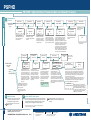
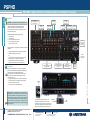
PSPHD quickstart guide PROCISE™ High Definition Professional Surround Sound Processor 3 Installer Menu Mode (Continued) Network Setup NETWORK SETUP NETWORK SETUP Subnet Mask: 255.255.240.000 Def Router: 173.030.161.001 NETWORK SETUP NETWORK SETUP NETWORK SETUP WINS is On Hostname: PSPHD-1 DHCP is On MAC Address: 00107f0013f6 (continued from page 2) [255] NETWORK SETUP NETWORK SETUP NETWORK SETUP NETWORK SETUP NETWORK SETUP Subnet Mask Default Router DHCP WINS PSPHD-1_ 255. 240. 000 [173] Change the subnet mask IP address following the same process as described for changing the PSPHD IP Address. 030. 161. Front Panel is Locked INSTALLER MENU (continued from page 2) 001 Off On Rotate the Selection Knob to the DHCP setup screen. Press the selection knob to make changes to the DHCP mode control setting. Rotate the knob to select either On or Off. (Default is “On.”) Off Del Rotate the selection knob to the WINS setup screen. Press the selection knob to make changes to the WINS mode control setting. Rotate the knob to select either On (default) or Off, and press the knob to accept the selection. company.copiers.com < > CONTROL SETUP CONTROL SETUP Cresnet ID: 03 Ctrl Sys Hostname: NewEntry DD Back CONTROL SETUP 03 IP Table Entry Currently Uses a Hostname Choose A Format to Overwrite It 0C IP Address Unlock A Net ID for control system communication over Cresnet can be assigned from the PSPHD’s front panel. Press the selection knob to make changes to the Cresnet ID. Rotate the knob to select the desired setting, then press the knob to accept the setting and return to the Control Setup function. An IP ID for control system communication over TCP/IP can be assigned from the PSPHD’s front panel. Press the selection knob to make changes to the IP ID. Rotate the knob to select the desired setting, then press the knob to accept the setting and return to the Control Setup function. The PSPHD uses an IP table for TCP/IP communication with a Crestron Control system. The IP table contains the IP address or the hostname of the control system that is communicating with the PSPHD. To specify the control system, rotate the selection knob to display the PSPHD Table Entry screen. Press the knob to open the IP Table Control. Rotate the knob to select either the IP Address or the Hostname format, and press the knob to enable changes. PROCISE Tools, part of Crestron Toolbox, allows you to configure the real-time surround sound processing and EQ settings of the PSPHD. For detailed procedures, refer to the Crestron Toolbox help file. 5 Manufactured under license from Audyssey Laboratories. U.S. and foreign patents pending. MultEQ XT is a trademark of Audyssey Laboratories. For details, refer to the latest revision of the PSPHD Operations Guide, Doc. 6837. QUICKSTART DOC. 6911B (2027570, Sheet 2 of 2) NewEntry_ Del www.crestron.com 07.10 ©2010 Specifications subject to change without notice. 888.273.7876 201.767.3400 All brand names, product names, and trademarks are the property of their respective owners. Ins < > Press the selection knob to open the hostname control. Select letters (upper and lower-case), numbers, or other characters by turning the selection knob until the desired character is displayed on the LCD. Valid hostname characters are ASCII letters “a” through “z” (case-insensitive), the digits “0” through “9”, and the hyphen. Hostname cannot begin or end with a hyphen. No other symbols, punctuation characters or blank spaces are permitted. Move the cursor to another position by pressing the soft buttons labeled < and >. To delete a character, press the soft button marked Del. To insert a space, press the soft button labeled Ins. When the entry is complete, press the selection knob to accept it, and press HOME to return to the Installer menu. Control System IP Address For detailed procedures, refer to the latest version of the Professional Surround Sound Tuning Kit Operations Guide (Doc. 6565). Press the selection knob to return to the Installer menu. CONTROL SETUP [172] The Crestron Professional Surround Sound Tuning Kit provides the hardware necessary for performing audio equalization of surround sound systems using the PROCISE PSPHD with Audyssey MultEQ®XT technology. For optimum listening enjoyment, run the Audyssey room calibration procedure. Back CONTROL SETUP CONTROL SETUP Audyssey MultEQ®XT Room Calibration NETWORK SETUP Press the selection knob to return to the Installer menu. Hostname Select this menu option to exit the Installer menu operation and reboot the system. PROCISE Tools Mode > 032. 159. 122 Rotate the selection knob to change the first octet. Press the knob to accept the change and move to the next octet. Repeat for each octet. Alternatively, you can use the Soft Keys to directly select the octet(s) to be changed, then rotate the selection knob to make the change, press the knob to accept it, and press HOME to return to the Installer menu. PSPHD NOTE: If an IP ID is set, Cresnet communications with the PSPHD are disabled. < Ctrl Sys Hostname: NewEntry CONTROL SETUP CONTROL SETUP Ins Press the selection knob to open the hostname Modify the domain name following the control. Select letters (upper and lower-case), same procedures as used for the numbers, or other characters by turning the hostname. selection knob until the desired character is displayed on the LCD. Valid hostname characters are ASCII letters “a” through “z” (case-insensitive), digits “0” through “9”, and the hyphen. Hostname cannot begin or end with a hyphen. No other symbols, punctuation characters or blank spaces are permitted. Move the cursor to another position by pressing the soft buttons labeled < and >. To delete a character, press the soft button marked Del. To insert a space, press the soft button labeled Ins. IP ID: 0C Select About to view information about the PSPHD’s operating firmware. No changes can be made to this screen through the Installer menu functions. 4 Del CONTROL SETUP CONTROL SETUP The PSPHD’s front panel can be locked to prevent access to the unit’s controls. Rotate the selection knob to access the Front Panel status screen, then press the knob to enable changes to the front panel status. Rotate the knob to select either Lock or Unlock (default). Press the knob to enable the selection and return to the Control Setup function. Ins The MAC address can not be modified, it is displayed for information only. NETWORK SETUP CONTROL SETUP Front Panel Lock Lock Control Setup About Exit Installer menu On Change the default router IP address following the same process as described for changing the PSPHD IP Address. CONTROL SETUP 3 NETWORK SETUP NETWORK SETUP Domain: company.copiers.com