1
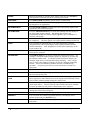
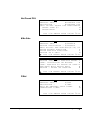
PARK ORDER
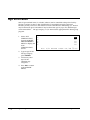
Used in conjunction with a kitchen video system and the SERVE ORDER
function key. Enter a number and press PARK ORDER to park or
"suspend" an order on the video monitor until the order is completely filled.
In the case of a drive through order that cannot be completed when the
customer arrives at the pick-up window, the operator would park the order
until it was completely filled. The order would then be served or bumped
by using the SERVE ORDER key.
%1 - %10
Ten discount keys (%1 - %10) are available to handle various kinds of
discounts, markdowns and adjustments to items or transactions.
PLU
Enter the PLU code number and press PLU to register a PLU.
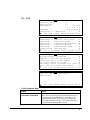
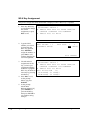
PREV. RECORD
Use the PREV. RECORD key when programming areas with multiple
records, i.e. PLUs, PLU Status Groups, Groups, Function Keys, WLUs, or
Employees. Press the PREV. RECORD field from any field on the
program screen and the previous sequential record will display with the
cursor in the same field position.
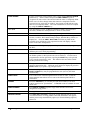
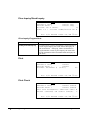
PRICE INQ
Press the PRICE INQ to display the PLU price without actually registering
the PLU.
PRICE LVL 1-20
Press a LEVEL key prior to a PLU entry to shift the price of a PLU to a
different price set in PLU programming.
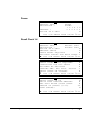
PRINT
Press the PRINT function to send items that require special preparation to
the kitchen printer (or KVS) before the sale is finalized. An item can be
programmed as an auto grill item, requiring the PRINT key to be pressed
every time the menu item is sold. This function does not affect normal
kitchen printer/KVS routing.
PRINT ALL
First press the one of the LIST CHECK keys to display all the open soft
checks in the tracking file. While the open checks are displayed, press the
PRINT ALL key to print a copy all open checks.
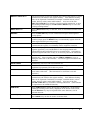
PRINT CHECK
Prints the soft guest check (tracking file) that is currently displayed. The
PRINT CHECK key may be programmed to store (service) the check
automatically.
PRINT HOLD
Use to remove the "hold" designation from an item or order, so that the
items and their instructions are now sent to the kitchen printer/KVS at
finalization.
PROMO
Press the PROMO key to void the price (the item remains) of an item.
Can be used for 2 for 1 promotions. A PROMO count is available for each
menu item.
PRINT SCREEN
Press PRINT SCREEN to print a copy of the current screen on the
designated receipt printer.
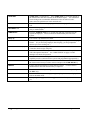
QUIT
Press QUIT to automatically sign off the current cashier/clerk.
RECEIPT ON/OFF
Press RECEIPT ON/OFF to toggle the receipt function from on to off.
You must first have a receipt printer connected, identified to the register,
and the print receipt automatically option (see General Printing Options)
turned on.
8
x
Getting Started
SER-7000 Program Manual