1
LCD digital colour TV
MS 1906F
USER MANUAL
-2 -
Contents
TV operation
Caution .................................................................................................................. 5
Safety Information ................................................................................................. 6
Electrical safety ..................................................................................................... 6
Physical safety....................................................................................................... 6
In the box............................................................................................................... 7
Connecting your TV ............................................................................................... 8
Getting Started....................................................................................................... 9
The Remote Control ............................................................................................ 10
The Menus........................................................................................................... 13
Using the menus.................................................................................................. 13
The Video menu .................................................................................................. 14
The PC menu ...................................................................................................... 15
The Audio menu .................................................................................................. 16
The TV menu ....................................................................................................... 17
The General menu............................................................................................... 19
DVD operation ..................................................................................................... 20
System operation................................................................................................. 25
General Steps of Setup Menu ............................................................................. 25
Menu specification............................................................................................... 25
-3 -
DVB Operation
Display the DVB Menu ...................................................................................... 28
Channel List option.............................................................................................. 28
Favorite List options .......................................................................................... 29
Channel Search options ..................................................................................... 29
System setting options ........................................................................................ 30
General Information
Disc Care
....................................................................................................... 32
User Help Guide ................................................................................................ 33
Features .............................................................................................................. 34
Specifications....................................................................................................... 34
-4 -
Caution
The lightning flash with arrowhead symbol, within an equilateral triangle is
intended to alert the user to the presence of un-insulated "dangerous
voltage" within the products enclosure that may be of sufficient magnitude to
constitute a risk of electric shock to the persons.
The exclamation point within an equilateral triangle is intend to alert the user
to the presence of important operating and maintenance (servicing)
instructions in the literature accompanying the appliance.
Correct disposal of this Product
Waste Electrical & Electronic Equipment (WEEE)
The crossed out “Wheelie bin” is intended to show that this appliance must
not be placed with ordinary household waste at the end of its useful life. To
prevent possible harm to the environment or human health from uncontrolled
waste disposal, please keep separate from other household waste and
recycle it responsibly to promote the sustainable reuse of material resources.
Household users should contact either the retailer where you purchased the
product, or their local government office for details of where and how you
can take this item for environmentally safe re-cycling.
Business users should contact their supplier and check the terms and
conditions of the purchase contract. This product must not be mixed with
other commercial wastes for disposal
This unit is a “CLASS 1” laser product. This product uses a visible laser
beam which could cause hazardous radiation exposure. Ensure the
recorder is operated as instructed. Do not remove any covers or look into
the DVD drawer opening whilst power is applied. Do NOT modify or adjust
any controls that may affect laser emissions. Should the appliance become
faulty consult a qualified technician.
This appliance complies with European Safety and Electrical
directives
-5 -
Safety Information
To ensure reliable and safe operation of this equipment, please read carefully all the
instructions in this user guide, especially the safety information below.
Electrical safety
x
The TV set should only be connected to a mains supply which matches that stated on
the label on the mains adaptor
x
To prevent overload, don't share the same mains supply socket with too many other
items of equipment.
- Do not place any connecting wires where they may be stepped on or tripped over.
- Do not place heavy items, which may damage the leads, on them.
- Hold the Mains plug, not the wires, when removing from a socket.
- During a thunderstorm or while leaving the TV for long periods, disconnect the
aerial (if outdoor) and mains adaptor from the supply.
- Do not allow water or moisture to enter the TV or mains adaptor. Do NOT use in
wet or moist areas such as Bathrooms, steamy kitchens or near swimming pools.
x
Pull the plug out immediately, and seek professional help if:
- the mains plug or cable is damaged
- liquid is spilt onto the set, or if it is accidentally exposed to water or moisture
- anything accidentally penetrates the ventilation slots
- the set doesn't work normally.
- Do NOT remove the safety covers. There are no user serviceable parts inside. You
may invalidate the warranty. Qualified personnel must only service this apparatus.
- To avoid battery leakage, remove exhausted batteries from the remote control
handset, or when not using for a long period.
- Do NOT break open or throw exhausted batteries on a fire.
Physical safety
x
Do NOT block ventilation slots in the back cover. You may place the TV in a cabinet,
but ensure at least 5cm (2") clearance all around.
x
Do NOT tap or shake the TV screen, you may damage the internal circuits. Take good
care of the remote control, do not drop.
x
To clean the TV use a soft dry cloth. Do NOT use solvents or petrol based fluids. For
stubborn stains, you may use a damp soft cloth with dilute detergent.
-6 -
In the box
-/--
OK
Remote control
TV set
Mains adaptor
Mains cable
This User Guide
If any of the accessories are missing, then contact your dealer as soon as possible. Keep
all the original packaging in case you need to return the set to the dealer.
-7 -
Connecting your TV
Rear connection panel
POWER HDMI
VGA
Name
POWER
HDMI
VGA
SCART
S-VIDEO VIDEO L(AV) R(AV) PC-IN HP RF
Headphone
COAX
Function Description
Connect to Mains Adapter
Connect to the HDMI of your DVD or other equipment
VGA signal from computer output
SCART
Connect to the composite terminal of your DVD/VCR
S-Video
S-Video signal input
Video
(AV)L (AV)R
PC-in
Headphone
RF
COAX
Video signal input
Audio signal input for AV
PC audio input
Connect it to your headphone or other audio equipment
Connect to antenna or cable source
Output to Audio amplifier(RF encoded)
-8 -
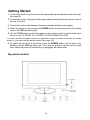
Getting Started
1 Connect the aerial or input source to the appropriate input socket at the rear of the set.
(see page 8).
2 Connect the small round plug on the power adaptor cable to the power input socket at
the rear of the set.
3 Connect the mains cable between the power adaptor and the mains supply
4 Switch the power on, by pressing the POWER button on the front panel or the remote
control, the LED will show green.
5 Use the TV/AV button on the front panel or the remote control to select which input
source to use TV, SCART, AV, S-VIDEO, PC-RGB, HDMI, DVD, DVB.
You can use the front panel controls to adjust the volume or select a channel, as shown
above, or you can use the remote control (see page 10).
6 To switch the set off for a short time, press the POWER button, the set will go into
Standby and the LED will show red. If you are not going to use the set for some
time, switch the power off completely by unplugging the mains cable.
Top panel controls
-9 -
Insert the 12cm disc with the mirror
side facing towards you
The Remote Control
Using the remote control for normal TV functions
1. Fit two AA batteries, making sure that they are
the correct way round, as marked on the case.
2. Aim the remote control at the window to the
right side of the screen, and keep the window
clear at all times.
3. Do not press the buttons on the remote
control too quickly, allow time for the set to
respond.
16
2
1
4
3
5
6
-/--
Battery Disposal.
When batteries are exhausted, do not
break open throw on a fire or put in the
general household waste. Contact your
7
8
local waste authority
9
11
13
OK
10
12
14
15
-10 -
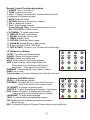
Remote Control Function description
1. POWER: Turn on or off the TV.
2. TV/AV: Input source select.
3. 0-9,-/--: Choose channel directly. Number buttons for DVD.
4. buttons for DVD(see next page)
5. MUTE: Mutes the Audio.
6. RETURN: Returns to the previous channel.
7. VOL+/-: Adjust the volume.
8. CH+/-: Scan through channels.
Cursor left/right CH+/-: Cursor buttons used in menus.
OK: CONFIRM BUTTON for menu.
9. SYS MENU: TV system setup menu.
10. DISPLAY: Display current mode.
11. SOUND: Select the sound mode.
12. TIMER: Standby Timer.
13. PICTURE: Select the picture mode.
14. NICAM/A2: Selects Nicam or Mono sound.
15. Buttons for DVD, DVB & TELETEXT
16. QUICK START: To tune in your TV press the correct button
15. Buttons for Teletext
TV/TXT: Turn off/on the Teletext display.
CANCEL: Cancel the Teletext display.
REVEAL: Reveal any hidden text.
HOLD: Hold or carry on the current subpage.
SIZE: Press to see top half of page double size.
Press again to see the bottom half of page
double size. Press again for normal size.
SUBPAGE: Selects subpage, press again to cancel.
INDEX: Go to index.
Colour buttons: short cuts-follow the coloured links in the text.
15 Buttons for DVB function
PROG+/-: DVB program up/down
DVB-MENU: To display the main menu on the screen or
return to the screen from a menu screen.
TV FORMAT: To change the picture mode.
SUBTITLE: To switch the dialog at the bottom of the screen
INFO: Means information, to display brief information
concerning the current channel you are viewing.
LANGUAGE: To select audio language.
TEXT: To view the teletext broadcasting program
FAV: Means favorite, to display the favorite channel list
defined by you.
EPG: To show the Electronic Program Guide during no-menu state only.
-11 -
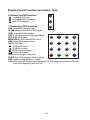
Remote Control Function description. Cont..
4. Buttons for DVD functions
: load/eject DVD disc.
: play/pause DVD program.
: stop DVD program.
15 Buttons for DVD functions
LAN: select DVD disc language.
ZOOM: adjust picture size in DVD mode.
SUB: select DVD disc subtitle.
GOTO: play your favorite title/chapter/track.
SET: DVD setup menu
MENU (PBC): DVD play list/Disc menu
ANG: select DVD picture angle.
TITLE: DVD title.
: DVD fast forward.
: DVD fast reverse
: DVD previous chapter.
: DVD next chapter.
PRO: edit the program and play.
SLOW: play DVD programs at slow speed.
REP: repeat playing the title or chapter.
A-B: select and play the preferable paragraph of DVD program by pressing this key
twice at the beginning and end of it.
-12 -
The Menus
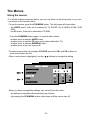
Using the menus
• For all the buttons mentioned below, you can use those on the front panel, or you can
use those on the remote control.
• To see the menus, press the SYS MENU button. The first press will show either:
- the VIDEO menu, if the set is switched to TV, SCART, AV, S-VIDEO, HDMI, DVB,
DVD.
- the PC menu, if the set is switched to PC-RGB.
Press the SYSMENU button again, to see the other menus:
- another press to see the AUDIO menu
- another press to see the TV menu (only when switched to TV)
- another press to see the GENERAL menu
- another press to turn the menus off.
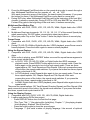
• To select a menu item, for example COLOUR, press the CH+ and CH- buttons to
scroll up and down the list.
• When a menu item is highlighted, use the
buttons to change the setting.
HUE
0
• When you have changed the settings, you can exit from the menu:
- by waiting ten seconds without pressing any buttons
- by pressing the SYS MENU button a few times until the menus turn off.
-13 -
The Video menu
The first press of the SYS MENU button will show either:
- the VIDEO menu, if the set is switched to TV, SCART, AV, S-VIDEO, HDMI, DVD.
- the PC menu, if the set is switched to PC-RGB. (see next page)
HUE
0
Brightness
Use the
buttons to adjust the brightness of the picture.
Contrast
Use the
buttons to adjust the contrast of the picture.
Colour
Use the
Hue
Use the
buttons to adjust the hue of the picture (only used in NTSC mode).
Sharpness
Use the
buttons to adjust the sharpness of the picture.
buttons to adjust the colour of the picture.
HDMI SOURCE
AUTO CONFIG
H-POSITION
0
V-POSITION
0
AUTO CONFIG: Press the
button to have the following settings configured
automatically.
H/V-POSITION: Use the
buttons to adjust the position of the picture on the screen.
-14 -
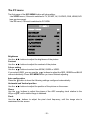
The PC menu
The first press of the SYS MENU button will show either:
- the VIDEO menu, if the set is switched to TV, SCART, AV, S-VIDEO, DVB, HDMI, DVD
(see previous page)
- the PC menu, if the set is switched to PC-RGB.
Brightness
Use the
Contrast
Use the
buttons to adjust the brightness of the picture.
buttons to adjust the contrast of the picture.
Colour setting
Use the
buttons to select from 6500K, 9300K or USER.
If you select USER, you can use the
buttons to adjust the RED, GREEN and BLUE
values individually. Press SYS MENU when you have finished adjusting.
Auto configuration
Press the
button to have the following settings configured automatically:
Horizontal and Vertical position
Use the
buttons to adjust the position of the picture on the screen.
Phase
Use the
buttons to adjust the phase of the ADC sampling clock relative to the
HSync signal, until a stable image is obtained.
Clock
Use the
buttons to adjust the pixel clock frequency, until the image size is
maximized for the screen.
-15 -
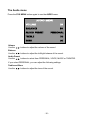
The Audio menu
Press the SYS MENU button again to see the AUDIO menu.
Volume
Use the
buttons to adjust the volume of the sound.
Balance
Use the
buttons to adjust the left/right balance of the sound.
Audio Preset
Use the
buttons to select from PERSONAL, VOICE, MUSIC or THEATRE.
If you select PERSONAL, you can adjust the following settings:
Treble and Bass
Use the
buttons to adjust the tone of the sound.
-16 -
The TV menu
Press the SYS MENU button again, to see the TV menu, (only if switched to TV).
To select an item in the Menu use the CH + / CH- buttons
CHANNEL NAME
********
Channel
Use the
buttons to select a channel.
Channel Name
Press the button to enter the channel name setting, press the
position of the letter, and press CH+/- buttons to select a letter.
buttons to select a
System
Use the
buttons to select a sound system. In the UK select "I", Western Europe
select "B/G", Eastern Europe select "D/K".
Skip
Use the
buttons to turn the channel skip:
ON - this channel will be skipped when changing channel using the CH buttons
OFF - this channel will be included when changing channel using the CH buttons
Automatic Frequency Control
Use the
buttons to turn AFC ON or OFF:
Fine Tune
Use the
buttons to fine tune the frequency if you are having problems with a weak
signal on the current channel.
The AFC will turn off if you use the Fine Tune controls.
Auto search
Press the
button to start Autosearch. The TV will start searching from the lowest
frequency. When it finds a station, it will automatically store this in the first location and
move to the next. When Autosearch is complete, the TV will display the first station found.
In most cases, the stored stations will not be in the correct order, therefore you must use
the "SWAP" function to change to the correct order.
-17 -
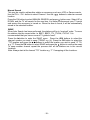
Manual Search
This may be used to add another station or accessory such as a VCR or Game console.
Use the CH + / CH - button to select Channel. Use the
buttons to select an unused
location.
Press the CH button to select MANUAL SEARCH and press button once. Select UP or
DOWN, and the TV will search for the new item. It is better to disconnect your TV aerial
and ensure the accessory is turned on. When the item is found, it will be automatically
stored in the selected location.
SWAP
When Auto Search has been performed, the stations will be in “received” order. To move
the stations into the correct order i.e. BBC1, BBC2, ITV, ITVCh4, ITVCh5. “It is
recommended that you have a current TV guide to hand”.
Press the
button to enter the SWAP menu. Press the
buttons to select the
channel number you wish to swap "FROM" e.g. (4). Press the CH button to select the
"TO" location and press the
buttons to select the location you wish to send "4" TO,
e.g. "5". Press the CH button to select SWAP and press the
button to confirm the swap.
To swap another channel repeat the process until all the stations are in the correct
locations.
Note: Always start at the Lowest "TO" location e.g. "1" if swapping all the locations.
-18 -
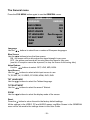
The General menu
Press the SYS MENU button again to see the GENERAL menu.
GENERAL MENU
LANGUAGE
ENGLISH
BLUE SCREEN
ON
NOISE REDUCE
OFF
INPUT SOURCE
TV
TXT LANGUAGE
Pan European
TXT EAST/WEST
WEST
ZOOM
16:9
RESET
Language
Use the
buttons to select from a number of European languages.
Blue Screen
Use the
buttons to turn the blue screen:
ON - the screen will turn blue when the signal strength is very poor
OFF - the picture and sound will be noisy when the signal is very poor
(use this if reception cannot be improved, to stop the screen from turning blue)
Noise Reduce
Use the
buttons to select: OFF, LOW, MID, HIGH.
Input Source
Use the
buttons to select which input source to use:
TV, SCART, AV, S-VIDEO, PC-RGB, HDMI, DVD, DVB.
TXT LANGUAGE
Use the
buttons to select the Teletext language.
TXT EAST/WEST
Use the
buttons to select the area of Teletext.
ZOOM
Use the
Reset
Press the
buttons to select the display mode of the screen.
button to return the set to the factory default settings.
All the settings in the VIDEO, PC and AUDIO menus, and Blue Screen in the GENERAL
menu will be returned to the settings shown in this User Guide.
-19 -
DVD OPERATION
Press the Power button on the TV or the remote control, then press the TV/AV button to
select DVD mode. If there is no disc in the DVD player the screen will show "NO DISC".
Place a disc
Insert a disc with the mirror side facing towards you. If the disc is double sided, place the
title you want to play facing you.
Do not touch the playing surface.
Hold the disc around the outside with your fingers and place the disc into the slot. The
player will automatically draw the disc into the player.
To "Eject" the disc, press the EJECT button on the TV or button on the remote control.
Play
The contents of each disc vary, as to how the disc was authored and what features are
included. Some discs start playing as soon as they have been read, some need "Play"
selecting in the Menu. Different play modes are offered, such as Menu Play, Sequence
Play and other modes.
Menu Play
1. Compatible with DVD, SVCD or VCD2.0.
2. lf the disc is a DVD, ROOT MENU will appear on the screen. If it is SVCD or VCD 2.0,
please press the MENU button to see the menu.
3. When a DVD disc is loaded, press the Arrows buttons to highlight the menu item you
want to choose. With SVCD or VCD 2.0, press the numeric buttons to select a track to
play.
4. Return to Menu when Playing: When playing a DVD disc press the Menu button to
return to the "ROOT" menu. When playing a SVCD or VCD, and PBC is "on" press
the Menu or Return button to return to the disc menu.
Title Play
1. Compatible with DVD discs only.
2. During DVD playback, press TITLE button to display the DVD title content.
3. Press the Arrow buttons to highlight the title you want to choose, and press OK; also
you can press numeric buttons to choose.
4. The DVD player begins with the chapter 1 of the chosen title.
Sequence Play
1. Compatible with DVD, SVCD, VCD, CD, HD-CD, WMA, Digital Audio disc /JPEG
discs.
2. When a SVCD or VCD disc is loaded and PBC is "on", press the MENU button once
switches the PBC "off". The player can now playback in sequence mode. To turn the
PBC back on press the MENU button again.
3. Except for SVCD or VCD discs, when in stop state, press the Play button, the player
will play in the "Sequence" mode. This is for all compatible discs.
-20 -
Program Play
1. Compatible with DVD, SVCD, VCD, CD, HD-CD, WMA, Digital Audio disc /JPEG
discs.
2. The Program Playback option allows you to enter the order in which you want
chapters or tracks to play, maximum to 16.
3. Program Menu:
If PBC is on, this operation will turn PBC off while the chapters / tracks play in
programmed order.
4. According to the highlight, use the Numeric buttons to enter the chapters / tracks in
the order you want them to play. Then press Play or use Arrow buttons to highlight the
"PLAY" item and press OK. The chapters /tracks will play in the programmed order.
You can program maximum 16 titles / chapters / tracks.
5. According to the Direction Indicator on the menu, you can press Arrow buttons to
highlight where you want to enter.
6. During Program Playback, if program button is repressed, the program order and the
contents will be displayed on the screen, and the Program Playback will be stopped;
also you can press Stop and Play to resume normal playback.
7. Notes:
To clear the program order, use Arrow buttons to highlight the "CLEAR" item, then
press OK.
To modify the program order, use Arrow buttons to highlight the item you are changing
and enter the new chapter / track you want to program directly.
8. The program indicator in the screen and the playing chapter / track illuminate.
Additional operation
Selecting Tracks
1 . Compatible with DVD, SVCD, VCD, CD, HD-CD, WMA, Digital Audio disc /JPEG
discs.
2. When playing a DVD disc, press Numeric buttons on the menu or title page to select
tracks; During DVD playback, you can input desired title numbers directly.
3. During sequence playback of a SVCD or VCD disk, press the numeric buttons to
select tracks. (During Program Playback and when the PBC is on, you can only press
Prev / Next button to select)
4. As for CD, HD-CD, discs, press Numeric buttons directly to select tracks.
5. When playing WMA, Digital Audio disc /JPEG discs, press Numeric buttons to select
different tracks on current track list.
Skipping Tracks
1. Compatible with DVD, SVCD, VCD, CD, HD-CD, WMA, Digital Audio disc /JPEG
discs.
2. To skip forward to the beginning of the next title / chapter / track on a disc, press Next
on the remote or the right side of the player.
3. To skip backward to the beginning of the preceding title / chapter/track on a disc,
press Prev on the remote or the right side of the player.
Multispeed Fast/Slow Motion Play
1. Compatible with DVD, SVCD, VCD, CD, HD-CD, WMA, Digital Audio disc /JPEG
discs.
-21 -
2.
3.
Press the Multispeed Fast/Slow button on the remote during play to search through a
disc. Multispeed Fast/Slow has four speeds: x2, x4, x8, x20.
With each consecutive press of the button, the search speed increases. If you press
the button five times, Fast Multispeed Fast/Slow cycles back to normal play.
During DVD play, when Multispeed Fast/Slow gets to the beginning of the next title /
chapter, it resumes normal play; During SVCD or VCD play with PBC on, when Fast
Forward Play gets to the beginning of the next track, it resumes normal play.
Multiphase Slow Motion Play
1. Compatible with DVD, SVCD, VCD, CD, HD-CD, WMA, Digital Audio disc /JPEG
discs.
2. Multiphase Slow has six speeds: 1/2, 1/3, 1/4, 1/5, 1/6, 1/7 of the normal Speed play
when pressing the "SLOW" button consecutively when playing discs.
3. When you press Play or the "Slow" button 7 times the player returns to normal play.
Freeze Frame
1. Compatible with DVD, SVCD, VCD, CD, HD-CD, WMA, Digital Audio disc /JPEG
discs.
2. During CD, HD-CD, WMA or Digital Audio disc / JPEG playback, press Pause once to
freeze playback; Press the button again to resume normal playback.
Using the Repeat Feature
1. Compatible with DVD, SVCD, VCD, CD, HD-CD, WMA, Digital Audio disc /JPEG
discs.
2. While a disc is playing, press REPEAT button once and the repeat banner appears to
show current repeat mode.
a) In SVCD, VCD, CD, HD-CD, WMA, or Digital Audio disc/JPEG sequence
playback mode. Press REPEAT button again to turn on repeat mode. Press the
button again on the remote to turn to the next repeat mode. There are three
repeat options: Off, Track Repeat and Disc Repeat. With each consecutive press
of the button, the repeat mode switches. If you press the button four times, repeat
mode cycles back to Off.
b) In DVD playback, press Repeat button again to turn on repeat mode. There are
three repeat options: Off, Chapter Repeat and Title Repeat. With each
consecutive press of the button, the repeat mode switches. If you press the
button four times, repeat mode cycles back to Off.
c) In WMA, Digital Audio disc /JPEG playback, press Repeat button again to turn on
repeat mode.
There are four repeat options: Off, Track Repeat, Directory Repeat, and Disc Repeat. With
each consecutive press of the button, the repeat mode switches. If you press the button
five times, repeat mode cycles back to Off.
Using the Display Feature
1. Compatible with DVD, SVCD, VCD, CD, HD-CD, WMA, Digital Audio disc
2. Loading and playing DVDs (two pages)
- Press DISPLAY button once to show the first page:
- "Disc Type, Title * / * (the playing title / total titles), Chapter * / * (the playing chapter
/ total chapters), Elapsed Time of the Disc".
- Press the button again to show the second page:
- "Language */* (the serial number of playing language / the amount of optional
-22 -
3.
4.
5.
languages) or Off, Language Type, Audio Type, Subtitle * / * (the serial number of
playing subtitle /the amount of optional subtitles) or Off, Angle * / * (the serial
number of playing angle / the amount of optional angles) or Off".
- Press the button for the third time, the display menu fades out.
Loading and playing SVCD discs (two pages)
- Press Display button once to show the first page:
- "Disc Type, Track * / * (the playing track / total tracks), Mute, PBC, Repeat Mode,
Elapsed Time of the Playing Track".
- Press the button again to show the second page:
- "Language * / * (the serial number of playing language/ the amount of optional
languages) or Off, Language Type, Audio Type, Subtitle * / * (the serial number of
playing subtitle / the amount of optional subtitles) or Off".
- Press the button for the third time, the display menu fades out.
Loading and playing VCD
- Press Display button once to show the first page:
- "Disc Type, Track * / * (the playing track / total tracks), Mute, PBC, Repeat Mode,
Elapsed Time of the Playing Track".
- Press the button again, the display menu fades out.
Loading and playing CD, HD-CD, WMA, Digital Audio disc / JPEG discs
- Press Display button once to show the first page:
- "Disc Type, Track * / * (the playing track / total tracks), Mute, Repeat Mode,
Elapsed Time of the Playing Track".
- Press the button again, the display menu fades out.
Using the Search Feature
1. Compatible with DVD, SVCD, VCD, CD, HD-CD discs.
2. You can use Search feature to select a title/ chapter/track number or go to a specific
point in a title. First, press GOTO button on the remote controller to bring up the
search menu and enter the edit state. Secondly, press Arrow buttons to highlight the
title / chapter/ track number or the time option; Thirdly, use Numeric buttons to enter
the title / chapter/ track you want to play or the elapsed time you want to go to in that
title. At last, press OK button to start playback.
For example, entering 01:23:56 will start playback one hour, twenty-three minutes
and fifty-six seconds into the title.
3. Notes
a) This feature does not work in Program Play mode.
b) If PBC is on, it will turn off automatically when Search Playback starts.
c) When playing WMA, Digital Audio disc / JPEG discs, Search Feature does not
work.
Changing the Soundtrack or Language
1. Compatible with DVD SVCD, VCD, CD, HD-CD, WMA, Digital Audio disc /JPEG
discs.
2. Press the LANGUAGE button to display current soundtrack.
a) Press the button to switch soundtracks.
b) Press the button again on the remote to turn to next soundtrack.
3. When playing a SVCD or VCD disc, there are five soundtracks: Stereo (L/R), L/L, R/R,
L/L Auto A/D Detect, and R/R Auto A/D Detect. With each consecutive press of the
button, the soundtrack switches. If you press the button six times, soundtrack cycles
-23 -
4.
5.
back to Stereo.
When playing a CD, HD-CD, WMA, or Digital Audio disc disc, there are three: Stereo
(L/R), L/L, and R/R.
When playing a DVD or SVCD disc, press LANGUAGE button to display current
language, press the button again to turn to next language if the disc has different
languages.
Subtitles
1. Compatible with DVD, SVCD discs.
2. Press the SUBTITLE button on the remote once, and the subtitle info banner appears
3. When a DVD or SVCD is recorded with subtitles, you can use the Subtitle feature to
view the subtitles on-screen. By default, subtitles are off. The info banner will display
Subtitle Off.
4. To display subtitles, press the SUBTITLE button again. The default language with its
responding serial number will be displayed in the info banner and subtitles will be
displayed in that language. With each consecutive press of the SUBTITLE button, the
subtitle switches.
For example, "Language Icon: [1 English DTS 6CH] or [Off]" (the availability of the
subtitles are disc-dependent). To turn subtitles off, press the Subtitle button until
Subtitle Off is displayed.
Mute the Audio Output
1. Compatible with DVD, SVCD, VCD, CD, HD-CD, WMA, Digital Audio disc /JPEG
discs.
2. Pressing the Mute button allows you to reduce sound to an inaudible level, and the
icon of "MUTE" will be displayed on screen. Press the button again or press the Vol
+/- button to return to the normal condition.
3. If the player has no sound, check that the "Mute" is not on.
Zoom In the Video Image
1. Compatible with DVD, SVCD, VCD, JPEG discs.
2. The Zoom Function allows you to enlarge the video image.
3. Press Zoom repeatedly to activate the function and choose the required zoom factor:
Zoom 1, Zoom 2, Zoom 3, Zoom 4, Zoom 1 /2, Zoom 1 /3, Zoom 1/4, Zoom Off.
Repeat a Specific Segment on the Disc that You Define
1. Compatible with DVD, SVCD, VCD, CD, HD-CD, WMA, Digital Audio disc.
2. During normal or fast playback, press the A-B button once. REPEAT "A" appears on
the screen. This indicates the start point of the loop.
3. Press A-B again, REPEAT A-B will be shown, this indicates the end point of the loop.
4. The segment will now be repeated until you press the "REPEAT" button again to turn
off the feature.
5. Press A-B again to cancel the loop points.
6. When playing a SVCD, VCD, or CD disc, you can repeat a specific segment only in
one track. When the next track begins, A-B Repeat turns off automatically.
7. When playing a DVD disc, you can repeat a specific segment only in one title.
Digital Audio Disc
1. Compatible with Digital Audio discs
2. The player will search the disc directory automatically and display the contents on screen.
-24 -
3.
4.
The player will then start to play the first track, of the selected directory.
To change directories use the direction buttons.
System operation
System operation will define the setting of the set; these definitions will be stored until you
change them again.
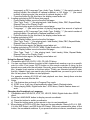
General Steps of Setup Menu
1.
Pause or Stop the player. Press SETUP on the remote control. The main menu will be
shown, as below.
2.
Press the CH + / CH- buttons to select the Icon of the desired section, e.g. “TV
System" and press
to open that section.
Press CH + / CH - to select the desired feature and again press to open that
section.
Press CH + / CH - to select the desired feature and then press "OK" to select the new
setting.
To exit the menu, press "SETUP" or CH - to select EXIT SETUP and then press "OK"
When launching the setup routine, the pressing of the following buttons will turn off
the setup menu, while the choices that have been changed will be saved.
3.
4.
5
Menu specification
1. SYSTEM SETUP
The system setup options are illustrated below:
-25 -
TV SYSTEM
According to the Colour system of your TV, normally this is set to either AUTO or PAL.
PASSWORD
The password option is initialized as locked. You cannot set the ratings limit or change the
password. To enable these features you must unlock the Password. The default password
is "0000". Using the CH button, move the highlight to "PASSWORD", press the
button
and enter "0000". You will see the padlock symbol open. You may now change the
RATING or put in a new password number.
If the Lock symbol is BLUE you must press the button to enter the lock field, the lock
symbol will change to YELLOW, you may now enter a new 4 digit number. Please
remember or write down the new Password and keep safe.
RATING
The Rating feature is a rating limit feature, like movie ratings. This helps you to control
what DVD the family watches. There are 8 levels of selection, from KIDS SAFE to ADULT.
Adult is the "play all" selection.
2. LANGUAGE SETUP
The language setup options are illustrated below:
- OSD LANGUAGE: The OSD will display in the language you choose.
- AUDIO LANG: If the disc you are playing has the language you choose, it will
output audio in that language.
- SUBTITLE LANG: If the disc you are playing has the language you require you may
select this either in the Menu or using the "SUBTITLE" button on the Remote control.
You may also switch this OFF.
- MENU LANG: If the disc you are playing has the language you require you may
select this.
-26 -
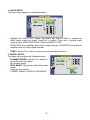
3. AUDIO SETUP
The audio setup options are illustrated below:
- Highlight the AUDIO OUT option, and press the Arrow buttons to choose the
audio output mode you prefer. Press OK to confirm; There are 3 optional audio
output modes: SPDIF /OFF, SPDIF / RAW, and SPDIF/ PCM.
SPDIF/ RAW is for amplifiers with a built in digital decoder. SPDIF/PCM is selected for
amplifiers with no built in digital decoder.
- TONE: Use the CH+/- button to move the scroll and adjust the tone.
4. DIGITAL SETUP
The video setup options are illustrated below:
- DYNAMIC RANGE: Use the CH+/- button to
move the scroll and adjust
the dynamic range.
- DUAL MONO: Choose the mode of the audio
output.
There are four modes:
STEREO, MONO L, MONO R, MIX MONO.
-27 -
DVB operation
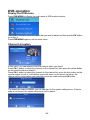
Display the DVB menu
Press DVB-MENU to display the main menu in DVB mode as below:
Press CH+/- button to select the option that you want to adjust and then use the OK button
to confirm it.
Press DVB-MENU again to exit the main menu.
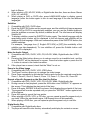
Channel List option
In this menu, you can delete or lock the channel which you select.
Press CH+/- button to select the channel on the channel list, then press the yellow button
on the remote control to delete it.
Press CH+/- button to select the channel on the channel list, press the blue button on the
remote control to lock it, it will display a pin code menu on the screen as below, the
channel will be locked when you enter the correct pin code and press OK button.
The default pin code is 888888, you can change it in the system setting menu. If the pin
code is not correct, the system will prompt you as below:
-28 -
Favorite List options
In this menu, you can remove or add the channel you require to the favorite list
Press CH+/- button to select the one on the list.
Press the red button to switch to the favorite list.
Press the OK button to remove or add the channel and press DVB-MENU to exit.
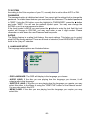
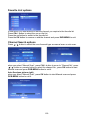
Channel Search options
Press
/
button to select the one of search type as manual scan or auto scan.
Manual Scan(see picture left)
when you select “Manual Scan”, press CH+/- button to move to “Channel No”, press
button or numeric button to select the channel No., press OK button to start
/
Manual scan and press DVB-MENU button to exit it.
Auto Scan(see picture right)
when you select “Manual Scan”, press OK button to start Manual scan and press
DVB-MENU button to exit it.
-29 -
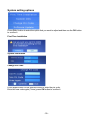
System setting options
Press CH+/- button to select the option that you want to adjust and then use the OK button
to confirm it.
First Time Installation
System Information
Change Pin Code
Press digital button on the remote control to enter the pin code.
Enter the new code again (Twice) press OK button to confirm it.
-30 -
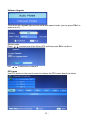
Software Upgrade
There have two upgrade type as auto mode and manual mode, you can press CH+/- to
select one of it
Manual mode
Press
/
to select one of the ON or OFF and then press OK to confirm it
use
/
to start scan or cancel it
EPG menu
Use EPG button on the remote control to display the EPG menu directly as below:
-31 -
Disc Care
About Disc Terms
Title
Generally, pictures or music compressed on a DVD are divided into several sections,
"title"
Chapter
The smaller section unit of picture or music in a DVD under the title, usually one title is
comprised of one or more chapters and each of them is numbered for easy searching, but
some discs may not have a recording chapter.
Track
A segment of picture or music on a CD, Each track is numbered for searching.
Care of Disc
Video disc contains high-density compressed data that needs proper handling.
1. Hold the disc with fingers by outer edge and/or the center spindle hole. Do not touch
the discs surface.
2. Do not bend or press the disc.
3.
Do not expose the disc to direct sunlight or heating sources, Stere discs in cabinet
vertically, and in dry condition.
Prevent exposure to:
Direct sunlight
Heat or exhaust from a heating device
Extreme humidity
Clean the disc surface with a soft, dry cleaning cloth, Wipe the disc surface gently and
radically from center toward the outer edge.
Do not apply thinner, alcohol, chemical solvent, or sprays when cleaning. Such cleaning
fluids will permanently damage the disc surface.
-32 -
User Help Guide
Should you experience problems, please consult the guide below before calling the
Customer Help line.
SYMPTOM
POSSIBLE CAUSE
REMEDY
GENERAL
Dead. No LED Lit
No power to the TV.
Dead. Led lit red
Set still in standby
Blue screen.
No signal
Incorrect source
selected
Noisy, snowy,
ghosting picture
(TV)
Poor aerial signal
Incorrect sound
system
Sound "Mute"
No sound.
Volume set too low
External leads not
connected "if used"
Bright dot/s on screen Pixel turned on fully.
Check all connections to the TV including
the Main adaptor, Mains lead and Mains socket
Press either the Power button or the Standby
button on the Remote control
TV not tuned in. Aerial not connected.
Press TV/AV button to select correct source.
If using an indoor aerial, try moving the
aerial. Check aerial connections
Have an out door aerial fitted.
Check "System" select in "TV Menu" see
page 17.
Turn sound "Mute" OFF
Check volume settings
Check all external leads are connected
Occasionally one or two pixels may fail, this
is normal as the screen ages or suffers a
violent impact. This is not a fault covered by
warranty
DVD
Will not accept disc
Screen shows "NO
DISC"
Picture "Freezes"
or breaks up
Certain disc functions
not highlighted
Select DVD with TV/AV button
Disc must have mirror side facing you if single
Disc placed incorrectly sided.
Inspect disc. If damaged you must discard.
Disc damaged or dirty
If dirty see "Disc care' page 32
See "Disc care" page 32
Disc damaged or dirty.
DVD not selected
Disc may not
support required
feature
Read disc information
PC Monitor
Unstable picture
Unstable picture
Monitor may not be set
to PC correctly.
No connection from PC.
PC Screen refresh rate
is set too high.
Enter PC Menu and select "AUTO" see page
15
Check PC/Monitor connecting lead.
Enter PC Screen setup and set refresh
rate at 60Hz
-33 -
Features
•
•
•
•
•
High quality display
VGA, RF, Video, DVB, S-Video, DVD, SCART, HDMI.
Stereo audio inputs
Automatic or manual channel search
Auto-shutdown to save power when no signal input
Specifications
TV
TV System
Screen size
Resolution
Response time
Aerial input
Audio output power
Mains power
Power consumption
PAL BG/DK/I SECAM BG/DK
19"(diagonal)
1440x900 pixels (RGB)
8 ms
75 ¡ (unbalanced)
2x3 W
DC 12V 5A
60W
Remote control
Type
Control distance
Control angle
Batteries
Dimensions
Weight
infrared
5m
30° (horizontal)
2 x 1.5 V, size AA
48 x 168 x24 mm
70 g (without battery)
-34 -
MARKS&
SPENCER
Your guarantee
All of our technology products are guaranteed for 2 years, 5 years for televisions.
Please retain your Marks & Spencer till receipt which is proof of purchase, and will
validate the date from which your guarantee will run. It is essential to keep your receipt
to preserve the guarantee. Please also retain the original packaging in case you need to
return the product.
In the unlikely event of a fault please call our technology customer service centre on
0845 671 0665. Alternatively, if the product costs under £150, please return it with
original packaging to any Marks & Spencer store (except Outlet stores and Simply
Food stores) along with your receipt. If it is within 90 days of purchase we will offer an
exchange for a new product, or a full refund. After 90 days and for the remainder of
your guarantee period, we will arrange for the product to be repaired. Should a repair
not be possible, we will exchange the product for a new one or the nearest equivalent.
In the unlikely event of being unable to exchange, we will offer a full refund.
This guarantee is only valid within the United Kingdom, Republic of Ireland and/or
Channel Islands. This guarantee excludes faults caused by accident, neglect, misuse,
not following the instructions or normal wear and tear.
The guarantee is in addition to your statutory rights and supersedes any guarantee that
is with the product.
Once the tamperproof seal on your technology product is broken, refunds can only be
given in accordance with your legal rights. Remember you are not entitled to a refund if
you simply change your mind, or if you damage the goods after you buy them.
T04/ 9350/1905
© Marks and Spencer plc
Registered Office: Waterside House
35 North Wharf Road, London,
W2 1NW Registered No: 214436
(England and Wales)
www.marksandspencer.com
M&S technology customer services:
Tel 0845 671 0665
-35 -