1
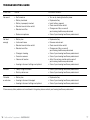
Troubleshooting Guide
SYMPTOMCAUSE
POSSIBLE REMEDY
No sound
•
•
•
•
•
• Broken microphone
• Turn on by closing the battery door
• Replace battery
• Insert battery properly
• Clean sound inlet or outlet
• Change wax filter, or consult
your hearing healthcare professional
• Consult your hearing healthcare professional
Not loud enough
•
•
•
•
• Change in hearing
• Excessive earwax
• Volume set too low
• Hearing instrument settings not optimal
• Replace battery
• Remove and reinsert
• Clean sound inlet or outlet
• Change wax filter, or consult
your hearing healthcare professional
• Consult your hearing healthcare professional
• Consult your hearing healthcare professional
• Adjust the volume control and/or consult
your hearing healthcare professional
• Consult your hearing healthcare professional
Whistles
• Poorly fitting instrument
• Build-up of earwax
• Consult your hearing healthcare professional
• Consult your hearing healthcare professional
Distorted or not clear
• Battery low
• Hearing instrument damaged
• Hearing instrument settings not optimal
• Replace battery
• Consult your hearing healthcare professional
• Consult your hearing healthcare professional
Not turned on
Battery low/dead
Battery improperly inserted
Blocked sound inlet or outlet
Blocked wax filter
Battery low
Instrument loose
Blocked sound inlet or outlet
Blocked wax filter
If there are any other problems not mentioned in this guide, please contact your hearing healthcare professional.
16
ReSound Vea™ supplement—Custom CIC
17