1
Contents
page
Getting started
Illustration of the hearing instrument������������������������� 2
How to use the hearing instrument��������������������������� 3
On/Off function
SmartStart™
Changing the battery
Inserting the hearing instrument . . . . . . . . . . . . . . . . 4
Removing the hearing instrument . . . . . . . . . . . . . . . 5
Controls and features
Telephone use
Acoustic phone program . . . . . . . . . . . . . . . . . . .
PhoneNow™ . . . . . . . . . . . . . . . . . . . . . . . . . . . .
Cell phone . . . . . . . . . . . . . . . . . . . . . . . . . . . . . .
Listening to the radio or TV
Using assistive listening (tele-loop) systems
Low battery indicator . . . . . . . . . . . . . . . . . . . . . . . .
6
7
8
9
Maintenance
Proper handling
Daily maintenance . . . . . . . . . . . . . . . . . . . . . . . . . 10
Maintaining the sound inlet
Maintaining the sound outlet
Wax protection systems . . . . . . . . . . . . . . . . . . . . . 11
The CeruSTOP™ wax protection system
The HF3 wax protection system . . . . . . . . . . . . 13
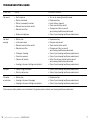
Troubleshooting guide . . . . . . . . . . . . . . . . . . . . . . 16
ReSound Vea™ supplement—Custom CIC
1