1
Operating Individual Areas in the Multi-Partition Mode
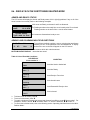
Enter a code that is a valid arm/disarm code for the area you wish to operate.
12-45-78
Disarm
--3-56--
Arm
º
º
Only the areas authorized by this user code will appear.
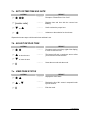
To toggle between the armed and disarmed states on an individual area, press [Area Number].
To operate an individual area, enter the number of the partition you wish to operate. The LCD keypad
will now operate as a single area keypad. All keys and functions entered will affect this individual
partition only. The lights and LCD display represent the status of that partition only. The word
"System" will be replaced with the word "Area #". The following is an example of this feature.
Press # to exit.
Area 5 Ready
Type code to arm
Area 5 is selected and Area 5 is ready to arm.
Press # # to exit the individual partition mode.
Silencing Alarms in the Multi-Partition Mode
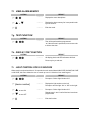
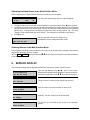
If the keypad is sounding an alarm or the siren is running, it can be silenced by entering a code with the
authority for the area(s) that are in alarm.
The EXIT ,
BYPASS and Alarm Memory function keys will only work if an individual partition
is selected.
9. SERVICE DISPLAY
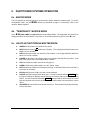
The following message will be displayed periodically if the security system requires service.
Service Required
If you see this display, press . One or more of the
following fault messages will be displayed. Use the scroll keys
Type r2 for help
to browse through them. Press #
Control
Over Current
Control
#
to exit the service menu.
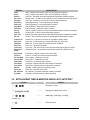
A short circuit of a control=s power supply has occurred.
Open circuit has occurred on the bell or siren circuit.
Siren Trouble
Control
(Optional) The Box Tamper circuit has activated.
Box Tamper
Control
Phone Trouble
LCD KEYPAD
The Phone Line connected to the control is not operating
properly.
21