1
R/C Manual
2. USING MIDI
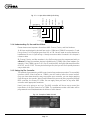
2.2.3 Expanding the SysEx String
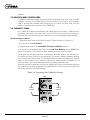
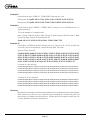
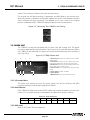
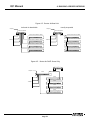
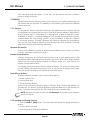
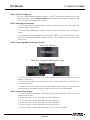
Just like direct MIDI control, you can repeat 3-byte commands within the parametric SysEx
string to send multiple commands to a single 1788A as shown by figure 2-7.
F0 00 00 38 xx xx xx
xx xx xx xx xx xx
SysEx End
Value
Mic Channel
Command
Value
Mic Channel
Command
Value
Mic Channel
Put Up To 64 3-byte Commands Here
Command
1788A NET Number
Placeholder1
Aphex MIDI I.D.
1788A-R MIDI Channel
SysEx Start
Fig. 2-7. Expanding the SysEx String
xx xx xx F7
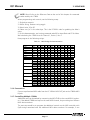
NOTE: You cannot expand the 2-byte MIDI Preset string.
2.2.4 1788A-R’s Odd MIDI I.D.
All 1788A-R units are I.D.’d a little differently than normal MIDI devices or the 1788A’s
direct MIDI port. There is no recognition of the MIDI Device byte, although it must be
present as a placeholder in the SysEx string. Any value may be used. The MIDI Channel is
responded to normally.
Refer to Section 3 to learn how to set up the MIDI Channel on the 1788A-R.
2.2.5 Daisy-Chained 1788A-R’s
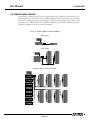
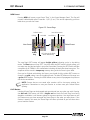
When you daisy-chain units by using the MIDI THRU ports, every unit will recognize
the SysEx strings addressed to its MIDI channel. Each unit will analyze the NET Number
contained in parametric strings and redirect any commands falling within its own bank,
ignoring all others. If a 2-byte MIDI Preset command is received, the targeted 1788A-R will
propagate its prescribed preset to its own Bank of 1788A’s.
2.2.6 Preset Recall Strategy
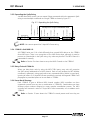
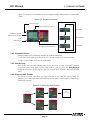
Each 1788A-R is given a different MIDI channel number. MIDI controllers can then
command a preset from any one or combination of 1788A-R’s. Combinations can have
different preset numbers assigned to create complex constellation presets. The MIDI
controller will transmit a series of 2-byte MIDI Preset commands, one to address each
1788A-R.
Refer to Section 3 learn about the 1788A-R’s stored presets and how they are
Page 15