1
Yo u r D E V I u n d e r f l o o r h e a t i n g s y s t e m
Congratulations!
You have purchased a Devireg™ 550 thermostat,
which forms an integral part of your DEVI™
system.
DEVI has developed the Devireg 550 in order to
make your floor heating system and the heating
of your home as economical and environmentally friendly as possible.
Devireg™ 550 works dynamically with both the
room and floor temperature in order to ensure
optimum efficiency, giving you the highest possible comfort in the most economical way.
We wish you many years of comfort with your
new DEVI™ system.
Warning
Do not cover the thermostat, for intance by
hanging towels etc. directly in front of it.
Please note, it is not advisable to leave certain
insulative objects on the same spot as this can
cause ‘hot spots’ on your floor.
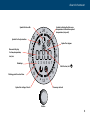
24
3
21
00:00
18
Once the Devireg 550 has been installed for a
few days, it will fully optimise the use of the heating system. it will then continue to learn from
the room, thus constantly improving its performance, as well as your comfort and economy.
AM
PM
6
1 2 3 4 5 6 7
9
15
12
devireg™550
1