1
UNPACKING
Carefully remove all of the parts from the packaging. Unpack and identify the following parts for the
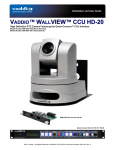
WallVIEW PRO EagleEye system (Note: The EagleEye camera is not supplied with this system):
• One (1) - Vaddio EZ Interface Module (EZIM)
• One (1) - Vaddio EZIM to EagleEye adapter cable
• One (1) - Vaddio Quick-Connect PRO Universal with HSDS (1-RU Rack Mountable)
• One (1) - Vaddio Thin Profile WallVIEW PRO EagleEye Wall Mount
• One (1) - DB-9 to RJ-45 adapter (998-1004-232) for Polycom HDC 7000, 8000 and 9000 Series Codecs
• One (1) - 36V PowerRite™ Power Supply with AC Cord Set
• One (1) - 2-position Phoenix Connector for IR
• Mounting Hardware
• Documentation and Manuals
INSTALLATION
All WallVIEW products are specifically designed for installation on a vertical wall surface with CAT. 5 cable
connectivity for Power, Video and Control signaling. Installation is simplified in that no custom cables or
expensive multi-coax plenum cables are needed and no power outlets are required near the camera bracket.
All cabling is routed to the head-end using Cat. 5 cables. All RJ-45 connectors need to be terminated
TIA/EIA 568B or A. The use of RJ-45 “EZ” connectors is not recommended.
Before Installing
• Locate the camera mounting location paying close attention to camera viewing angles, lighting conditions,
possible line of site obstructions, and checking for in-wall obstructions. Pick a mounting location to
optimize the performance of the camera.
• Pre-wire all cabling as required from the camera location to the head end equipment.
• The camera mount can be mounted directly to a 2-gang wall box or to drywall using the supplied anchors.
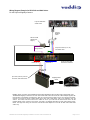
Wiring Diagram Example for HDX 9000 Series:
Polycom HDX-9000
Series Codec
IR Input
Polycom
Breakout
Cable
WallVIEW EagleEye with
Camera (not included),
Wall Mount and EZIM
RS-232 Cat. 5 to
DB-9 Adapter
Component Video
(Y, Pb, Pr) to
breakout cable
IR Output
Video Cat. 5
Power Cat. 5
Quick-Connect PRO
Up to 500’ (152.4m) of CAT. 5
for Power, Video and Control
36 VDC
PowerRite
Power Supply
Figure 2: The WallVIEW EagleEye connected to an HDX 9000 series codec uses the RJ-45 to DB-9 adapter supplied. IR is fed
out of the Quick-Connect rack mount unit to the IR port on the back of the HDX 9000 series codec for IR forwarding from the
camera. The Power, Video and Control Cat. 5 cables can be run up to 500 from the Quick-Connect box to the EZ Interface
Module (EZIM), which connects to the camera. See Step 7 for additional information on HDX 9000 IR wiring. NOTE: The single
wire coming out of the back of the RJ-45 to DB-9 adapter is for use with the HDX 7000 / 8000 series codecs only.
WallVIEW Universal PRO EagleEye Installation and User Guide 341-660 Rev. B
Page 2 of 12