1
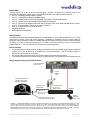
Wiring Diagram Example for HDX 7000 and 8000 Series:
For the Polycom EagleEye Camera
Polycom HDX-8000
Series Codec
Polycom
Breakout
Cable
RS-232 and IR
Adapter (see
Page 5)
Component Video (Y, Pb, Pr)
to breakout cable
IR Signal Wire
Power Cat. 5
Video Cat. 5
Quick-Connect PRO
Rack Mount Interface
RS-232 Cat. 5
Up to 500’ (152.4m) of CAT-5
for Power, Video and Control
EagleEye EZIM
Cable
EagleEye on Mount
Figure 3: Basic connectivity of the WallVIEW Universal PRO EagleEye System with HDX 7000 or 8000 series codec.
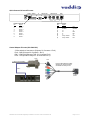
The WallVIEW EagleEye connected to an HDX 7000 / 8000 series codec uses the RJ-45 to DB-9 adapter supplied, with
the single wire on the adapter connected to the “SIG” pin on the IR Port of the Quick-Connect. IR is fed out of the QuickConnect unit, through the RJ-45 to DB-9 adapter to the HDX 7000 / 8000 series codec for IR forwarding from the
camera. The Power, Video and Control Cat. 5 cables can be run up to 500 from the Quick-Connect box to the EZ
Interface Module, which connects to the camera. See Step 7 for additional information on HDX 7000 / 8000 IR wiring.
NOTE: The single wire coming out of the back of the RJ-45 to DB-9 adapter is for use with the HDX 7000 / 8000 series
codecs only.
WallVIEW Universal PRO EagleEye Installation and User Guide 341-660 Rev. B
Page 3 of 12