1
ELAN HOME SYSTEMS
COM2 Communications Controller
Rear
/ &$Ø#..1
4#(.Ø+../
(-/43.43/43Ø) "*2 Ø"'(,$Ø.43/43
1" 3XODØ,NMN
1" 3XODØ2SDQDN
/ &$24,Ø#!#!
31(&&$1Ø.43/432
LLØRSDQDNØNMKX
/.6$1
.-.%%
35-
).
0'
6!#
(:
W
$"
/54
6)!.%4
$"
/540543
-/$%,#/-
#/--5.)#!4)/.3#/.42/,,%2
).
/54
,!"%,&0/
0'$"/54
,
0(/.%
,).%
4%,#/
,).%
/54
).
,%8).'4/.+953!s-!$%).#().!
[
4!,490%
&53%
2%0,!#%
7)4(3!-%
490%!.$
2!4).'/.,9
0/7%2
2
42)''%23
.43/43Ø3.
3$+$/'.-$2Ø
1)
6#/
).0543
6'.$
.##./
.##./
.##./
.##./
0/7%2
2%,!9
2%,!9
2%,!9
2%,!9
2
!5$)/,//0
-/().
-/./
$//234!4)/.
"53
(-/43Ø%1.,
31(&&$1Ø(-/4325.+4,$Ø".-31.+Ø.5$11(#$ ,42(".-'.+# #..1Ø23 3(.3$+".Ø
1$+ 8Ø/.6$1ØØ1$+ 82
(-/43Ø) "*
!42
1)
1DLNU@AKDØ+NBJHMFØ"NMMDBSNQR
,.-.
1DLNU@AKDØ+NBJHMF
Ø"NMMDBSNQ
"Ø/.6$1
5( ×-$3
".1#
".--$"3(.-2
1)
ETSTQDØTRD
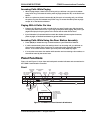
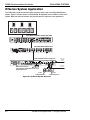
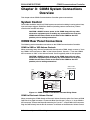
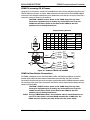
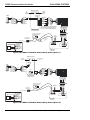
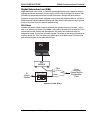
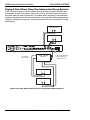
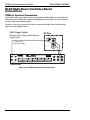
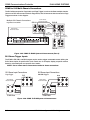
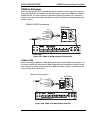
Figure 1-5 COM2 Rear Panel Connections
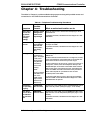
Front Panel Adjustments
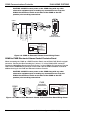
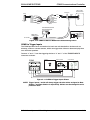
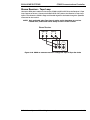
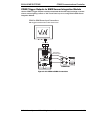
Figure 1-5 shows the front panel pot adjustments for the COM2 Communications Controller.
Turn potentiometers clockwise to increase or counterclockwise to decrease the various levels.
+HMDØØ,TRHB
.MØ'NKC
+DUDK
,HMHØ42!
/QNFQ@L
/NQS
#NNQØ"GHLD
.TSOTS
+DUDK
/@FD
.TSOTS
+DUDK
#NNQØ2S@SHNM
.TSOTS
+DUDK
#NNQØ2S@SHNM
,HBQNOGNMD
(MOTSØ+DUDK
+HMDØØ,TRHB
.MØ'NKC
+DUDK
+$7 2SQHO
Figure 1-6 Front Panel Adjustments
USB Program Port - Future use.
Page Output Level - Adjusts the PAGE audio volume level presented to the Page/ Doorbell
Output and Audio Loop Output.
Door Chime Output Level - Adjusts the volume level of the internally generated sounds door chimes, alerts and Page/DB Audio Out presented to the Audio Loop Output.
Line 1/2 Music On Hold Input Level - Adjusts the volume level of the music heard over
Phone Line 1 or Phone Line 2 respectfully.
© ELAN Home Systems 2007 • All rights reserved.
1-9