1
ENGLISH
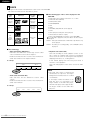
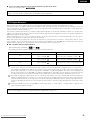
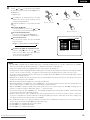
(6) MP3 Playback
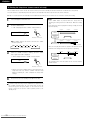
2 There are many music distribution sites on the internet from which music files in MP3 format can be downloaded. Music downloaded as
instructed on the site and written onto a CD-R/RW disc can be played on the ADV-1000.
If music recorded on commercially available music CDs is converted on a computer into MP3 files using an MP3 encoder (conversion software),
the data on a 12 cm CD is reduced into about 1/10 the amount of the original data. Thus, when written in MP3 format, the data of about 10
music CDs can fit onto a single CD-R/RW disc. A single CD-R/RW disc can contain over 100 tracks.
Values when 5-minute tracks are converted with a standard bit rate of 128 kbps into MP3 files and using a CD-R/RW disc with a capacity
of 650 MB.
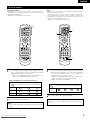
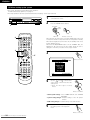
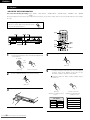
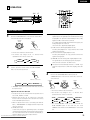
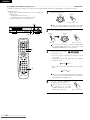
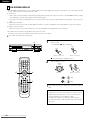
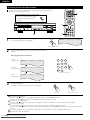
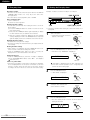
Before operating the remote control unit!
• Be sure to set the DVD mode using
the remote control mode selector
buttons.
DVD
CH
1
ON
POWER
3
VCR
4
OFF
VCR POWER
5
CH
CH
8
9
TV/VCR
SLEEP
DISPLAY
TV
0
+10
CALL
6
VOL
7
CLEAR
TV POWER
1
2
CH
RETURN INPUT MODE SURROUND
MENU
FUNCTION
2,3
ENTER
2,3
3
MODE
VOLUME
BAND
MUTE
1 3
1
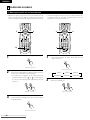
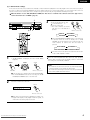
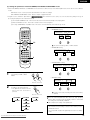
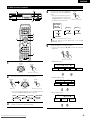
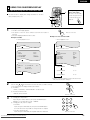
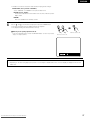
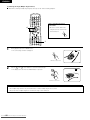
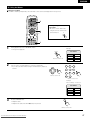
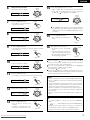
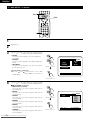
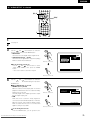
Load the CD-R/RW disc on which the MP3 format
music files have been written into this unit. (See page
31.)
• When the disc is loaded in the ADV-1000, the disc
information screen appears.
CH
SHIFT
NTSC/PAL STATUS
TU
MEMO
ROO T
ROOT
FOL DE R
FOL DE R
FOL DE R
FOL DE R
FOL DE R
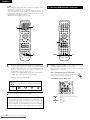
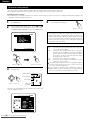
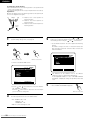
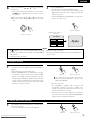
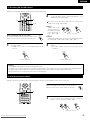
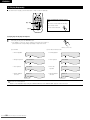
• If there are multiple folders, proceed to step 2.
• If there are no folders on the disc (if the disc only
contains MP3 files), proceed to step 3.
PLAY MODE
S INGLE ELAPSED
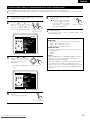
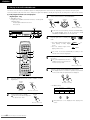
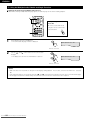
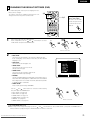
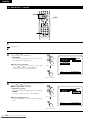
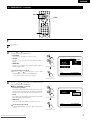
All the folders recorded on the disc are displayed.
(The folders are not displayed by layer.)
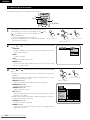
2
upper right of the screen, then press the ENTER
button. The screen in step 1 reappears. Select the
desired folder.
DEC I S ION: ENTER BUTTON
ENTER
\
Remote control unit
Remote control unit
D I SC INFORMAT I ON
ROO
ROOT
FOL DE R
FOL DE R
FOL DE R
FOL DE R
FOL DE R
NAME 1
NAME 2
NAME 3
NAME 4
NAME 5
PLAY MODE
S INGLE ELAPSED
SELECT :
62 From Disc-Player.com Denon Manuals
Downloaded
NAME 1
NAME 2
NAME 3
NAME 4
NAME 5
: NORMAL
: -- : --
SELECT :
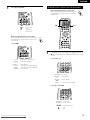
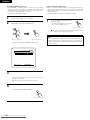
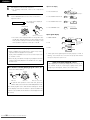
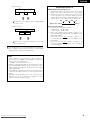
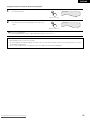
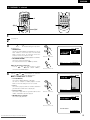
Use the
and
cursor buttons to select the
folder containing the file(s) you want to play, then
press the ENTER button.
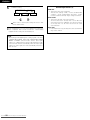
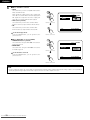
To change the folder
Use the
cursor button to select “ROOT” at the
B
D I SC INFORMAT I ON
ROOT
ROO
B
ROO T
ROOT
MP3 FILE
MP3 FILE
MP3 FILE
MP3 FILE
MP3 FILE
NAME
NAME
NAME
NAME
NAME
1
2
3
4
5
: NORMAL
: -- : -DEC I S ION: ENTER BUTTON
0
1
2
3
4
5
0
1
2
3
4
5