1
All Systems Tab
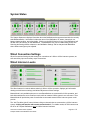
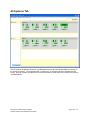
The All Systems tab displays the status of all BeltStations associated with all BaseStations currently on
the local area network. The All Systems tab is “display only” so changes cannot be initiated from this
screen. Once all systems are optimized, this screen provides an easy method for continuous monitoring
of all BeltStations.
Clear-Com Communication Systems
Tempest 2400 T-Desk Software User Guide
Page 15 of 16