1
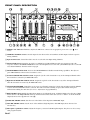
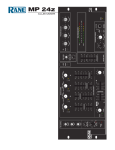
햿 LOOP ENGAGE switch: Controls the Switchable Effects Loop; pressing it to its down and locked position routes the main
signal through the processor attached to the SWITCHABLE LOOP connectors on the rear. (See Rear Panel 햾 and 햿.)
헀 MASTER LEVEL fader: Determines the program and mic level at the Main Outputs. Unity gain is approximately “4.5”.
헁 BOOTH LEVEL control: Adjusts the program and mic level at the Booth Outputs. Unity gain is approximately “6.5”. This
Output utilizes a “ducking” circuit, reducing the mic level when the MIC ENGAGE switch is pressed. (See Rear Panel 헆.)
헂 ZONE LEVEL control: Adjusts the program and mic level of the Zone Outputs. Unity gain is approximately “6.5”.
헃 PROGRAM EQUALIZER controls: Contour the frequency response of the program at the Main, Booth and Zone
Outputs. This is not designed to be the only equalizer in the system, this is intended to provide EQ between varying
program materials.
헄 PROGRAM EQUALIZER ENGAGE switch: Enables the Program Equalizer to function when pressed in. The Equalizer
is bypassed in the out position.
헅 HEADPHONE LEVEL CONTROL: Clockwise rotation of this rotary control increases the headphone drive level.
헆 HEADPHONE PAN CONTROL: Serves two purposes…In the STEREO mode it changes the relative levels of the Cue
and Program mixed together in both earcups. In the MONO mode it changes the balance between the Mono Cue in the left
ear cup and the Mono Program in the right.
HEADPHONE CUE mode switch: In the up position, this switch feeds STEREO Program and Cue to both earcups, in the
down position the Headphone circuit provides MONO Cue to the left ear and MONO Program to the right.
HEADPHONE output jack: A tip-ring-sleeve stereo jack provides for the insertion of stereo headphones.
PEAK PROGRAM METER: provides a visual indication of program output voltage. The calibration of the indication is
user adjustable. (See Rear Panel 햷.)
Fader Cleaning
With heavy use in harsh environments, the faders may
need lubrication. This treatment extends longevity and can
make used faders as good as new. The fader assembly must
be removed from the MP 24z for proper cleaning. We
recommend any of the following cleaning solutions:
Caig Cailube MCL 100% spray lubricant
Caig Cailube MCL 5% spray cleaner
CRC 2-26
Order CaiLube MCL® from:
CAIG Laboratories, Inc.
12200 Thatcher Ct.
Poway, CA 92064
Phone 619-486-8388
Fax 619-486-8398
Web http://www.caig.com
CLEANING INSTRUCTIONS
A. Fader assembly removal
1. Remove (2) 3mm screws.
2. Draw fader assembly out through hole.
3. Remove ribbon cable.
B. Fader cleaning
1. Hold the fader assembly away from the mixer.
2. Position the fader at mid-travel.
3. Spray cleaner/lubricant into both ends of the fader.
4. Move the fader over its full travel back and forth a few
times.
5. Shake excess fluid from the fader assembly.
6. Wipe off excess fluid.
Manual-3