1
Chapter 3
Removing and Installing Port Adapters
Connecting PA-FE-TX and PA-FE-FX Port Adapter Interface Cables
Connecting PA-FE-TX and PA-FE-FX Port Adapter Interface
Cables
To continue your PA-FE-TX and PA-FE-FX port adapter installation, you must install the interface
cables. The following instructions apply to all supported platforms.
PA-FE-TX and PA-FE-FX Port Adapter RJ-45 and MII Connections
On a single PA-FE, you can use either the RJ-45 (or SC for PA-FE-FX) connection or the MII
connection. (RJ-45, SC, and MII cables are not available from Cisco Systems; they are available from
outside commercial cable vendors.) If you have two PA-FE port adapters on your VIP or
Catalyst RSM/VIP2, you can use the RJ-45 (or SC for PA-FE-FX) connection on one port adapter and
the MII connection on the other port adapter.
Caution
Before you attach your MII transceiver to the MII receptacle on your PA-FE-TX and PA-FE-FX
port adapter, ensure that your MII transceiver responds to physical sublayer (PHY) address 0 per
section 22.2.4.4. “PHY Address” of the IEEE 802.3u specification; otherwise, interface problems
might result. Confirm that this capability is available on your MII transceiver with the transceiver
vendor or in the transceiver documentation. If a selection for isolation mode is available, we
recommend you use this setting (if PHY addressing is not mentioned).
Attaching PA-FE-TX and PA-FE-FX Port Adapter Interface Cables
Use the following procedure to connect RJ-45 (or SC for PA-FE-FX) and MII cables:
Step 1
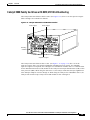
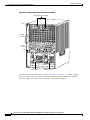
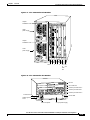
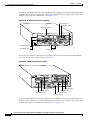
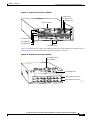
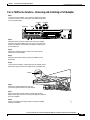
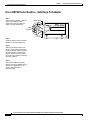
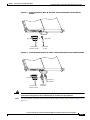
If you have MII connections, attach an MII cable directly to the MII receptacle on the PA-FE-TX and
PA-FE-FX or attach a 100BASE--T transceiver, with the media appropriate to your application, to the
MII receptacle on the PA-FE-TX and PA-FE-FX. (See Figure 3-2 on page 3-13 for the PA-FE-TX and
Figure 3-3 on page 3-13 for the PA-FE-FX.)
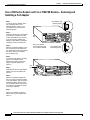
If you have RJ-45 connections, attach the Category 5 UTP cable directly to the RJ-45 port on the
PA-FE-TX and PA-FE-FX. (See Figure 3-2 for PA-FE-TX and Figure 3-3 for PA-FE-FX.) The
PA-FE-TX and PA-FE-FX is an end station device and not a repeater. You must connect the PA-FE-TX
and PA-FE-FX to a repeater or hub.
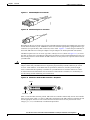
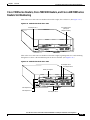
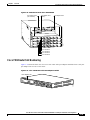
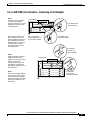
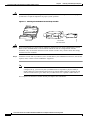
If you have an SC connection (PA-FE-FX), attach the cable directly to the SC port on the PA-FE-FX.
(See Figure 3-3.) Use either one duplex SC connector or two simplex SC connectors, and observe the
correct relationship between the receive (RX) and transmit (TX) ports on the PA-FE-FX and your
repeater.
Note
Each PA-FE-FX or PA-FE-TX can have either an MII attachment or an RJ-45 (or SC)
attachment, but not both simultaneously. The MII and RJ-45 (or SC) receptacles represent
two physical connection options for one Fast Ethernet interface.
Cisco PA-FE-TX and Cisco PA-FE-FX Fast Ethernet 100BaseT Port Adapter Installation and Configuration
3-12
OL-2899-02