1
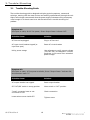
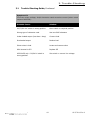
3. Trouble-Shooting 3.1 Trouble-Shooting Guide The trouble-shooting guide is designed to display typical symptoms, causes and solutions, starting with the most obvious and working systematically through the unit. Alpha Technologies recommends that the power supply maintenance log accompany units brought in for bench service to aid the technician in trouble-shooting the problem. Symptom #1: No output to cable; No AC line power; Green Output Power indicator OFF: Probable Cause: Solution: AC line cord unplugged Plug in AC line cord AC input circuit breaker tripped (or input fuse open) Reset AC circuit breaker Utility power outage Use voltmeter to verify correct voltage (120/240 VAC) at receptacle. Connect generator in the event of an extended power outage. Symptom #2: No output to cable; AC line power available; Green Output Power indicator ON; And Ammeter reads "0": Probable Cause: Solution: AC output breaker has tripped Reset output breaker SPI "ALT/ON" switch in wrong position Move switch to "ALT" position "Jones" connector loose or not connected to SPI Check connection Loose seizure screw inside SPI Tighten screw 016-537-B0-001 Rev. A 18 © 2002 TM