1
Basic Operation (Continued)
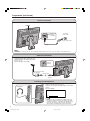
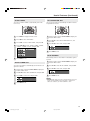
Changing Channels
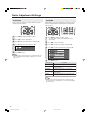
Sound Volume
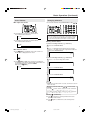
■ To adjust the volume
● Press VOL (+) to increase the sound volume.
The numerical value increases.
VOLUME
50
● Press VOL (–) to decrease the sound volume.
The numerical value decreases.
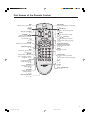
You can select channels using Channel Select or CH (
)/(
).
• To handle the increasing number of channels available, this
LCD TV set allows you to select up to 100 positions (Channels
0 to 99). One-digit and two-digit methods of selection can be
used. Follow the procedure shown below to select channels.
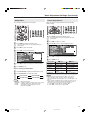
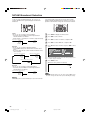
■ Using Channel Select
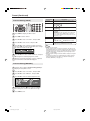
To select a one-digit channel (e.g., Channel 5):
VOLUME
10
■ To mute the sound
1
Press 5 of Channel Select.
2
If “5--” is indicated and the picture does not change,
press -/-- to switch over to the 1-digit select mode and
press 5 of Channel Select.
● Press e (Mute) to temporarily turn off the sound. The
MUTE mark is displayed on the screen.
5
PAL
B/G
To select a two-digit channel (e.g., Channel 15):
● Press e (Mute) or VOL (+)/(–) to turn the sound back to
the previous level. MUTE is automatically cleared when one
of the following buttons is pressed: POWER,
VOL (+)/(–) or e (Mute).
VOLUME
10
1
Press -/-- to set the 2-digit select mode.
--
2
Press 1 of Channel Select.
1-
3
Press 5 of Channel Select.
15
PAL
B/G
NOTE
• Complete this procedure within 4 seconds, otherwise the selection
will not be made.
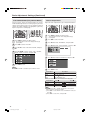
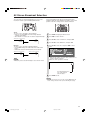
Changing channels with CH (
control.
Press CH (
1→2→3
Press CH (
3→2→1
)/(
) on the remote
) and the channels change in the order shown below:
→ . . . → 98 → 99 → 0 → 1 → 2 → 3 → . . .
) and the channels change in the order shown below:
→ 0 → 99 → 98 → . . . → 3 → 2 → 1 → . . .
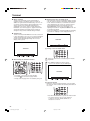
■ Using A (Flashback)
● Press A to switch the currently tuned channel to the
previously tuned channel.
● Press A again to switch back to the currently tuned
channel.
9
LC-20SH3X_E_P08-09.p65
9
05.9.20, 2:54 PM