1
Useful Features (Continued)
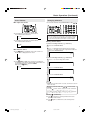
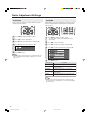
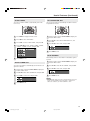
WIDE MODE
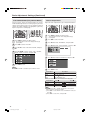
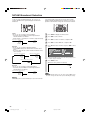
AUDIO ONLY
You can select the picture display size for the playback
image of the DVD player from the following four modes:
“4:3”, “16:9”, “ZOOM” and “STRETCH”.
1
Press MENU to display the Menu screen.
2
Press \/| to select “FEATURES”.
3
Press '/" to select “WIDE MODE”, and press OK.
4
Press '/" to select the desired setting, and press OK.
4:3
When listening to music from a music programme, you can
turn the display off and enjoy audio only.
1
Press MENU to display the Menu screen.
2
Press \/| to select “FEATURES”.
3
Press '/" to select “AUDIO ONLY”, and press OK.
4
Press '/" to select “DISPLAY OFF”, and press OK.
DISPLAY
ON
DISPLAY
OFF
16:9
5
ZOOM
Selected item
STRETCH
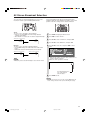
DISPLAY ON
Both screen images and audio are output.
Description
DISPLAY OFF
Audio is output without screen image.
Press MENU to exit.
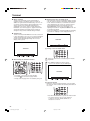
Selected item
Description
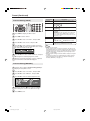
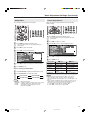
4:3
Displays the image in a 4:3 size.
16:9
Stretches the image horizontally to display it in a
16:9 size.
ZOOM
Displays the centre part of the image by enlarging
it in the horizontal and vertical directions.
STRETCH
Stretches the image horizontally.
Image type
4:3
16:9
ZOOM
STRETCH
(For an image
stretched vertically)
(For an image
stretched vertically
with bands at the left
and right sides)
(For a 4:3 image)
NOTE
• The 4:3 image will be distorted on the screen when the “WIDE MODE”
is set to “16:9”.
18
LC-20SH3X_E_P17-21.p65
18
2005.8.29, 2:16 PM