1
English
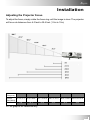
Installation
Adjusting the Projected Image
Adjusting the Projector Height
The projector is equipped with an elevator foot for adjusting the projector
height.
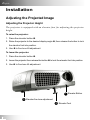
To raise the projector:
1. Press the elevator button X.
2. Raise the projector to the desired display angle Y, then release the button to lock
the elevator foot into position.
3. Use Z to fine-tune tilt adjustment.
To lower the projector:
1. Press the elevator button X.
2. Lower the projector then release the button Y to lock the elevator foot into position.
3. Use Z to fine-tune tilt-adjustment.
1 Elevator Button
3 Elevator fine-tune adjustment
2 Elevator Foot
14