1
Aton CLT109 / Swisscom EN / A31008-M2007-F151-1-2X19 / overview.fm / 04.02.2009
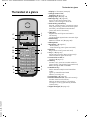
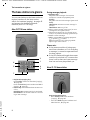
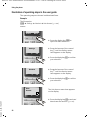
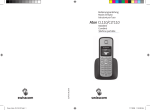
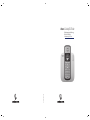
The handset at a glance
The handset at a glance
17
16
Ð
×
V
01.10.08
07:15
Hotline
Menu
¢
1
2
3
15
14
4
13
5
12
11
¢
¢
¢
¢
¢
¢
10
6
9
7
8
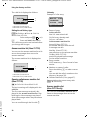
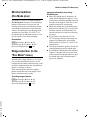
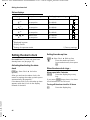
1 Display in idle status (example)
2 Charge status of the
page 13)
batteries(
page 19)
3 Display keys (
page 29)
4 Message key (
Access to calls and message lists;
Flashes: new message or new call
5 End call key, On/Off key
End call, cancel function, go back one menu
level (press briefly), back to idle status (press
and hold), activate/deactivate handset
(press and hold in idle status)
6 Hash key
Keypad lock on/off (press and hold in
idle status);
toggle between upper/lower case and digits
7 Internal key
page 46)
Make an internal call (
8 Microphone
page 51)
9 Recall key (
- Recall (flash)
- Insert a dialling pause (press and hold)
10 Star key
Ringer tones on/off (press and hold)
page 41)
11 Key 1 (
Dial answer machine (Aton CLT110 only)/
network mailbox (press and hold)
12 Connection socket for
page 17)
headset(
13 Talk key
Answer a call, open last number redial list
(press briefly), start dialling (press and hold)
When writing an SMS: send SMS
14 Handsfree key
Switch between earpiece and handsfree
mode;
Lights up: handsfree activated
Flashes: incoming call
page 19)
15 Control key (
16 Answer machine icon (Aton CLT110 only)
Answer machine switched on;
Flashes: Answer machine is recording a
message or is being operated by another
internal party
page 13)
17 Signal strength (
¢
Version 4, 29.10.2007
¢
1