1
Operating The C com opti
COMPRESSING A SIGNAL
C com opti’s compressor section can be used for a variety of gain management
tasks including printing signals to a multi-track recorder, as a mix-down effect,
mastering, and for increasing the loudness of a live PA system. To begin compressing your signal, follow the steps below:
•
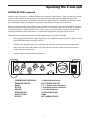
Follow the section above, “SETTING UP THE C com opti” for normalizing
the controls.
•
Press the BYPASS switch to the IN position.
•
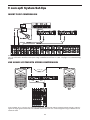
Run a signal into your mixer, in this case a vocal track, and raise the input
fader until you see the C com opti’s OUTPUT METER read about 0dB.
•
Engage the C com opti by pressing the BYPASS switch so that the
GREEN LED turns on.
•
Now press the METER switch to the out position so that the LED goes off,
allowing you to monitor the GAIN REDUCTION. The meter should still
read about 0dB.
Note: In this default configuration, the C com opti is simply passing audio
at unity gain with no dynamics processing. It’s a good idea to check your
gain structure at this point. Use the BYPASS switch and the METER to
match the level.
•
Once you have set a good gain structure you can begin to compress your
signal.
•
Press the BYPASS switch to the IN position so that the green LED is on.
•
Adjust the Ratio to 3:1, the ATTACK to 5 and the RELEASE control to 0.3.
•
Now, gradually lower the THRESHOLD level and listen for the compression. For a visual representation, the amount of compression is indicated
on the GAIN REDUCTION meter. Try to get the GAIN REDUCTION
METER to read between -1 and -3 dB.
Now, you can experiment with lowering the THRESHOLD a bit and raising
the OUTPUT level some. By lowering the THRESHOLD level you are
adding more compression, so the level may drop. Use the OUTPUT level
control for “make-up gain”, getting back to unity gain (the same level), with
the BYPASS in or out.
•
Once you get a feel for squeezing the signal, you can experiment with the
ATTACK and RELEASE controls.
As always, experience is the best teacher, so plug in and get experience! Try your compressor
on different audio signals. You’ll find it useful and pleasant sounding on a variety of applications. For more information on dynamics and their application see the sections “Dynamic
Processing 101” and “Applications” later in this manual.
8