1
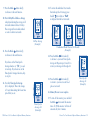
9. Press the Mode
button briefly
to advance to the next function.
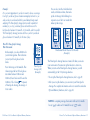
10. Your 14-Day Blood Glucose Average
is displayed showing the average of all
test results taken in the last 14 days.
The average will not include marked
or control solution test results.
13. To review the individual 3 test results
that make up the A1 average, press
the left
arrow button. “
”
is displayed after the last test result.
Mem. mmol/L
Avg.
Mem. mmol/L
Mem. mmol/L
Mem. mmol/L
AM
AM
AM
14-Day Average
(Example)
3 Individual Blood Glucose Test Results
(Example)
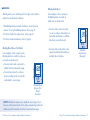
11. Press the Mode
button briefly
to advance to the next function.
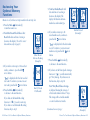
14. Press the Mode
button briefly
to advance to your next Time-Specific
Average A2. Repeat steps 12 and 13 to
review your Averages A2 through A4.
If you have set the Time-Specific
Averages function to “ ,” proceed
to next step. If you have not set the
Time-Specific Averages function, skip
to step 16.
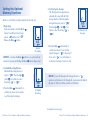
12. Your first Time-Specific Average
(A1) is displayed. This is the average
of 3 tests taken during the 2-hour time
period that you set.
15. Press the Mode
button briefly
to return to your most recent blood
glucose test result.
Mem. mmol/L
Avg.
AM
Time-Specific
Average A1
(Example)
50 • How to Use Your Monitor’s Optional Memory Functions
Mem. mmol/L
Avg.
PM
Time-Specific
Average A2
(Example)
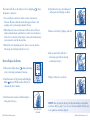
16. Memory Review is now complete.
17. To turn off the monitor, press and hold
the Mode
button until the monitor
turns off, OR the monitor will turn off
automatically after 1 minute.
How to Use Your Monitor’s Optional Memory Functions • 51