1
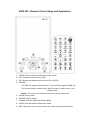
BPR-101 / Remote Control Keys and Operations
1. CLEAR: Hide or show the information of the screen.
2. L/R: Change the track to left or right.
3. P/N: Change the display signal mode to PAL or NTSC.
4. POWER:
For BPR-101 keypad’s power button: Turn on/off main power of BPR-101.
For remote control’s power button: While in power on state, enter or exit
standby state.
Notice: You can not use remote control to turn on/off main power
5. ZOOM: Zoom photos.
6. ROTATE: Rotate photos.
7. THUMB: Enter the photo 3x3 Browse Mode.
8. SLIDE: Enter Music/photo-slide-show mode.
9. REC: Record the movie, press this key can enter recording mode directly.
6