1
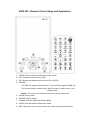
10. EQ: Enter the equalizer menu.
11. EFFECT: Enter the selection list of special effect.
12. INTERVAL: Select the interval time for slideshow, including music-slide-show.
13. MENU: Show function list of current status of user interface.
14. DIRECTION: Move cursor or move the photo in the Zoom mode.
15. EXIT: Stop the current playing program to back to previous browse directory or
exit browse mode to show MAIN MENU.
16. BROWSER: Back to root directory
17. ENTER/PLAY: Confirm your selection.
18. VOLUME+: Increase volume (0-30).
19. INFO: Show or close a floating menu of file operation.
20. SUBTITLE: Select movie subtitle.
21. VOLUME-: Decease volume (0-30).
22. PREV: Switch to previous file or turn a page up.
23. PAUSE: Pause the current playing program or resume the paused program.
24. NEXT: Switch to next file or turn a page down.
25. MUTE: Mute or cancel mute.
26. FR: Play fast backward (1- 4).
27. STOP: Stop playing and back to the directory.
28. FF: Play fast forward (1- 4).
29. REPEAT: Select repeat mode.
30. COPY: Copy files when BPR-101 acts as an USB host.
Notice:
■
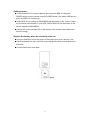
When using the remote control, you should point the infrared emitter to the
receiver on BPR-101’s front panel. The receiving angle is about ±30 degrees in
the range of 5 meters.
■
Do not drop the remote control to ground or damp it.
■
Do not expose the remote control directly to intense sunlight.
■
Disconnect the device from power if you don’t need to use BPR-101 for a long
time.
7