1
Chapter 13. Command-line mode
SonicWALL Bare Metal Recovery supports the command-line mode.
The command-line mode functionality is somewhat limited as compared to the GUI mode.
You will not be able to perform operations that require the reboot of the system, such as
restore a system partition or clone a system drive. These operations only can be done
through the GUI.
13.1 Working in the command-line mode
An administrator might need a console interface in some situations. SonicWALL Bare
Metal Recovery supports this mode with TrueImageCmd.exe utility. The file is located
in a folder where SonicWALL Bare Metal Recovery has been installed, by default it is
C:\Program Files\SonicWALL\BareMetalRecovery.
13.1.1 Supported commands
BareMetalRecoveryCmd has the following format:
baremetalrecoverycmd /command /option1 /option2…
Commands may be accompanied with options. Some options are common for most
baremetalrecoverycmd commands, while other are specific for individual commands.
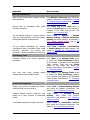
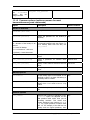
Below is a list of supported commands and compatible options.
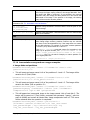
Command
Common Options
Specific Options
create
/filename:[file name]
/password:[password] /asz
/net_user:[username]
/net_password:[password]
/ftp_user /ftp_password
/incremental
/compression:[0…9]
/split:[size in MB]
/oss_numbers /reboot
/log:[file name]
/log_net_user:[remote user]
/log_net_password:[password]
/harddisk:[disk number]
/partition:[partition number]
/file_partition:[partition letter]
/raw /progress:[on|off]
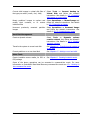
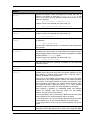
/filename:[file name]
/password:[password] /asz
/index:N
/net_user:[username]
/net_password:[password]
/ftp_user /ftp_password
/oss_numbers /reboot
/log:[file name]
/log_net_user:[remote user]
/log_net_password:[password]
/harddisk:[disk number]
/partition:[partition number]
/target_harddisk:[disk number]
/target_partition:[partition
number] /file_partition:[partition
letter] /start:[start sector]
/fat16_32 /size:[partition size in
sectors]
/type:[active|primary|logical]
/preserve_mbr
Creates an image of
specified disks and
partitions
deploy
Restores disks and
partitions, except for
the MBR, from an
image
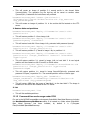
When using the SonicWALL Universal
Restore option:
/ur_path:[path]
/ur_username:[user]
/ur_password:[pwd]
/ur_driver:[inf-filename]
list
Lists available drives
/password:[password]
/index:N /asz
/net_user:[username]
Copyright © SonicWALL, Inc., 2000-2008
/filename:[file name]
83