1
Advance
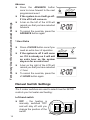
Press the ADVANCE button
once to move forward to the next
programmed event
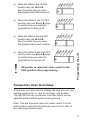
Temporary User Overrides and manual settings
If the system is on it will go off.
If it is off it will come on
A bar on the left of the LCD will
remind you that you have selected
Advance
To cancel the override, press the
ADVANCE button again
1 Hour Extra
Press +1 HOUR button once if you
need an extra hour of operation
If the system is off it will come
on. If it is already on it will add
an extra hour so the system
stays on for an extra hour
A bar on the right of the LCD will
remind you that you have selected
+1 hour
To cancel the override, press the
+1 HOUR button again
Manual Switch Settings
The 2 rocker switches are used to select how the SET2E
controls your hot water and heating:
Left-hand switch
OFF - the heating is
manually switched OFF
and will stay off until you
change the position of the
switch
14