1
Polycom® VVX® Series
Business Media Phone User Guide
To remove a Favorite from the list:
1. From your Contact Directory, select the contact.
2. From the contact’s screen, press Edit.
3. From the Edit Contact screen, select Favorite Index, and remove the favorite index number.
4. Press Save.
Shared Lines (Shared Call Appearances)
If your phone shares a line with other phones, an incoming call to the shared line will cause all phones to ring.
The call can be answered on any of the phones. You can transfer, hold, or set up a conference with calls on
shared lines.
If you have an incoming call on a shared line, you can stop your phone from ringing by selecting Silence.
Even though the phone doesn’t ring, the call’s visual notification will still display and you’ll still have the option
to answer the call.
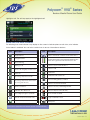
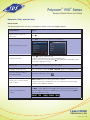
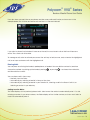
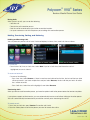
In Lines view, the following icons and status indicators display for shared lines, depending if the line is idle, has
an active call, or has a held call:
Shared Line Status
Icon and Status Indicator
Status Indicator
Idle
(No indicator)
Active call
HD voice icon
Held call
Hold icon
Call Forwarding is not available on shared lines.
Advanced Features
Call Recording (VVX500/VVX600 Only)
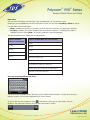
If the call recording feature is available, and you connect a USB flash drive to the USB port on your phone,
you can record active calls on your phone. Recordings are stored as .wav files on the USB flash drive. You can
record up to four hours in one file.
When you attach a USB flash drive to your phone, a USB icon,
, scrolls in the status bar, together
with a message that tells you how much recording time is available on the USB flash drive.
1-866-9-TDSBIZ
tdsbusiness.com
157149/4-14/8571
42