1
SW 5250A•SW 3500A•SW 1750A
Operation
KEYPAD. The 12-key keypad is used to enter numeric values (0 through 9), a
decimal point (when required), and to change the polarity of the selection via the
+/- key.
For example, to enter an amplitude value of “-139.2,” enter 1, 3, 9, decimal point,
2; press the +/- key to change the polarity; then press the Enter key to accept
the value.
FUNCTION KEYS F1 THROUGH F3. Functions of these keys depend on the
selected menu item and is defined in the Help screens.
OUTPUT KEY. This key activates/deactivates the output relay. The status of
the output relay is indicated as “OUTPUT [ON]” or “OUTPUT [OFF]” on the top
line of the LCD display.
% !(
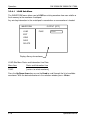
The backlit graphics LCD screen displays menus, data entry fields, and status
information in the general format shown below.
Operation Manual
3-3