1
Operation
SW 5250A•SW 3500A•SW 1750A
!0= % !
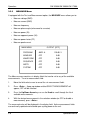
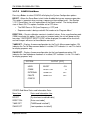
The WAVEFORM menu allows you to LOAD an existing waveform from non-volatile or
flash memory to the waveform scratchpad.
Any existing information in the scratchpad is erased when a new waveform is loaded.
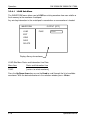
WAVEFORM
LOAD
OUTPUT [OFF]
FUNC
Name
EDIT
VIEW
SAVE
DELETE
Displays library of waveforms
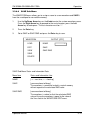
LOAD Sub-Menu Status and Information Line Data:
Menu Item
Status and Information Line
FUNC
[<enter> to select waveform]
Press the Up/Down Arrow keys or use the Knob to scroll through the list of available
waveforms. With the desired waveform in the selection window, press <Enter>.
3-10
Operation Manual