1
•
Display installation
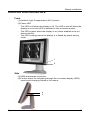
To browse or scroll through the menus on the current level, turn
the wheel clockwise or counterclockwise.
•
To enter into a menu or move to a lower level of the menu
structure, turn the control wheel to select the desired menu. Next,
click the wheel shortly.
•
To exit from a menu or move to a higher level of the menu
structure, turn the control wheel to select EXIT. Next, click the
control wheel shortly.
If you do this when you are in the Main Menu, you exit the menu
system.
•
Some adjustments can be made by changing an adjustment value.
To change an adjustment value:
-
•
Turn the control wheel to select the adjustment
Click the wheel shortly. The adjustment name appears, as well
as the current adjustment value
Turn the wheel to change the value
Click the wheel shortly to confirm the change and return to the
menu
Some adjustments can be made by selecting from a range of
predefined settings. To change the selection:
-
Turn the control wheel to select the adjustment
Click the wheel until the desired setting appears in the menu.
Saving changes
When you have changed something and you wish to exit from the
main menu, the display asks if you wish to save the changes.
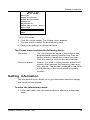
Save Changes?
Yes
No
1 Turn the control wheel to select Yes (to save the changes) or No (if
you do not wish to save the changes).
2 Click the control wheel to confirm the choice.
Info: The memory of the display contains maximum 200 fixed and 28 programmable presets.
When you connect a video signal, the display checks in the memory for a
matching preset.
If it finds one, it selects the corresponding settings and parameters from the
memory. If it does not find a matching preset, the display uses default
settings to display the image.
When you make adjustments and save the changes, the current preset is
saved as programmable preset. If this happens while all programmable
presets are occupied, the oldest programmable preset is overwritten
automatically.
System manual Coronis 1MP
34