1
camera operation
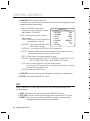
EXPOSURE
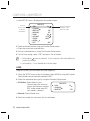
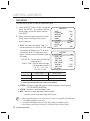
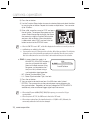
1. When the SETUP menu screen is displayed,
select ‘EXPOSURE’ by using the Function
Setup button so that the arrow indicates
‘EXPOSURE’.
MAIN SETUP
1. LENS
䯝 2. EXPOSURE
3. WHITE BAL
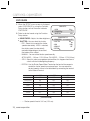
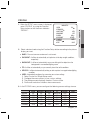
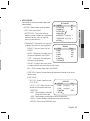
2. Select a desired mode using the Function
Setup button.
DC
ATW
EXPOSURE SETUP
y BRIGHTNESS : Adjusts the video brightness.
䯝 1.BRIGHTNESS
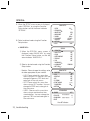
y SHUTTER : You can select the shutter.
2.SHUTTER
- ESC : Select this to control the shutter
3.AGC
speed automatically. If ESC is selected,
4.SENS-UP
the shutter speed is automatically
5.RETURN
controlled depending on the ambient
illumination of the subject.
25
ESC
HIGH
OFF
IIIIIÂIIIIIIIIIIIIIIII
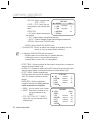
- MANUAL : You can control shutter speed manually.
(NTSC MODEL - 1/60sec~1/120,000sec, PAL MODEL - 1/50sec~1/120,000sec)
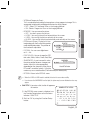
- A.FLK : Select this when you experience picture flicker, this happen when there is
a clash with the installed lighting frequency.
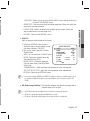
- EXTERN : Use the Shutter Speed Select Terminal on the back of the camera to
control the shutter speed via an external input. You can control the
desired speed as shown in the table below by connecting the terminal
to the Ground Terminal.
SHUTTER 1
SHUTTER 2
SHUTTER 3
1/60(1/50)
OFF
OFF
OFF
1/120(1/100)
ON
OFF
OFF
1/250
OFF
ON
OFF
1/500
ON
ON
OFF
1/700
OFF
OFF
ON
1/1000
ON
OFF
ON
1/1600
OFF
ON
ON
1/2500
ON
ON
ON
[Interlace Mode]
- --- : Shutter speed is fixed at 1/60 sec (1/50 sec).
24_ camera operation