1
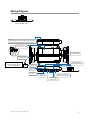
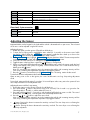
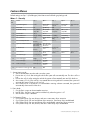
Wiring Diagram
Menu
Wheel
Menu
Wheel
Menu
Wheel
Control button
Status LED
Control Center 6711T
D2D jumpers; Factory setting is horizontal position.
Most Xpresskit modules use this setting, check the
Xpresskit installation guide for the specific setting.
MINI ATM
RPN: 8540
10A FUSE
+
-
(10A (MAXIMUM) FUSE JUMPER)
LIGHT FLASH POLARITY
LIGHT FLASH POLARITY
(10A (MAXIMUM) FUSE JUMPER)
+
-
10A FUSE
MINI ATM
RPN: 8540
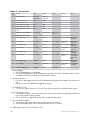
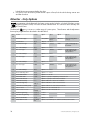
Remote Start (H3)
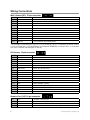
(see wiring tables)
Main Harness (H1)
(see wiring tables)
CPU1
IMPORTANT! Neutral Safety
switch must be plugged in
and in the ON position
Optional Mux Port
(for additional sensors)
Neutral Safety
Switch
ON
RF Port
for IVU
Bitwriter
Port
Control Center
Temperature
Sensor
D2D Port (for external
Xpresskit interface module)
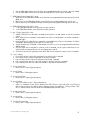
Door Lock
(see wiring tables)
H2 Harness
(see wiring tables)
1
12
1
9
8
7
6
5
4
3
2
1
10
1
8
1
1
10
5
3
1
18
10
9
1
© 2009 Directed Electronics. All rights reserved.
12
5