1
UltiMate 3000 Series:
VWD-3100 and VWD-3400RS Variable Wavelength Detectors
5.6.2 Recording Absorbance Spectra
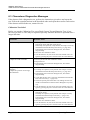
The detector allows you to record the absorbance spectra of substances that are used in an
analysis, and thus, for example, to detect peak impurities, or to identify optimum
wavelengths for method development.
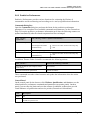
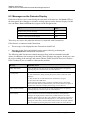
Spectra scanning can be performed:
•
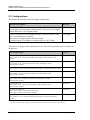
Directly, by using the parameters and commands from the Commands dialog box
(→ page 59)
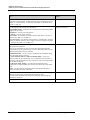
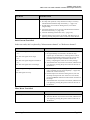
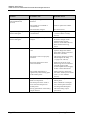
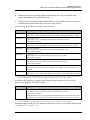
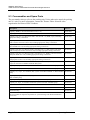
Chromeleon
Description
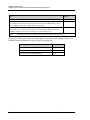
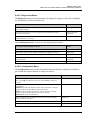
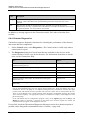
ScanStartWavelength
Set the wavelength at which the scan should start.
ScanEndWavelength
Set the wavelength at which the scan should end.
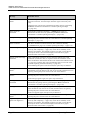
ScanSpeed
Set the speed at which the wavelength range, which is defined by
ScanStartWavelength and ScanEndWavelength, is scanned.
Select one of the following speeds: Slow (1 nm/s), Medium (5 nm/s), Fast
(10 nm/s), or Max (33 nm/s).
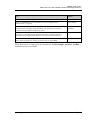
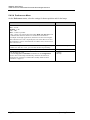
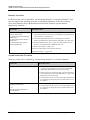
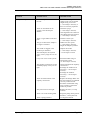
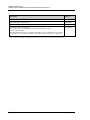
ScanBaseline
Saves a baseline scan based on the current settings to a spectra library.
Before you can record an absorbance spectrum (→ Scan), you have to
record an intensity spectrum of the baseline with the same wavelength
settings that you want to use for recording the absorbance spectrum. The
baseline spectrum is saved in Chromeleon until a new baseline spectrum is
recorded or until the ClearBaseline command is performed to delete the
spectrum.
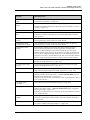
Tip: Whenever you change the wavelength setting, you have to record a
new baseline spectrum in any case.
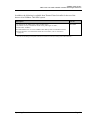
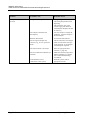
Scan
Saves an absorbance spectrum based on the current settings to the spectra
library.
This requires that a baseline spectrum was recorded with identical
wavelength settings before (→ ScanBaseline).
StopScan
Stops the current scan.
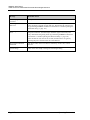
For more information and additional tips, see the Chromeleon Help.
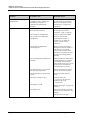
•
Automated control with a control program (PGM) (→ page 62)
See the Chromeleon Help for a program example.
Page 88
Operating Instructions