1
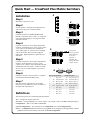
Quick Start — CrossPoint Plus Matrix Switchers
Installation
3
Step 1
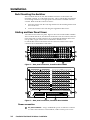
Mount the switcher in a rack.
4
Tip
Sleeve
Step 2
Tip
Sleeve
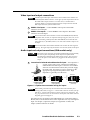
Turn off power to the input and output devices,
and remove the power cords from them.
Unbalanced Input
(high impedance)
Tip
Ring
Sleeve (s)
Tip
Ring
Step 3
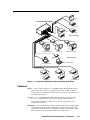
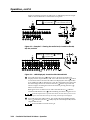
Cable the switcher for RGBHV, RGBS, RGsB,
RsGsBs, component video, S-video, or composite
video input and output (3). See page 2-3 in this
manual for details.
Balanced Input
(high impedance)
600 ohms
Tip
Ring
Sleeve (s)
Tip
Ring
Step 4
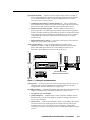
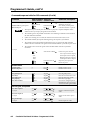
Cable the switcher for stereo audio output (HVA
models). Each output has a 3.5 mm, 5-pole
captive screw connector that outputs the selected
unamplified, line level audio. Connect an audio
device, such as an audio amplifier or powered
speakers (5).
(600 ohms)
5
Tip
See warning
Sleeve
Tip
See warning
Unbalanced Output
Tip
Ring
Sleeve (s)
Tip
Ring
Balanced Output
5
1
1
5
6
9
6
Female
Step 6
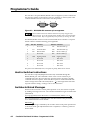
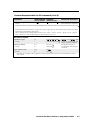
If desired, connect a control system or computer
to the Remote RS-232/RS-422 port (6).
Connect the
sleeve to ground.
Connecting the
sleeve to a
negative (-)
terminal will
damage the audio
output circuits.
AUDIO
Step 5
Balanced Input
AUDIO
Cable the switcher for stereo audio input (HVA
models). Each input has a 3.5 mm, 5-pole captive
screw connector for balanced or unbalanced
stereo audio input (4). Connectors are included
with each switcher, but you must supply the
audio cable. High impedance is generally over
800 ohms.
600 ohms
Pin RS-232 Function
Step 7
Plug the switcher, input devices, and output
devices into a grounded AC source, and turn on
the input and output devices.
Definitions
1
—
Not used
6
9
Male
RS-422 Function
TX-
Transmit data (+)
2
TX
Transmit data
TX+
Transmit data (-)
3
RX
Receive data
RX+
Receive data (+)
4
—
5
Gnd
Not used
RX-
Receive data (-)
Signal ground
Gnd
Signal ground
6
—
Not used
—
Not used
7
—
Not used
—
Not used
8
—
Not used
—
Not used
9
—
Not used
—
Not used
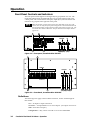
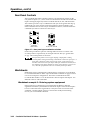
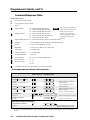
The following terms are used throughout this manual:
Tie — An input-to-output connection.
Set of ties — An input tied to two or more outputs. (An output can never be tied to multiple inputs.)
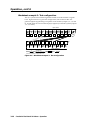
Configuration — One or more ties or sets of ties.
Current configuration — The currently active configuration (also called configuration 0).
Preset — A configuration that has been stored. One preset can be assigned to each input button. When a
preset is retrieved from memory, it becomes the current configuration.